
I typically stream my music through internet radio stations, but there are certainly times when you either don’t have broadband to make that possible or actually just want to listen to a local station. With a quick trip to grab the fmradio.deb, you can then access the FM Radio within your N800.
- First grab and install the file.
- Next, open up your terminal and enter ‘fmradio’ and return
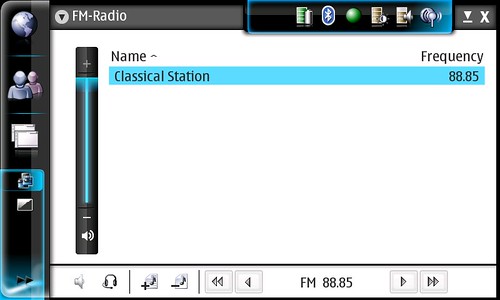
- You should be looking at your N800’s new FM Rad
- A special bonus is that once, run, you can add the FM Radio as a home screen applet for easy access.
Here’s a quick video as well…(should be live shortly if not now)
Hat tip – Maemo-Users.
Technorati Tags: FM Radio, Internet Tablet, Maemo, N-Series, N800, Nokia
Very nice… d!_!b
Is Xterm a program that i need to download onto my N800? If so, where can i get it? Thanks
It is something you need to install and can be found through the applications manager. I can’t recall whether you need to add the repository in order for it to show up, but you can download it directly here – http://downloads.maemo.org/product/osso-xterm-advanced – if you don’t see it.
I got it to work. You do have to download the Xterminal prog. and install it first. Thanks for the help, works great!
Glad to have helped – have fun!
Thanks. Having installed the software but it being still apparently absent, you encouraged me to look harder. You don’t need xterm. It is in ‘Home’, ‘Select Applets’ but unchecked.
From the initial discussions about this, I was under the impression you had to run the command from the terminal the first time in order to get it to show in the applets… either way it’s not hard and great to have as an added feature!
I loaded the app and it runs but what have you done about reception. Is there a hidden antennae?
Once you plug in your headphones it should work fine… that’s the antenna
Chris,
After blundering through your 4 step instructions we got the 0.3 MB Fm-radio file installed in the document folder. If we double click this file, it only wants to uninstall.
How do we open a Linux terminal on the N800?
Thanks,
Clete Boldrin
Open it from the home screen… it’s an applet. To open a terminal, you need to install one… check http://downloads.maemo.org
I installed the fm radio and created the applet icon. The applet does not respond to any input and cannot get the fm radio to show the screen from the applet. When I select anything from the applet nothing happens and the window is greyed out also.
Sorry to hear… I’m not sure what’s wrong there.
I got it to work. I tried to run the applet before I typed “fmradio” in the terminal. Thanks.
I don’t know if this is normal, but the headphones do not seem to be a very good antenna. Often it works just fine, but if you move the cord a little, you can lose the stereo. This is very annoying. Because losing the stereo was so sudden, I first thought that the cord was broken and went to buy new headphones. But the problem continues, so it is probably in the N800.
The receiver is probably just not sensitive enough. I’ve worked in center of city in a high building with probably a direct view to the transmitting antenna, so the radio must be really insensitive not to work.
I honestly don’t use it much as FM reception where I live is pretty poor for the stations I’d want to hear. I do recall though that there’s a fair bit of sensitivity with reception …
it works fine here… great!!!
Please – I need a little help. Just bought a N800 and would like to have the fm radio. Watched the video, but :
(1)there is no category called Extras when I go to tools
(2)I cannot find anything resembling a terminal.
(3) I grabbed the fmradio.deb file but have no idea of how to install it. Is there a site which could help me figure this out ?- the online manual is no help.
I have installed the update wizard but have not yet run it. My OS is 4.2007.26-8
Did you get the file from tableer – via the tablet itself? Assume you are running os2007?
Once it’s installed it can be launched from the home screen under the menu for applets. It will then sit on the main screen like the rest of the widgets.
yes – it is os 2007
Found the Tableer on the screen – but when I went to the site there was nothing that I could find about fm radio.
How did you get the Extras added to your Tools list?
MJW
If you have installed the file, go to your home screen and tap Home / Select Applets. FM Radio should be there…
I’m running OS2008 which is not currently compatible with the FM Radio Applet
I managed to get it installed – found an alternative set of instructions at http://tabletschool.blogspot.com/2007/09/nokia-n800-how-to-activate-secret-built.html which when combined with yours worked. Thank you very much.
Is there a way to backup the list of fm stations that i made ?
They are not in the internal list of known fm station, i have added them for my selfe