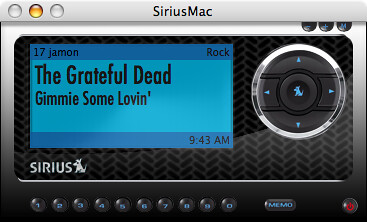
SiriusMac

SiriusMac - Jam On

SiriusMac is a super cool application I just stumbled on at the Apple Downloads site. You have to install MacPython, but that’s very easy (follow the prompts) and then you are on you way. If you’ve got a Sirius Radio subscription this is infinitely simpler than browser streaming which is a royal pain for Macs. The best feature is a single CAPTCHA rather than having to enter one each time you run.

You can set alerts for artists you want to hear (like on a hardware radio) and get Growl support so it’s easy to see what’s playing as things change. You also get a popup guide which shows what’s on each station …

Happy Listening!

One thing the iPhone definitely needs… Profiles!

I use profiles frequently on my Nokia devices and really miss that option on the iPhone.

When I’m in the car using the iPod, I want to turn mail notifications off and while I can do it manually, I’d prefer to set the phone into car mode. Lying in bed, I’d like system sounds on, but don’t want to hear the ringer in the middle of the night or hear my email coming in…

There’s a hardware switch which you can use to change things to silent, but you have to also choose to turn vibration off manually in settings in order to make the phone actually quiet which is handy if you charge on your bedside table as I do.

There are currently no settings for what uses vibration or options (like silent) for sounds per app. Right now it’s as Apple decided. A simple profiles setting (like what’s in all my Nokia’s) or a 3rd party app when the day comes we can install something would be much appreciated.

Technorati Tags:
, , ,

What’s on a Blogger’s Phone?

Zach from Symbian in Motion tagged me in the latest meme, “What’s on a Blogger’s Phone?” Zach is curious as to how I am adjusting (and perhaps compensating) for the iPhone’s lack of true applications based on what I run on the N95.My standard set of apps on S60 has not changed in quite a while…

  • Jaiku Mobile – I love the beta… and I am sure you will as well when it’s finally released to the greater public. The beta lets you see status for your contacts, update your location, post and reply. Essentially all the things you’d expect and miss in the release version.
  • Gmail Mobile – right softkey. Just wish it would do attachment sending and respect my preferred identity when sending mail.
  • Google Maps Mobile
  • Epocware has been a standard part of what I use. Their suite of Handy apps are well designed and look great too. My favorites are HandyWeather, HandyClock and HandyTaskman.
  • I really like Shozu, though it’s been a problem for me on the N95. The official release is out and seems to work fine, but people are still reporting incompatibilities. To me this biggest drawback is only being able to upload a 10MB video file which is (not so) surprisingly small on the N95.
  • On the WiFi capable devices I tend to install either Gizmo or TruPhone. I’ve got them both plugged into GrandCentral to simplify things, though honestly VOIP is more because I can, than because I need. 99.9% of my calls happen on the cellular network when I am mobile.

 That’s pretty much my standard set of apps to install. I use the Camera a lot to take video and still shots, review in Gallery and also find myself using the Calendar, Browser and Nokia Maps a fair bit though all of these are standard on the device. The iPhone is a new beast. No way to install anything and only Safari as a path to run something more robust. So far this has not really been that much of an issue for me, though I’d really like to get at least a chat client going. The mobile web apps I’ve been trying work nicely but have no notification sounds, so you have to constantly check to see if something is new. 

  • m.jaiku.com is my door into Jaiku on the iPhone and it works really well on EDGE or WiFi.
  • Unfortunately there is no way to get the Gmail mobile app running on the iPhone… without Java and a way to install, you need to choose either the web UI or POP download. I hate POP, but it’s the path I’ve chosen. I’ve yet to set Gmail to archive what gets popped and use the iPhone to review, desktop to manage. I like the looks of the iPhone email application, but wish there were some more advanced settings to choose an account when sending a message or perhaps adjust the reply to field at the very least. Once we have file system access I’d expect the mail client to change so attachment support for something other than mailing a picture (only from within the Photos app).
  • Google Maps is awesome! I use that frequently – in fact instead of sending an SMS To Google as I’ve done many times, I simply search and then either bookmark or add the result to my address book. This is very cool!
  • Weather and Clock are easily handled by the default app widgets. I’d love to have more than one countdown timer and would apprciate some louder sounds for alarms, but these work very well regardless. There’s currently no need to view my memory utilization or launch apps more quickly on the iPhone since there are no low memory issues and launching is two-clicks.
  • To “upload” to Flickr, I just email the pictures, but the iPhone strips EXIF data (if it even captures it in the first place) and scales pictures to 640×480 which is smaller than the original. I find unless I want to do a quick image blog post I’m uploading to Flickr less via mobile. I do sync my images back to Aperture which is great and works out of the box. No need to install the Nokia Media Transfer tool, which I did not mention above, but is required to sync / download images from your Nokia to your Mac.
  • Photos is a very impressive application and my 3yr old figured it out within moments. I have well over 700 images synced from Aperture and she loves to flick through them – as do I actually. The display is phenomenal and really shows off your pics!
  • iPod – I’ve got podcasts and a few albums loaded and find I use this more than I have ever on a mobile phone though perhaps an obvious outcome as an iPod syncs so easily with iTunes. I’ve been using Pzizz to generate some sleep patterns for the past week as well and have been enjoying.
  • From within Safari… I’ve been checking out AppMarks, Leaflets, and Digg and Mowser iFeeds to find good stuff to use and read. I also like the NYT and BBC River of news sites to see the latest headlines, though at least in the past 24 hours, the news reading on Leaflets is more appealing. I’ve tried the chat apps – BeeJive, FlickIM which are both nice. BeeJive lets you do more than AIM, while FlickIM has a way to track down links to either YouTube or movie trailers with a /youtube [movie name] or /movie [movie trailer] in a message. This feature is super cool actually and something I think others will likely copy.


On all my devices I tend to spend a good amount of time on Google Reader mobile and have bookmarks for certain tag folders so I can quickly drill down on topics of interest. I’d like to hear what Bryan Sawler is up to on his mobiles… He’s a mobile developer and I know has both an iPhone and a Nokia or two handy.

Technorati Tags:, , , , , , , , , , , , , , , , , , , , ,

iPhone Browser Sync

As good as it is to have all your bookmarks with you on the iPhone I wish Safari had some of the other features you have on the desktop.

I’d really like to have some form management so it was easier to save logins and I’d like to see my keychain sync – or parts of it anyway that were relative to the browser. I suppose if we get an OTA sync and share function with Leopard as has been rumored we may be able to save logins to servers and other systems if that’s a device capability. For now, stronger management of my personal data would be most excellent.

Technorati Tags:
, ,

atmaspheric | interference #1

Today I recorded what I hope will start to become a regular podcast here. Long time readers might reflect back to 2004 which was the last time I did this, though I only lasted 5 shows. I’m planning a considerably longer tour this time around and hope you’ll join me.

atmaspheric | interference is the show name and you should be able to subscribe directly in your podcatcher of choice using this feed. If you like, you can download the iTunes (MP3) file here (right click, save as).

I’m looking forward to your feedback, suggestions and ideas. And yes I know I need a better mic setup…

Technorati Tags:
, , , , , , , , , , , , ,

Browser Comparison: iPhone vs. Nokia N95 and N800

I took a look at the browsing experience on the iPhone and compared it to the Nokia N95 as well as the Nokia N800 Internet Tablet. In general, the iPhone and N800 are much closer experiences, though having used both I’m leaning towards the iPhone. The N800 is definitely still robust for handling your browsing needs – especially with the addition of Flash 9 support, but my preference is for how Safari handles things over Opera.

Technorati Tags:
, , , , , , , , , , ,

Competing with iPhone: Nokia

Roland Tanglao has an interest post about a few ways Nokia could start thinking about competing with the iPhone:

Plan A:

  1. Make the existing phones work right. e.g. fix the memory problems with ShoZu and the N95 even if this requires throwing hardware at it e.g. by doubling the RAM.
  2. Bundle N95s with ShoZu (a version that allows unlimited size video uploads to YouTube, or blip.tv, the present 4MB limit is silly) and a flickr membership and market the N95 for the groundbreaking and cool device that it is (well that I think it is; I don’t have an N95 but other than the usual memory problems and the GPS antenna not being sensitive enough it looks like an awesome device)

Plan B:

  1. recast S60 around an open source core to make it more reliable and robust
  2. add touch and create a new user interface from the ground up to make the S60 user experience competitive with iPhone.

Hard to argue with Plan A, though I would add offering an upgrade / update to existing owners to fix the memory issues that plague us on the N95. The phone is $750, which as you know is MORE than the iPhone which according to the iPhone haters out there means you should be getting more for your money. I like the notion of a special version of Shozu. Assuming it actually works on your device – something that is a crap shoot apparently – it would be nice to actually be able to get media from the device up to your online service of choice. This only enhances the value of the device to the people most likely to be attracted to purchase.

Shozu should probably not be where things end either. Since there’s a bevy of applications available for the S60 platform, why not parter with the software companies for some bundling. Take better advantage of the Downloads service and offer more than people want and how they can get the most from their purchase. The devices are being sold unlocked — use that to your advantage as well… they can work out of the box anywhere you want on any carrier with little exception).

Nokia’s real issue though is marketing. They’ve had a massive head start in the market and have a few devices (UI aside) with much greater capabilities. The phones are more complex to use and have a definite learning curve if you are new to S60 which hurts adoption. That said, there’s an appeal with power users that needs to be properly exploited.

The Blogger Relations program of which I am a part helps – as illustrated by my readership as well as the reader of other participants, but Nokia needs to do more to SHOW what the devices are about, how they work and most importantly WHY you want one. I would suggest embracing the users more and sharing a deeper view from the base in a broader context — not just what readers see on the blogs, but in actual ads and a campaign site – make it mass! The iPhone broke through all the barriers and has become a pop culture icon in consumer electronics… use that momentum now that the people have awakened but steer them down your path. Apple’s excellent marketing simplicity has opened the door for opportunity.

BTW — my guess on the initial response to the iPhone in the US is that rumored 8GB N95 though I have a feeling we’ll see it working on US 3G bands.

Technorati Tags:
, , , , , , , , , , , , ,

8 Random Things

Ok so I’ve been tagged … first from Ricky and now by Marc.

  • My professional background is in Direct Marketing though I’ve been focused primarily on integrating interactive ideas into campaign strategy. I’ve spent a considerable amount of time within large holding company agencies and understand the full view. I am actively considering new career paths and am considering agency and client side technology / web 2.0 opportunities as well as (for me) less traditional options like consulting or trying to get more into tech journalism (TV or online video).
  • I’m hooked on social software tools. I’m actively using Jaiku, Flickr, Facebook, LinkedIn, Twitter, Last.FM… less actively using Pownce and Dopplr. My preference is for services that make it easy to continue participation from my mobile and use both mobile sites and applications (when possible) to stay connected. This tends to make my wife a tad nutty… but it’s been a valuable experience so far.
  • I’m a former All American swimmer. In college I swam distance Freestyle, IM and sprint backstroke. A few of my records still stand.
  • Sadly, I have not done much working out since college. We did recently pick up some exercise equipment for the house and I’m trying… need to get back on the horse!
  • I’m a certified open water diver.
  • I’ve been married to my wife Ashley for over 7 6 years and have two beautiful daughters Hannah (3.5) and Campbell (11 months). We live in our first house in Katonah NY which is in Northern Westchester, about 45 miles from NYC.
  • I feel like I was much more of a music geek before tech took over…. I used to want to record music as an electronic musician but never went for it. It’s hardly too late to start, but priorities are currently on other things. I did used to play tenor saxophone in high school, but that seems like ages ago. Today I listen to a lot of electronica, jazz and classic rock.
  • This blog has existed in various forms since 2002. I’ve used Radio, Grey Matter, Blogger, Typepad, Moveable Type and WordPress. Google Reader reports I have 781 subscriptions. Over the last 30 days I’ve read 14,134 items and starred 73 items which you can see on my sidebar.

My turn to pass the torch… Let’s hear from Neil Vineberg, Zach Epstein and Rudy De Waele.Technorati Tags:

iPhone Application Exploration

This morning I decided to check out some apps for the iPhone… Things seem to work great actually and I’ve set up dynamic dns services to enable access from EDGE when away from my systems.

BeeJive is a Multi-IM web service that can connect you to AIM / iChat, Yahoo, MSN, ICQ and Jabber / GoogleTalk nicely in the browser. Seems to be smart enough to manage the network switching between EDGE and WiFi. I’m hoping for some buddy management as they update things… it’s currently in a public alpha.

If you enjoy staying in touch via IRC, Colloquy has enabled a web server plugin which lets you connect through your Mac. I found it really works well and while I don’t do IRC every day it’s nice to know I can easily connect here.

As you may have heard there is currently no ToDo app on the iPhone for some reason even though it exists in iCal today and in Mail in the upcoming Leopard release of OSX. Omni Group has heeded the call by enabling their pending GTD app OmniFocus serve itself up through the browser. Seems to work very well – though I noticed it takes a few moments to update back on the desktop. Regardless, this is a great solution if you’ve already organized yourself or are planning to use Omnifocus.

PocketTweets is a beautiful way to stay connected with Twitter … while I’ve been using the m.jaiku.com site for about a week for my Jaiku fix, I’d love to see something similar developed to take specific advantage of the iPhone browser UI.

I’m also dabbling with iPhone Remote which lets you do some interesting things in a remote way with any Mac you install it on. You can run apple scripts, use the webcam, remote control iTunes, browse and send links to files (though they don’t work as attachments yet) and a few other tricks. This is one to watch I think as it really has the potential to extend your desktop into your mobile experience.

I’m still hoping there will be a way to get widgets if not full local apps on the iPhone though I don’t think that will happen until at least after the dust settles on the launch.

Technorati Tags:
, , , , , , , , , , ,

N95 Updated

Last night I began the firmware update process for my N95 and windows crashed about halfway through. This was a rather critical moment and I found myself looking potentially at a Nokia paperweight.

I tried several times to reestablish a connection but nothing seemed to work. My Windows machine is virtual running in Parallels so I was not certain I really even had a chance to get things restored. I did manage to get a connection going after several tries (and battery removals) but it was taking far too long to be reasonable. At the advice of my Jaiku friends, I kept it rolling and decided to get some sleep and check back in the am… nothing.

A fresh start to the day can apparently make some difference. After another couple of tries the connection just worked and somehow the N95 was reflashed and back in service! I honestly have no idea what happened or why it worked, but it does!

I’m happy to report that the new Firmware brings the AGPS support I alluded in a previous post about Nokia Maps. This is on by default in your Navigation preferences (system not app) though it may not be too obvious it’s running at first. When I connected for the first time today I was expecting first time response in less than 2 minutes. Instead, I found myself waiting for over 20 minutes… after about 15 I went outside to try and get a clear signal. I then powered down and restarted the N95. When I relaunched Nokia Maps, I was found instantly (literally) though the map needed about 20 seconds to complete the animation and zoom to where I was standing. This is VERY cool! Since the device has ZERO carrier support, Nokia is collecting data on the Cell-ID and building their own database. The more you use the real GPS, the more associations you’ll find with the cell towers in your travels and the better the experience for everyone. It’s a shame this is privatized data to begin with, but cool nonetheless. At least in my situation, I know I can just go with the GPS from my house, without having to worry about when I’ll get a signal to begin tracking a trip.

I’ve also loaded Shozu and the latest Jaiku beta which both seem to work just fine. Shozu now offers official N95 support which for me means it actually works. I’ve used Shozu for a long time across devices and in my book it’s the best way to get content from your device up to your web service of choice.

The N95 still suffers from memory issues unfortunately – probably it’s biggest weakness. I’m not sure why this is the case given it’s status as the über N-Series, but it’s how it is for now. With Jaiku, Shozu (both in the background) and the browser running, you can expect to run out of memory very quickly.

Technorati Tags:
, , , , , , , ,

Happy Friday!


Happy Friday!, originally uploaded by atmasphere.

Yahoo’s Push … Mail

Using the iPhone with a few email accounts over the past few days has given me some insight into the nature of how things are getting done between Apple and Google and Yahoo. While Google has a lock on the maps, YouTube and as the initial search partner for Safari, Yahoo scored two widget home screen placements with Stocks and Weather and is also the only way to get a push mail experience.

POP Mail is horrible. I was an IMAP user for years and only switched to GMail fulltime (my domain’s IMAP forwards into Gmail) when I realized I could get a similar experience across my mobile phones and the Nokia Internet Tablet (full web Gmail). Now on the iPhone things are a different story. For starters, there’s no Gmail application. I guess I could use the web browser, but I’ve been spoiled by the speed of the application Google released and would either like that as my main option or even better an iPhone integrated Gmail mail service. This full integration is actually exactly what Yahoo has scored with their IMAP support. For starters – it’s instant! Exactly what you would have come to expect if you’ve used a blackberry or a Treo with Chattermail. The shortest interval you can get mail to check on the iPhone is 15 minutes – unless it’s a Yahoo Account and then it’s real-time.

It’s great to have Yahoo mail updating in real-time, but there’s no way to change how you appear in sent mail and Yahoo is not my preferred domain. Additionally it’s more than likely that any reply to a mailing list will be blocked as it’s not the address you’ve subscribed with. Push is not enough for me to switch to Yahoo, but I definitely want it when I can tap in from another email account. For now without a way to change my identity I’m still sticking it out with GMail. POP annoyances aside…

It will be interested to see how long this lock lasts for Yahoo as well as everything else. I can’t see Google allowing Yahoo’s exclusive on premium access to mail lasting longer than the terms of the initial deal.

Technorati Tags:
, , , ,

I’m loving the iPhone!

I’m sure there will be a lot to say about this new device over time but I’ve got to say it’s a VERY cool device. Considering what it does and does well and even the things it does not do, I’m extremely pleased with how it all comes together.

I’ve been using Nokia N-Series mobile devices for a few years now and have enjoyed the progression of functionality and features from the N90 to the N95 as well as in the two Nokia Internet Tablets. The iPhone combines everything I know I want to have and ties it all together in a beautiful package.

The hardware is stunning. When you hold it in your hand, you know it’s a solid piece. It’s heavier than my N95 but it’s metal, not plastic and the iPhone is also very smooth. The front as you’ve certainly seen by now is almost all screen and the display is the best I’ve seen – super bright and easy to read indoors and amazingly very easy to read in outdoor environments as well. I’ve been using it at the beach the past few days and have had no problem reading the screen in bright sun – even with polarizing sunglasses.

Calling the iPhone a phone would be a disservice.

It’s far more computer that makes phone calls than it is phone, though compared to any mobile computer I’ve used. The battery has enough in it to go a full day with everything on. I’ve been getting up around 6 and find that the battery can go until close to 5pm before I get the warning at 20%. This is with email (3 accounts) checking every 15 minutes, wifi and bluetooth on and clicking through to the web frequently from email as well as general browsing to sites like Google Reader or Jaiku. I’ve listened to a few podcasts while doing all of this and in general things flow very smoothly. Using the included earphones (not my usual choice) works great and with the single button controller I can start and stop the audio playing or take and kill calls.

There are a few times I’ve found that either the browser or email quits, which I honestly (and unfortunately) have come to expect on every device I’ve used. When this happens, it does so with grace and it’s easy to largely resume where yo left off in either app – though you will have to open your web pages again. The last one opened in the first tab pops back when you re-open safari…

It’s hard if not impossible to gauge how the iPhone uses memory. I can’t figure out when I am pushing it too far, though a few clues keep popping up. At times, when tapping a reply into a form in Jaiku, I’ve seen substantial delays in text entry. The only fix that works for me is to kill that tab and try again which is easy enough as I’ve clicked a link from email to get there anyway. I’ve had 5 windows going in the browser while email runs and I view pictures with my family. Initially I though that the browser was not loading windows unless they were upfront, but I Think actually that the iPhone is in fact a multi-threaded device thanks to OSX and having that much going at once just taxes the system to slow things down. Additional delays in both mail and web have been when I’ve walked to the maximum range of the wifi here at our beach house. While the iPhone beautifully reconnects to wifi when I enter the house, it’s slow to drop the connection to EDGE if it can detect WiFi on any level. If I know I’m going to be sitting in a tough connection place, I just manually switch the WiFi off and have had no issues working with EDGE.

The camera is adequate. If there’s good light and your subject is still, you can snap some very nice pictures. The shutter lag seems perfectly manageable – actually it’s pretty quick for a phone camera in my experience. I really like the integration of the images with Aperture and the Photos application is amazing – kills the Gallery app from my N-Series experience. The main drag here is that the only way to get images off is to either sync or email and you can’t save an image to the iPhone if you receive one via mail. That all happens on the desktop since Apple has rudely blocked access to the file system. This also means that your not able to upload to flickr for example while on the go. I did email a pic last night and it worked fine, though as has been reported elsewhere the iPhone strips the EXIF data when you do this for some reason along with resizing things down.

The touch-screen is killer. I’ve had to issues with entering text and have found it easy to pick up, which puts me in the minority I suppose, but I sorta already knew that’s where I was with how many of these toys I played with. 😉 Like everyone else I’d like to see landscape mode work in more than pictures, movies and safari. Especially given that the iPhone does HTML email by default. The zoom features with a double-tap are pretty sweet though and amazing when you realize it “knows” what part of the page to zoom on.

In general my gripes are things that can very easily be fixed with software updates. I’ll be doing some video soon and will compare more directly with my Nokia’s…

Technorati Tags:
, , , , , ,

iPhone Day 1: Battery is strong with this one

Not really my first day with the iPhone, but certainly the first day I can use it for the whole day. I’ve had it going since about 6am and got a 20% battery warning at around 12:40. All in all not a bad run.

I’ve had wifi and bluetooth on, email auto-checking every 15 minutes and used the web extensively. I’ve only made one call and that lasted about 15 minutes.

In my previous usage with WiFi enabled handsets, this is by far the best.

Technorati Tags:
, , , , , ,