SimpleSpark – Explore and Share Web 2.0 Applications

Blog friend and Christian Gloddy has launched an amazingly comprehensive service called SimpleSpark. SimpleSpark provides a simple way for people to find and share information about Web 2.0 services and looks like a great site. His timing could not be better given the focus on Web 2.0 applications for iPhone and the rather high level of awareness for Web 2.0 as a result…

Once you start browsing the site, you’ll realize as I did that there are way more applications and services in this space than I was aware. Christian has done a really nice job with the design and made it simple to explore, breaking things into categories of interest. Once you sign up as a member you can review apps, edit the listing information and add apps you use to your profile. When you leave the site, you can still contribute by adding new services via bookmarklet and on your return you can scan through the pending listings and easily see what’s new.

Some highlights:

  • Explore over 3000 actively tracked and openly categorized web apps with screenshots, icons, feeds, reviews and concise summaries for easy browsing.
  • An intelligent search engine that understands the web app landscape. For example, flicker is flickr, delicious is del.icio.us, and thirty boxes is 30boxes.
  • Find apps by over 70 categories including Spreadsheets, Workspace & Wikis, Education, Fashion, Green Living and Family & Kids.
  • Share and save any of the apps with forty of the most popular bookmarking services including del.icio.us, digg, StumbleUpon, reddit, facebook, squidoo, and more.
  • Rate and review any web app in the catalog.
  • Track a competitive space with RSS feeds for individual categories, searches, as well as the newest additions to the catalog.
  • Submit new apps and edit the information on any existing app.

Technorati Tags: , , , ,

AppleTV updated with YouTube – Surprisingly Good!

AppleTV with YouTube

I just updated my AppleTV with the latest software to get access to YouTube and I have to say that the H.264 quality is excellent! We all know what the majority of YouTube video looks like, but this is something well beyond what you normally see and bodes very well for the iPhone when it’s released next week.

Once you connect and login, you can see your favorites and rate or report video. You can’t however see your own videos or those of your friends / subscriptions which seems like an oversight to me. I would expect to see that in a future update since that’s a large part of the community aspect within YouTube.

I shot some video of the process which should give you some insight into the update process as well as the quality of the experience. It’s not the most exciting of videos, but here you go:

Technorati Tags: , , ,

Good news for the future of Nokia Maps

Nokia Maps is off to a very strong start and thanks to the N95 has been downloaded over 1.1 Million times. I’ve been informed that some very good things are in store for us moving forward as the latest beta only alludes…

There’s a brand new Maps Loader which is reported to perform up to 30x faster! In my tests downloading and installing NY, CT, NJ maps as well as the UK English voice, it was reasonable. Having never used the Map Loader before I can’t say whether it was 30x faster – seems hard to believe that the previous version could be that much slower actually. Pre-loaded maps are also reported to be considerably faster to use and I’ll be testing that out a bit now that I’ve actually loaded some! In order to appreciate the speed difference with a Map loaded map vs. one that downloads on the fly through your data connection, I’ve been told it’s best to first delete the existing map data. This will ensure you are actually using the new map file which will provide the speed increase. When I deleted my existing data it took a while. I was not watching the clock, but I’d say it was about 10 minutes. I’ve been through the areas I just downloaded in case you were wondering … not like I had the whole US on there.

As I shared recently , there’s a new look in the map in general and I’ve been finding things easier to read while moving around. Local searching (just start typing) can now include more generic terms like bar, cafe or even a city center if you are not sure what’s around or a specific address — pretty helpful when you are in a strange place. I should note that searching for Bar which actually return anything with bar in the name as well as bars in your area…

While a number of beta users myself included felt the GPS connected more quickly from a cold start, I’ve been told that in fact there’s currently no difference. When the new firmware hits shortly for the N95, there should be a nice improvement based on the work that’s been done between the Maps and S60 teams. At that time we’ll also benefit from A-GPS (assisted GPS) which will enable Cell-ID to kick in and help you locate yourself in under 20 seconds the first time you connect and under 10 seconds from a warm start. Cell-ID’s have to be learned, and will improve accuracy and therefore speed over time.

Needless to say, I am very excited about this update!

Technorati Tags: , , , , , ,

AT&T selling live video-calling

At&T Video Share looks like a cool service (video call streaming finally!) though you have to have one of three phones that support the service… ah the walled garden. Too bad there’s no mention of either the iPhone (oh right no 3G!) or any of the Nokia N-Series – the N75 does support 3G with ATT and would seem capable enough. There’s no mention of which devices will be added, but that more are coming. You’ll be able to share to other screens which is a nice bonus and certainly makes sense from a family perspective. Sharing the kid’s experiences to grandparent etc…

I’m not crazy about either the monthly or ala cart pricing plans. This should just be part of someone’s unlimited data package since it is just data after all.

The service, called AT&T Video Share, will enable people to send live, one-way video feeds during phone conversations, the top U.S. phone company announced at the NXTcomm telecommunications conference in Chicago.

People can, for example, talk to a friend or a spouse while sending live video of something they are considering buying or an event they are attending.

The service is now available on AT&T’s 3G wireless service in Atlanta, Dallas and San Antonio, and will be expanded in late July throughout its next-generation network, the company said.

AT&T said this is another step toward combining communications tools. It will eventually offer video-sharing technology on various devices.

While AT&T has recently begun offering bundles with video, phone and Internet, such combinations have mostly been about sending customers a single bill rather than making the different services work together.

“Ultimately, services such as Video Share will be accessible over any of the three primary screens that customers use most frequently: the wireless device, the PC and the television,” the company said in a statement.

Video Share will cost $4.99 a month for 25 minutes of video share use, or $9.99 a month for 60 minutes, AT&T said. A “pay as you go” option will be priced at 35 cents a minute.

CNET News.com:

Technorati Tags: , , , , , ,

Where are the extensions for Safari 3?

The update for the Safari 3 beta has been out for a week now yet none of the extensions seem to be updated to work with it yet. Since I’m not a developer, I can’t tell how much has changed under the hood, but from my eyes things seem similar enough… I’m not even thinking about Windows support at this time – just the existing Mac tools.

Technorati Tags: ,

Nokia Maps Beta

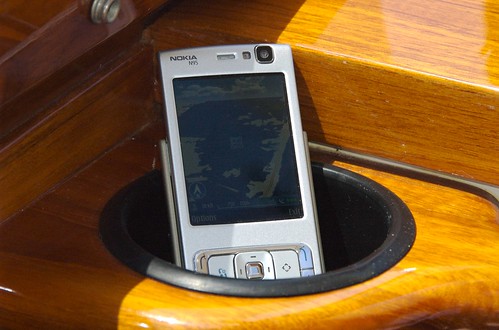
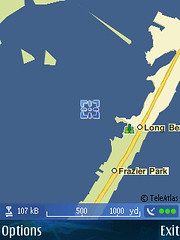
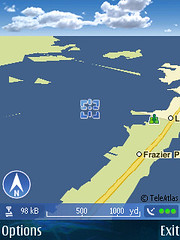
I was able to download the Nokia Maps beta for my N95 yesterday before it was removed from the Smart2Go site which makes me a bit lucky and probably a bit crazy to have installed it, but so far so good. In general, I’ve found GPS connectivity to be much quicker which is excellent! The maps have been updated as well and as you can see in the screenshot below, there’s even a nice set of clouds in the sky over the ocean. No moon or stars at night that I’ve seen …

My initial testing has been a the beach and even took the N95 for a spin on the bay, which is where I snapped these screenshots.

N95 Boat Navigation

Nokia Maps Beta 2DNokia Maps Beta 3D

I found a few adjustments in the UI. You can now see the scale of the map, the amount of data transferred and the quality of your connection in what I’ll call the data bar on the bottom of the screen. This threw me at first though I actually like having the info. It took me a few minutes to find how a few keyboard shotcuts had changed that I use regularly. First, In order to have the map snap to your GPS position (if you’ve been moving around the area) you now press 0 (Zero). In order to switch from 2D to 3D to have to go into the menu for Map Options… this used to be a simple 0 (Zero) away.

In the car, the system still will only let North stay up so when you are driving south the map moves up screen. I prefer to have my heading be the top of the screen personally and hope that eventually that’s a setting we can adjust for ourselves.

All in all, I like what I see and am happy that I’ve yet to see any issues — especially since the installer for my device was pulled.

Technorati Tags: , , , ,

YouTube on my Mobile – Yawn

I think I though this was going to be cool before I could get it, but I have to say it’s not really something I care too much about. I’ve stopped posting my own videos to YouTube (I’m all about Viddler now) and really only check the site when I get a link from someone. The mobile experience is pretty limited – no way to search for a vid, or open a link from an email — let alone keep tabs on your subscriptions.

If you are interested however, set your mobile to http://m.youtube.com. Be sure that your Real Player has an AP set – WiFi works best.

BTW – This has actually worked for a while on the N95 in the Video Centre application.

Technorati Tags: , , , , ,

T-Mobile, You used to be cool, what happened?

T-Mobile used to be cool. They were one of the first carriers in the US to offer the opportunity to use unlocked phones and they also were very early in WiFi deployments, tested Dual-Mode Services and even invested in VOIP company JahJah — Amazingly this coolness has been lost and while the left hand has been exploring the potential for advanced voice services, the right hand has begin smacking themselves back into the traditional and anti VOIP line.

If you’ve been an active follower of the working anywhere ethos, you’ve certainly used a TMO Hotspot here or overseas and probably used a VOIP service there as well… Today, though VOIP has become an issue for TMO in the UK and they are actually blocking it’s use on their networks – though cellular today, it could escalate to blocking VOIP over WiFi as well.

In case you missed the news recently TruPhone is rolling out a new version of their service. TruPhone offers a software download which enables users of WiFi enabled Nokia devices (N and E Series) to make VOIP calls over WiFi and now even 3G data. This is a great boon for the active traveller, caller and just someone looking to cut down on their monthly minute allocation. T-Mobiel has taken a remarkably active stance against Truphone and is blocking calls between their network and TruPhone, thus making themselves an island I would not want to be trapped on.

Here are some core FACTS worth noting:

  • T-Mobile has refused to interconnect with mobile VoIP provider Truphone: T-Mobile customers making a call to Truphone’s number range (07978 8xxxxx) will not be connected.
  • T-Mobile refuses to interconnect with operators offering VoIP as a matter of policy.
  • However T-Online Ventures, the venture capital arm of T-Mobile’s parent company Deutsche Telekom, has just invested in VoIP provider Jajah; T-Mobile connects with BT Fusion, a VoIP service; and T-Mobile has also announced a trial of a VoIP service in USA and Germany.
  • T-Mobile is required to ‘make calls or otherwise transmit electronic communications to every normal telephone number’, which it has refused to do in the case of Truphone and other VoIP operators.
  • The other four UK major mobile network operators – 3, O2, Orange and Vodafone – all interconnect with Truphone, leaving T-Mobile isolated on this issue.
  • T-Mobile’s current adverts display the slogan “Setting the internet free”.
  • Currently a ‘beta’ service, Truphone’s is prevented from launching fully until the 07978 8xxxxx number range is fully interconnected. Beta service customers are presently unaffected by this issue.
  • Other mobile operators have employed different methods to prevent VoIP uptake. There has already been the well-publicized removal of internet telephony functionality from Nokia’s popular N95 handset by Vodafone and Orange, and new data tariffs published by Vodafone that mean customers using VoIP will be charged more than for web browsing or email.

The CEO of Truphone, James Tragg said “T-Mobile will argue that it is not ‘blocking’ Truphone but is merely negotiating on price. T-Mobile receives 35p per minute from its customers but is offering only 0.21p per minute to Truphone even when Truphone’s costs are 9p per minute to terminate the call.

While I recognize that T-Mobile is a global company with views that may vary a bit by country, this stance is sure to extend into other regions soon enough. My advice is to switch and let them know just how ridiculous this attitude really is. The users can be in control, rather than the networks. We are willing and able to purchase advanced devices and have the right to use them. In this case voice is being used as a data service and if you buy an unlimited data plan, we should be able to use it. The walled garden approach has held excitement and innovation back long enough.

Technorati Tags: , ,

Jaiku Mobile – Lifestreaming with my friends

There are certainly no shortage of social networks at the moment, but I’ve found a nice home on Jaiku. There are some similarities with Jaiku and Twitter, but once you start to dive into Jaiku, you’ll note that the similarities remain at the surface.

When you visit either the main Jaiku page or a user’s page, you’ll see their availability, location, feeds, friends and a presence or “life” stream. Aside from simply posting a quick snippet on your status you can included feeds from any other source with an ATOM or RSS feed. In my case, I’ve got bookmarks, photos, videos and songs – all automatically posting to my page and informing my friends. This can turn into far more than you might want to be tracking from friends and contacts and Jaiku has also make it very easy to simply remove those updates from your contact’s flow. Jaiku offers a Symbian (S60v3) client and recently released a Widset for J2ME complient devices. Both are quite nice and elegant visually though the Widset offers a great deal more from the Jaiku website – like Channels which I hope will make it into the Mobile client. The Widset also offers a way to comment which is currently lacking in the release version though that should be resolved when the new update comes out next month.

I’ve been testing the Jaiku mobile beta for S60 3rd Edition devices for the past few days and while it’s still definitely a beta product, there are substantial advances here that make Jaiku an even richer experience. Instead of walking you through in words or even a screen-shot tour, I though I’d show you with video…

Before I started using this version of the client, I was only looking for a way to post, but the team has pushed things well beyond that “simple” request and enabled fully threaded discussion tracking. There’s no active notification (sound) yet, but it’s easy to see not only when there’s an update from a friend, but even how mnay have ben posted on a particular thread. You can also surf through an individual contact’s stream or if you prefer browse through your own with friends, which will show you everything that’s happening.

You can reply at any point to any comment or thread which is a killer detail. This enables Jaiku to be a fully interactive experience between participants. Jaiku has been intelligently managing threads and comments on the web, but having this level of control in the palm of your hand completes the experience.

Technorati Tags: , , , , , , , ,

AJAX does not, an iPhone application make

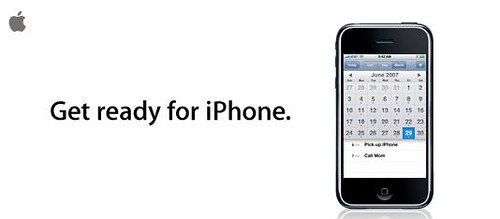
get ready for iPhone

I like web apps as much as the next geek around here, but I find the decision (or lack therof) to make the iPhone DevKit the “Safari Engine.” Unless there’s some nifty way to make things work offline in cached mode, users are going to get frustrated quickly with the way things work. I know I’m saying all this before it’s even real, but in my experience with the various devices I’ve used (plenty… please feel free to search!) It’s much better not to have to rely on a net connection for getting things done.

Just think about the basic every day challenges of losing a connection in your browser while trying to do things like Gmail, RSS Reading, Calendaring any of the GTD web apps… and on and on. Dedicated apps can do far more often not just because they are not running in a browser (though that helps) but because the local filesystem can take full advantage of a device’s available resources. VOIP in-browser will be a no show though I’m sure that was part of the plan with ATT. No iChat for actual chat – so you are forced to use SMS. Google’s Gears which works on Webkit might make some of this better — but you need (currently) to remember to go offline first so that things sync. Otherwise, you’ll have nothing …

The latest bit is that there is limited to no flash support – perhaps the real reason behind the YouTube h.264 changes. I can’t see how running Safari in OSX will go on the majority of sites we all like to visit without Flash.

I find the iPhone very compelling, but I just keep bumping into rather annoying issues – No 3G, No iChat, only a 2MP camera, No MMS and now only web apps? $600 is a lot of cash for a device that you’ll be locked in on for 2 years when we will likely see a 2.0 release within 6 months. Apple stated they’d be looking to surprise and delight people … well there’s plenty of room for that.

Technorati Tags: , , , ,

Zurfer – Mobilized Flickr!

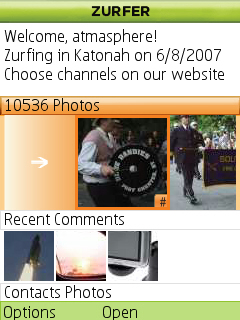
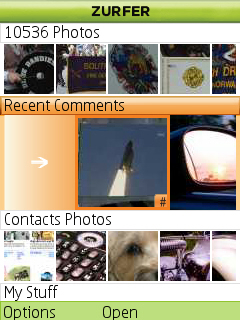
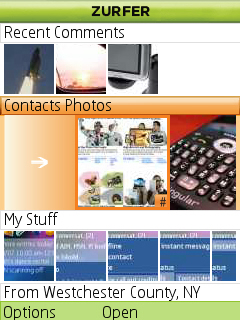
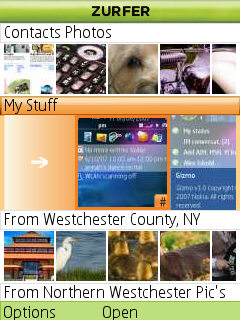
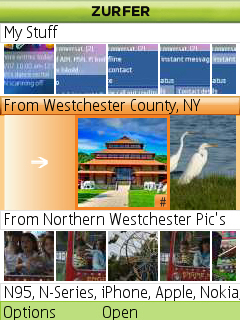
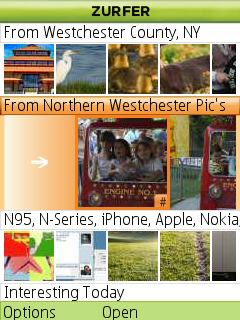
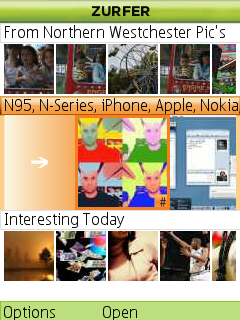
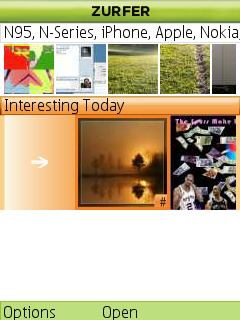
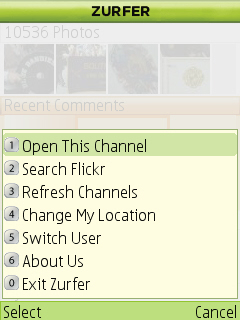
Yahoo! Research Berkeley has developed Zurfer, an amazing application to engage and interact with Flickr. I’ve only been playing with this for about 10 minutes but I can tell it’s going to be one of my favorite mobile applications! This is definitley one of those things you need to use to fully enjoy and appreciate, but basically any social or exploratory activity you can do within Flickr, you can do from your phone.

You set your location when things start and can immediately see images that are local to you. Zurfer shows you images you’ve recently commented on, your contacts images, your images and then beyond that, it’s up to you. I’ve added a few groups I’ve recently joined as well as a tag pool for interesting gadgets. You can as they say go nuts!

It’s seriously fun! Get it now if your phone is supported… Nokia Series 2 and 3 as well as Motorola RAZR V3X.

Screenshot0010.jpgScreenshot0011.jpg

Screenshot0012.jpgScreenshot0013.jpg

Screenshot0014.jpgScreenshot0015.jpg

Screenshot0016.jpgScreenshot0017.jpg

Screenshot0018.jpgScreenshot0019.jpg

Screenshot0020.jpg

Technorati Tags: , , , , , , , , , , , ,

Gizmo updated on N95

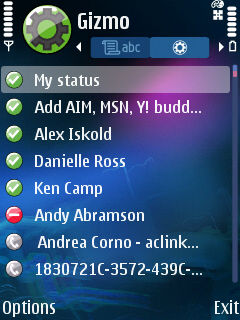
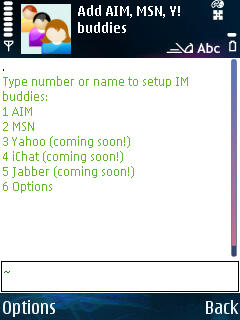
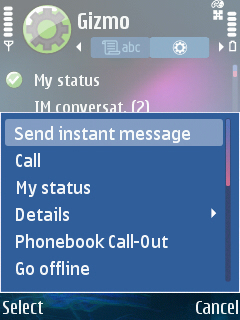
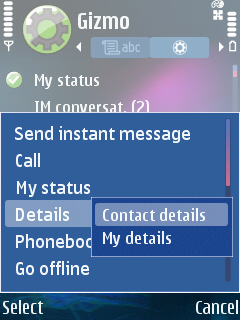
I just updated the Gizmo client on my N95 (actually updated on my N800 as well) and have to say it’s very slick. You can add contacts from AIM and MSN with a coming soon on Jabber, Yahoo and iChat. I love that it’s integrated with my phonebook which means I only have to open my contacts and slide to the right one click to see who’s online with my various IM services. You can then chat or make a call to any of these contacts.

Gizmo seems to run in the background which is nice so it’s “just on” once you’ve established which networks (cellular and wifi) you want it to use…

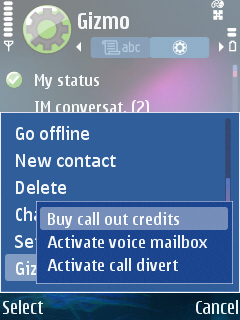
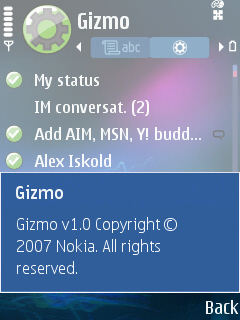
Here’s a quick round-up in Screenshots:

Main Screen - SIP enabled

Contacts on N95 ... Gizmo is on the Right SideMain Gizmo Screen

Adding IM ServicesContact Actions

Contact Detail OptionsGizmo Activities ...

Gizmo Version 1.0

Technorati Tags: , , , ,

Nokia Media Transfer is very cool…

So this morning I’ve actually had a chance to play with the Nokia Media Transfer application I mentioned yesterday.

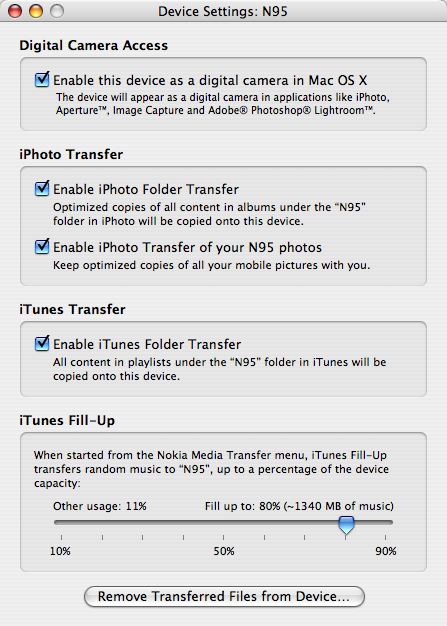
Once you’ve set your preferences (which you do on launch and can adjust through the menu bar item) your phone simply connects and begins it’s sync process when it connects to your computer.

Nokia Media Transfer Settings

I chose USB, but you can also do Bluetooth if you prefer. I figured go for the faster transfer system since I’ll be moving large photos, videos and music. All you do to get things rolling is connect your device and select the PC-Suite profile. Otherwise it works pretty much in the same manner as an iPod – it just works.

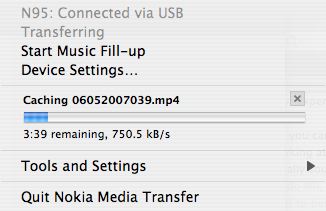
N95_Transfering

One nice feature is that you can choose to transfer or sync your pictures. This allows you to keep every phone picture on your phone as well as your computer. There’s a manual option to remove files which have been transferred from your device as well to conserve space. All in all, this is a very well thought out NATIVE Mac app from Nokia. My only feature request is to add support for Aperture which is the tool I use for Photo management.

Technorati Tags: , , , , , , , , , , , , ,

Sprite going Social

I get why Sprite wants to do what they are planning, but don’t understand the method… Rather than develop y our own social network, why not parter with exist companies that have massive communities and inertia. Being an active participant in these networks take time and time in Sprint Yard will be time away from MySpace, Facebook Bebo, Twitter and Jaiku… among probably at least a hundred other choices.

Sprite Yard, to be introduced in the United States this month, will look a lot like the social networking sites that have become popular on the Internet. Consumers will be able to set up personal profiles, share photos and chat online with friends, all using cellphones rather than computer screens.

People will type in codes from Sprite bottle caps to redeem original content, like ring tones and short video clips called mobisodes. Recently, one of the most redeemed prizes from Coca-Cola promotions has been virtual clothing and furniture to use in virtual online worlds, said Mark J. Greatrex, senior vice president for marketing communications and insights at Coca-Cola.

Sprite Yard was introduced in China last week, and Coca-Cola plans to extend it globally and perhaps to other soda brands over the next few years. For the time being, Sprite Yard will function only on cellphones — the medium that Sprite’s marketing team said was the most popular with teenagers.

“Being with them on their mobile phones is absolutely essential,” said Mr. Greatrex at a news conference yesterday. Sprite, he said, is “trying to establish an omnipresent, on-the-go, everywhere relationship with teens.” [New York Times]

I do like that it’s mobile only initially and actually think that will be part of the appeal. My suggestion would be to make it accessible over using both web and messaging services – perhaps even a mobile J2ME app. Again, I’d prefer to see this implemented over Facebook (for example) rather than as something new…

Technorati Tags: , , , , , , , ,

Nokia Legal Strikes within YouTube… removes a disassembly video?

UPDATEResolved!

I am not sure how this in any way this falls under DMCA legal jurisdiction, but blog buddy ThoughtFix had a video removed from YouTube. Apparently, Nokia did not like how he PURCHASED an N800 and the proceeded to take it apart and put it back together again. I thought it was a cool video and so did much of the enthusiast community.

It’s not like this is some secret or stolen pre-release hardware. There’s little to no documentation in the box so it would be hard if not impossible to say this violates some BS user agreement upon purchase.

I hope much like Stefan’s legal trouble, that the right people are reading and can help call the dogs back into the house!

Technorati Tags: , , ,

Working Anywhere: give me broadband and stand clear

I’m not quite as travel-intensive these days but reading Andy’s post on Working Anywhere got me thinking about some past experiences and frustrations. Reflecting back across the past few years, I can recall many times when hotel “broadband” was difficult to connect to or even impossible. I’ve had wireless only rooms that can’t get a signal – always a nice feature and of course the ridiculous price you get charged for a 24 hour session, which always seems to timeout if you leave your machine running overnight. I never expect the ports to be wide open, but it’s great when you can actually use a VOIP app or connect through to your VPN without issue.

My main needs are a clean modern room, good desk and chair with more than 2 outlets within reach and a reliable high speed connection. It’d be nice if the desk was near a window and not with your back to an HVAC unit — tends to make the temperature hard to regulate when working. In the past year the number of gadgets I carry has increased considerably and I prefer to have wired access in the room so that I can enable rest of my fleet with a travel router. I used to be content with just getting online, but now I really do look for the same flexibility I am accustomed to at home. Beyond my room, It is certainly nice when you find connectivity (that’s either free or that respects your existing login) in the lobby areas and even the hotel restaurants.

I don’t need the pampering that Andy seeks as I tend to spend little time sitting around the hotel other than pre-sleep and pre-breakfast.

Technorati Tags: ,

Working Anywhere: give me broadband and stand clear

I’m not quite as travel-intensive these days but reading Andy’s post on Working Anywhere got me thinking about some past experiences and frustrations. Reflecting back across the past few years, I can recall many times when hotel “broadband” was difficult to connect to or even impossible. I’ve had wireless only rooms that can’t get a signal – always a nice feature and of course the ridiculous price you get charged for a 24 hour session, which always seems to timeout if you leave your machine running overnight. I never expect the ports to be wide open, but it’s great when you can actually use a VOIP app or connect through to your VPN without issue.

My main needs are a clean modern room, good desk and chair with more than 2 outlets within reach and a reliable high speed connection. It’d be nice if the desk was near a window and not with your back to an HVAC unit — tends to make the temperature hard to regulate when working. In the past year the number of gadgets I carry has increased considerably and I prefer to have wired access in the room so that I can enable rest of my fleet with a travel router. I used to be content with just getting online, but now I really do look for the same flexibility I am accustomed to at home. Beyond my room, It is certainly nice when you find connectivity (that’s either free or that respects your existing login) in the lobby areas and even the hotel restaurants.

I don’t need the pampering that Andy seeks as I tend to spend little time sitting around the hotel other than pre-sleep and pre-breakfast.

Technorati Tags: ,