
I had read about but was struggling to recall an app that could easily sync content from iTunes to a mass storage device (mounted memory card for example) and finally re-discovered SyncTunes today!
Through the magic of this application I can now VERY easily sync content to either memory card in the Nokia N800 which is very cool. You can certainly drag and drop things as you like, but through SmartPlaylists in iTunes, things are so much more interesting.
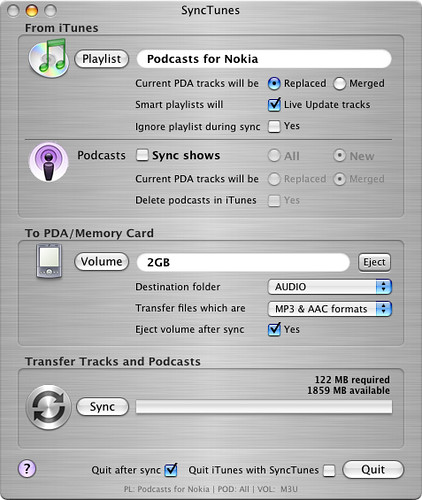
As you can see, the main interface of SyncTunes is pretty straightforward. You can choose a playlist (or smartplaylist), Podcasts and which volume and folder within you’d like to have things reside. I currently subscribe to far too many podcasts to be able to sync everything so instead I created a smartplaylist so the latest unread content could be waiting for me on the Tablet.
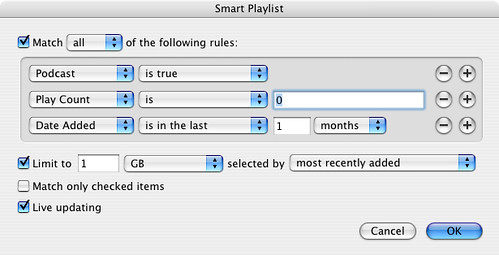
With this configuration, I am selecting only podcasts from the last month that iTunes (and also my iPod) have not played. SyncTunes will automatically replace the material on my N800 with each sync and the smartplaylist in iTunes is set to update on the fly. The whole process took about 5 minutes to set-up. While I am using this with a Nokia N800 tablet it will certainly work with any device that can be mounted on your desktop either through USB or even a card reader.
Technorati Tags: iTunes, Internet Tablet, N800, Podcast, SyncTunes, iPod, Mass Storage
aw man … Now how about a SyncTunes for XP, hmm? 😉
I don’t have a windows machine to try this on, but this might work for you… http://www.teavuihuang.com/massstorsync/
Just picked up a N800 and this post helped me greatly…THANKS!!!
my pleasure!
Just in case you didn’t notice there are some additional options for podcasts: look in the Advanced menu.
Here you can opt to have podcasts restricted to those added to your library within the last N hours/days/weeks.
Nice – Thanks for the tip!