Mapping on the go

I’ve been playing a bit with some map and navigation applications on the N91 and think it has some pretty slick applications for on the go navigation as well as just cool info.

WayFinder Navigator is the most comprehensive application I’ve found to date but in order to get the most from it, you’ll want to pair your system with a bluetooth GPS like the Nokia LD-1W which actually arrived with a previous NSeries phone I was using. Wayfinder Navigator is a full featured navigation system that enables you to be located (of course) and chart courses to new locations. This is perfect for driving or walking in new places. I found that with my bluetooth headset attached, the directions I needed to follow were spoken discretely in my ear as I went along which is nice as the screen on the N91 is great for a phone, but a touch small to really be watching while driving.

Another cool app is Google Maps Mobile. It’s exactly what you know, but on your phone. No GPS integration (which would make this amazing) but it’s amazingly responsive and worth a download.

Technorati Tags: , , , , , ,

Radar

Radar: Welcome

Just joined Radar.net. If you know me and want to share access to photos, drop a line.

Radar is a private photo sharing network for friends. By default, all your images are set to private and only viewable by Friends you set.  The Java app rocks on my N91…

technorati tags:, , , , ,

Blockbusted – Online data management at it’s best

Blockbuster has really done a stellar job at mis-managing someone’s account and merging their data into my email address this week. I’ve never rented from Blockbuster Online, but I do recall registering to check it out when they launched to compare against Netflx… since then I have no recollection of using the system whatsoever. This week, however, I’ve received several emails from them regarding my alleged account.

First I received a message on Wednesday night addressing me as Patti and telling me first that the movie I’d rented (Legend) had shipped. I thought – OK it’s just a mistake so I unsubscribed through the link in the message and also hit reply noting that I was not Patti. I was informed by Customer Associate Grazel Joy, that while they were sorry for the inconvience, this matter could not be resolved over email and I should call them at 800…. I replied that I would not and that instead they should just remove me.

Tonight I received a note saying that my queue was empty so I figured with a few spare minutes I could look into this a bit further and I am stunned and how bad this is – and more for Patti than for me. By clicking on the “My Account” link, I was able to reset the password on this account by simply dropping my email back into the form with forgot password… low and behold a reset link came through that has allowed me to change the password and given me access to the user control panel. While I have no malevolent desires here, it’s pretty easy to see how badly this might work out assuming there are others like Patti (or perhaps Nathalie) who have had their accounts altered. Here’s a screen shot of the account system for Patti / Nathalie:

Technorati Tags: ,

Drive – Custom Track for Nike + iPod

The Crystal Method have released a track designed for runners and the new Nike – iPod system.  Obviously anyone can listen and buy the music, but I think it really speaks to the commitment of both companies to this partnership.  Custom content with a focus on the application of what they  both bring is an excellent move and hopefully we’ll see more stuff like this.

Eventhough I don’t currently run for exercise, it’s quite tempting to want this type of connection between my Nano and a pair of sneakers (or Trainers for UK readers).

technorati tags:, , , , ,

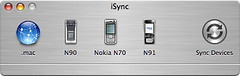
N91 – iSync — Success!

While I really dig my N91, I’ve been frustrated that I have not able to have my full contact list because I could not add the phone to iSync. As you might imagine without your contact list dialing and caller ID might be a tad more challenging.

After much searching I was able to locate a few tips and a piece of software which I think finally did the trick, though nothing worked the first time and even after a few syncs there are some quirks.

If you are feeling brave, you can manually edit a file buried well within the iSync application package. It’s not hard, but there’s always risk when you hack / alter a how things came from the manufacturer.

Be sure you start, make sure iSync is not running or syncing in the background. If you’ve already paired your phone and tried to get this working, you might want to remove the pairing from both computer and phone and start fresh — a reboot might even help.

You’ll need to control-click on iSync to Show Package Contents. You’ll notice a new window opens and you can begin to explore… here’s the exact location you’ll need to end up:

/Applications/iSync.app/Contents/PlugIns/ApplePhoneConduit.syncdevice/Contents/PlugIns/PhoneModelsSync.phoneplugin/Contents/Resources/MetaClasses.plist

The MetaClasses file should be open in a text editor so you don’t mistakenly add any strange characters. I’m using TextWrangler. I suggest making a backup of the original before you rush to open and edit it. When you have the file open you’ll see it’s really just a massive XML file. I’ve inserted a piece of code for the N91 at line 3136 which is right after the section on the N-Gage and was the last Nokia phone listed. It seemed logical to me… your mileage may vary. Simply paste the following in and hit save:

com.nokia.N91

Identification

com.apple.cgmi+cgmm

Nokia+Nokia N91
Nokia+Nokia N91-1

com.apple.gmi+gmm

Nokia+Nokia N91
Nokia+Nokia N91-1

InheritsFrom

family.com.nokia.serie60v2.3

Services

ServiceName
com.apple.model
ServiceProperties

ModelIcon
NOKN91.tiff
ModelName
N91
If you’d like the actual Phone icon as indicated in the code, here it is (option+click to save it directly).  UPDATE – I’ve also just posted my metaclasses.plist file (option+click to save) for people having trouble.  I’d recommend you move yours to a safe location before replacing with mine.
I did this before I tried the plugin since this is essentially the same trick that allowed my N70 and N90 to work in iSync, but it did not seem to happen for me. I actually tried pairing my phone a few times to now avail and finally made the move to purchase the plugins…

For the easier and probably more mass recommendation, I’d suggest paying to purchase a copy of the iSync plugins from nova media. Installation is not complete for the N91 until you run the 2 other packages that appear in your Documents folder once the main piece is installed. There is no warning or suggestion to install these, but I found that things worked after I installed both. The installers (and the uninstaller for the plugins) are located within your ~/Documents folder.

/Users/*yourusername*/Documents/nova media phone plugins/SyncML-Version for Communicator+Smartphone /
/Users/*yourusername*/Documents/nova media phone plugins/Nokia-Agent-Version for Communicator+Smartphone/

A gentle warning — Nova media could definitely use a few lessons in customer support. For starters, they might want to try answering email to support. I know it’s the World Cup and they are in Germany, but perhaps an auto-responded would be nice if business has to shut down when games are on.

I spent some good time searching after failing a few times and discovered that there is a another application from nova media (Free, but not on their website anywhere!) called Sync Repair, that I think repairs permissions on the MetaClasses.plist. Once I ran this I was able to add the N91 and begin to Sync!

This was a considerable effort for me as there is no consistent way to get this to work until Apple natively supports the phone in iSync which as of today’s Mac OS X update to 10.4.7 (and iSync 2.3) is still not there. I hope you find this helpful – happy syncing!

Update — Nova Media has updated their plugin for iSync 2.3. So far it’s the same for me. Works mainly – with an error as noted above on some syncs.

Technorati Tags: , , , , , ,

Because you can

I am currently commuting home on the train to Westchester listening to a Podcast on the N91. At the same time I am using the phone as a modem for my MacBook Pro as I needed to quickly send a file which had already been sent via Exchange using Outlook Web Access. Since I was connected already I decided to check out a few feeds and decided what the heck, I’ll fire up Opera Mini back on the phone which amazingly still works quite well all on my GPRS connection. As I started to type this entry, I felt the familiar buzzing of a new email arriving in my inbox via N91 to top it all off.

Not so bad for a pocket-able system.

Technorati Tags: ,

Nokia makes “Multimedia Computers” – I get it now

As I mentioned earlier in the week – I really dig the N91. It’s pretty hefty, but without heft. What I mean is that is looks like a larger phone, but still maintains a relatively sleek form factor and is quite easy to pocket in jeans or shorts. I’ve been pushing the device pretty hard and so far I am very pleased with what I’ve discovered.

My main gripe is that S60 is a tad more complex than I would like – at least compared to Palm OS which is my reference for smartphone / PDA / Handheld usage. On top of the complexity, quite a few applications are not yet available for the 3rd edition on which the N91 runs… A few key menus are hidden well within the system and you should definitely spend some time reading or at least scanning through the manual. I’m not really a big manual reader, but I found it actually revealed a few tricks which I wanted to know like the connections manager – which lets you define both WLAN and cellular data connect points as well as define when you want to use them – though what would be killer is a profile that lets you configure this like a location manager. I don’t need to change my sound settings much and would really prefer to see something that lets my data access be configured by where I might happen to be. There’s no reason to use cellular data when I have wifi at home for example. The way I do it now involves a manual select as apps connect which is not horrible but could easily be skipped if I had chosen “home” once.

Push email via IMAP rocks. Of course you are left to reply through T9, rather than a full keyboard, but it works very well – even just using the built-in client. I gave Profimail a try and while it seems like a very robust application, I can’t justify the 30 bucks after a very limited trial. It has many more features than the built-in messaging does and is really more like a pocket version of a desktop client (but in a good way). If you set the email app to check on an interval, it will do so politely and reliably as you ask. Messages or headers flow in as you would expect. You can leave the application running as well which enables a real-time experience if you feel more compelled towards OCD email reading. 😉

On the IM front, Agile Messenger rocks through all your clients simultaneously. I run Yahoo, AIM, MSN and GTalk with no issue all at the same time.

Opera Mini is a must have application if you plan to spend anytime in a browser. Again the built-in tool works well, but once you compare the display, speed and capabilities of Opera Mini there’s no going back. My issue here is that there does not seem to be any way to set Opera to be the default browser. Instead I find myself in both if I click a link a text message or email… seems like a careless omission, or a rather inane UI issue if the pref is hidden that well. I’ve been reading my RSS through Newsgator Mobile which works amazingly well on either GPRS or WLAN.

Nokia’s Podcasting application is a great addition and I’ve been jamming to Dubwise and Groovetek Chillout throughout my experiences this weekend. Switching to wifi lets the download speed through which makes life simple as it should be… I’ve also just discovered Nokia’s Internet Radio application which let’s you stream shoutcast stations – Groove Salad… check!

I’ve captured a bunch of photos and even shot a fair bit of video all of which I am quite pleased. I’d love for Shozu to release their photoblog software on s60 3rd Edition so I could upload to Flickr as I go rather than dropping back to Lifeblog, which is nice, but as a Mac user, I won’t be syncing to a desktop anytime soon… It certainly let’s me upload to Flickr as I want which is great. I like the UI as well actually on the phone, but don’t feel myself gravitating towards it much.

Having a 4GB drive in your pocket connected to a reliable camera is amazing. I was shooting some video of my daughter Hannah on Saturday afternoon when she decided to break into song and realized that as long as my battery kept running, I could easily shoot for an hour! I know the intended purpose here was to be a great music device and I think the N91 is very strong in this category, but it’s not going to replace my iPod – mainly because it does not sync to iTunes and even then it would probably replace the Nano rather than my larger 60GB version… Nokia does make software to connect to iTunes on Mac, but it never worked for me.

Overall, the N91 is an extremely solid device. In one smooth operator, you get robust multimedia capabilities, awesome connectivity, all the communications you can handle and essentially no storage issues to worry about.

Now, if the N91 was was only supported by iSync, it’d be nothing but smooth sailing…

Technorati Tags: ,

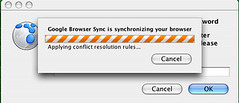
Flock / Google Browser Sync Conflict


There is a seriously annoying conflict between the Google Sync Extension for Flock and Flock itself. Because, you need to enter a password to protect both your initial flock data as well as your google sync info, there are prompts on start-up.

For some reason the Google bit likes to jump on top of the flock bit making it impossible to enter your information.

The rub is that this only happens if you are not running Flock as the top-most application, which actually happens quiet frequently. My only fix (read avoidance) is to be sure to sit and watch Flock start in order to work-around it.

Technorati Tags: , , ,

Walk to Work

I thought it would be vaguely interesting to shoot some video of my walk to work. I always get my New York on a bit while in Grand Central as it feels like you have to be aggressive in order to stay on the line you want to walk. Way too many people wander aimlessly or simply cut in your path. Yesterday, was not a particularly busy day, but if nothing else you’ll get a sense of video quality of the N91. I simply held it mid-chest and walked from Grand Central to my office a few blocks away.


Technorati Tags: , , ,

N91 Initial Thoughts

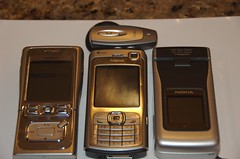
So today was the first full day of use with the N91, and I have to say I really like it — a lot!  I still think the N70 is the most pocket-able of the NSeries I’ve tried and that’s a very good thing, but the extra size (which is really not that bad) in the N91 offers a considerably greater bang.

For starters, you’ve got a 4GB (yes Giga) harddrive which can be use to store apps, data, photos, video and of course music.  The N91 is intended as a Music Phone – ahem, excuse me, Multimedia Computer. With 4GB of storage and a great (almost iPod) UI for music
you can easily see the value in carrying a single device.

I had just commented to someone that I could not see switching to a music phone over an iPod and while that largely still stands after my first day with the unit, it’s making a strong case for why one-piece is something to think about.

I will definitely post more as I spend (and have) more time with the N91, but for now here’s a quick list of cool stuff inside:

  • 4GB Hard Drive
  • 2Megapixel camera for still or video capture
  • Bluetooth 1.2 (no wireless headphone capability though)
  • 802.11G WLAN – yes WIFI!  You can choose how to connect based on where you are and use the extra speed to do VOIP over SIP (seriously), browse, email, IM, stream multimedia etc etc…
  • Hardware lock switch – you know the phone will not phantom dial or answer without your knowledge (thank you Nokia!), nor will a music track start or stop playing due to pressure on your pocket or jacket…
  • USB connection (how else do you think you can fill that 4GB drive!)
  • much more…

One thing I know already I don’t like… It’s quite difficult to open the battery compartment.  I’m sure this is intentionally stiff, but the battery life could be a lot better given how you are likely to use this so opening the back is something I’ll have to get used to in order to swap batteries.

Technorati Tags: , , , , , ,

Netsape reborn as a Digg-type news site

So Jason Calacanis (Weblogs Inc) has been hard at work on a stealth project within AOL which rears it’s head today as Netscape Beta. It’s essentially DIgg, plus editors, but for much more than simply tech news. It looks interesting… I am not sure that I’ll be that intrigued to use it more than today to be honest – I mean there are already way too many news sources. If nothing else, I’ll probably add some RSS feeds once I explore a bit more.

Digg is actually supposed to be launching it’s new site for all news next week and Vallywag has screenshots.

If you like community driven editor supported news there’s also Newsvine.

Quite a bit happening in this space… Digg appears to be the leader, but personally I think Newsvine is the most interesting for now – I’m sure Digg is up to the challenge.

technorati tags:, , , ,

Wrestling Reader


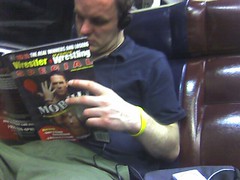
Sure there’s a pub for everything, but I would not expect to find someone reading wrestling. This is WWE not NCAA.

A min ago this guy had the mag turned and was admiring some sort of centerfold-like thing…

Entertainment is entertainment I guess.