Access Point Destinations Make it Easy to Get the Best Connection, If You Can Choose One

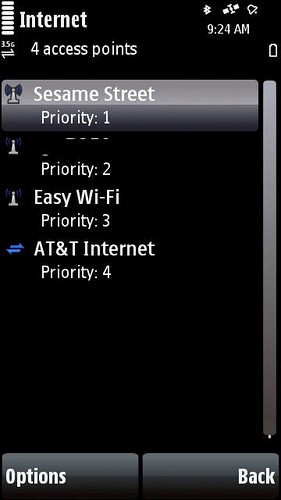
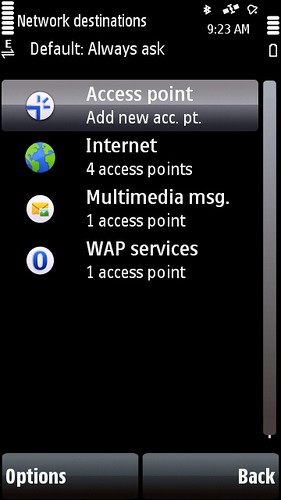
Nokia has been making some very nice though admittedly subtle updates to the way the S60 functions on the later devices and having used most of them I’ve been taking this for granted.  Starting in Feature Pack 2 (N85, N79) the Network Setting panel received an update which added something called Destinations.  Destinations are a way to group access points like your cellular data and wifi into a group.  This group function is actually an old function that used to exist in early Eseries devices (E61) and was awesome, but never seemed to carry forward to later ones like the E71.  Gotta love the consistency …
5800 - Network Destinations 5800 - Internet Destination

5800 - Network Destinations

Since using the Nokia 5800 I’ve noticed something about how these Destinations now work and it’s a very powerful concept and one that should really be part of all smart devices.  With wifi scanning on (I set mine to a 10 min interval), my phone will automatically switch over to wifi when in range.  The 5800 runs the 5th edition version of S60 which is what the upcoming N97 runs so this will also work there.  Connection switching back to cellular has not been as smooth in my experience, but it does work.  In classic form (and yes that is sarcasm) S60 is not set to use a Destination for all applications.  Instead some applications rely on an Access Point which makes the switching impossible. New apps like the Nokia Messaging service looks to use Default which will drop to Internet (the main Destination) though MailForExchange needs a single Access Point. The browser is happy with a Destination though Gravity (a 3rd party twitter app) wants an Access Point. Google Maps wants an Access Point … you get the idea.

These subtle changes are powerful but frustrating as even Nokia’s core applications cannot take best advantage of the work that’s been done to improve the user experience.  As a non-developer it’s hard to know whether these updates get pushed out in a reasonable way to encourage adoption or whether developers are left to figure it out for themselves just like the user. It’s getting better, but clearly quite a bit of work still lies ahead.


Windows 7 needs to get cleaned up before going out

I’ve been using the Windows 7 beta since it was released and I’ve updated through a few builds as well though admittedly not as an official MSDN partner.  I’ve acquired he build in the wild and have been using Windows 7 daily on my netbook.  The experience has been most good, but a few frustrating issues have remained through each update and these are going to frustrate people to no end.

The main bug I’ve encountered is that my network connection simply times out.  Sometimes I get hours, sometims minutes and sometimes it refuses to work at all after waking from sleep.  The repair utility has about a 40% chance of getting me back online, but generally I need to reboot the system.  The only upside here is that Windows 7 boots pretty quickly, but the average person is going to hate this.  This is a basic requirement for a computer and I expect networking to just work.

About 20% of the time after waking from sleep I lose the ability to control both volume and screen brightness from my function keys.  I can still handle volume from the taskbar, but there is no way to adjust screen brightness.  Brightness is locked down at the first level which is quite low.  I tend to run on the 3rd step up which is a nice balance of brightness and power utilization.  A restart fixes things.

I’ve mentioned these issues before and doing a general search around I can see I’m not alone though there’s no actual resolution from Microsoft yet.  The problems seem to actually be a part of Windows 7.  It took 2 restarts just to publish this post today … not cool at all.

This is what’s happening now …

This is what’s happening now …

Sprint’s launched a new campaign and is getting some good buzz on twitter because it mentions twitter.  I think the ad is a serious miss. But first why not watch it for yourself…

online casino

Pretty cool animation style, potentially interesting factoids – but for whom?  Most of what happens though is more visually interesting to the average person than actually meaningful or more importantly informative.

TV advertising is generally considered highly efficient because of it’s potential reach, but it’s also incredibly wasteful because there’s no real way to focus the message effectively at that scale. In the case of this piece, I’m wondering how many people even understand what they are seeing. The premise here is gobs of activity on our amazingly capable network.  If you get that and based on the frequency it’s running you’ll get a few chances to pick up on it, you might also realize Sprint is saying they apparently are able to and more importantly are actively scanning customer content.

The best part though is the end when they claim to be America’s most dependable 3G network bringing you the first wireless (in case you were expecting there to be a wired) 4G network.  This is when the magic happens … all the content from the screen – and there’s a lot of it – zooms through the PalmPre screen which is NOT called out by name or that it is coming soon.  The transition from 4G to PalmPre suggests the Pre is going to be a 4G device which is simply false.  I’m a geek.  I get it.  Most people will not and will instead be left (if they get any of this commerical) that there’s a new 4G cool thing coming.  Good luck buying that phone!

Let’s recap –

  • expensive to produce, expensive to run
  • limited audience understanding
  • negative brand connotations
  • false associations with an upcoming major product

Score!

The mobile phone is the social camera

I started to leave a blog comment on Antonio’s post and decided to do it here instead …

When I read the rumor that Apple has ordered a 5MP CMOS sensor for an unspecified product, it screamed to me of another coming disruption, this time around the point-and-shoot slice of the digital camera market. Because while the market for digicams is still growing at a healthy clip, the fat belly of point-and-shoot cameras has been relatively stalled since 2007 and shows signs of becoming a segment dominated by price and share wars— in other words, ripe for an Apple-like disruption.

A lot of the industry analysts that cover the emerging mobile space have been saying for a long time that better cellphone cameras would eventually kill the point-and-shoot, but I’m not sure that it is quite that simple. Or that is, before we get to this cellphone-as-camera nirvana, we may still have room for the iPod Touch of cameras (one that is connected but without a data plan). This would allow for all sorts of neat use cases around the concept of the “Social Camera, ” some similar to what Eye-Fi allows today, albeit with richer, more mass-market integration.

And best of all, if such a device was based on the iPhone platform, we’d benefit from the same Precambrian-like explosion of apps to explore every corner of the programable camera universe in a much more rich way than any one company could.[ The Onda]

An interesting thought for sure, but here’s where I see it really going. I already have a social camera and it’s called ANY Nokia handset I’ve used in the past several years.

Here’s how it works:

  1. I take a picture and share it instantly via (your choice) Share Online or Shozu.
  2. My current arrangement is via Share Online and pics pass through Pixelpipe which is an amazing photo mediation service. My default setting sends pictures to Flickr, Ovi, Facebook and Twitpic – all at once. Share Online also regularly checks Ovi and Flickr for new media, media that I’ve commented on and media of mine that’s been commented on and brings it all to me – even nicely notifying me via the homescreen.
  3. Pictures and Video I capture are geotagged and mapped on the supporting services as well so I’ve got a very rich contextual map of my media.

The social camera is here now.  It’s easy to use and has worked for a while.  I”m sure Apple has a perspective on this, but my guess is that it will happen on the existing platform not via some new piece of hardware.

World’s Fastest Broadband – And Not Here of Course

We can’t possibly get 100Mbps at home soon enough! Video seems like the obvious service in what we use today, but just imagine if everyone had such a fast connection! There’s sure to be new applications …

Cable executives have given several reasons for why many cable systems in the United States are going very slowly in upgrading to Docsis 3. There’s little competition in areas not served by Verizon’s FiOS system, which soon will offer 50 Mbps service. And some argue there isn’t that much demand for super-high speed.

Mr. Fries added another: Fear. Other cable operators, he said, are concerned that not only will prices fall, but that the super-fast service will encourage customers to watch video on the Web and drop their cable service.

The industry is worried that by offering 100 Mbps, they are opening Pandora’s box, he said. Everyone will be able to get video on the Internet, and then competition will bring the price for the broadband down from $80 to $60 to $40.

via World’s Fastest Broadband at $20 per Home – Bits Blog – NYTimes.com.

When Cablevision rolls out 50Mbps later this year, I will be very tempted though the cost will be double what I currently pay for 30Mbps. Seems like a steep upgrade tax to speed up the recoup on investment.

AT&T’s new mobile rules are BS

update – AT&T Caved!

I’m just catching the news on AT&T’s new TOS which seriously limits the potential for bringing your own mobile capabilities.

I think we all get that carriers don’t want to be just a dumb pipe, but let’s be honest the more advanced the mobile device, the less likely you are to be using the carrier offered services – music, navigation etc.  In today’s smartphone market, we are seeing all kinds of manufacturer and 3rd party offered applications and services and the user is really in control of what they do and more importantly, how they do it.

Instead of trying to force us to use devices or specific services (which usually only work on a limited set of devices), I would much rather just pay for my usage – exactly the same way I buy access from my home broadband provider.  Provide a reliable consumer service at a realistic price and everyone wins.  Consider this – the new TOS from AT&T means that applications like Qik, Sling or Hava, and Joikuspot are all violations of your basic unlimited plan since unlimited means exactly the opposite – plenty of limits.

Should be interesting to see who gets caught doing anything that’s no longer allowed.  I wonder what the real penalty is actually and if we’ll even receive a formal notice on the change as a precursor to some formal action against the consumer.

Do MIDs make sense?

Joanna Stern from Laptop Magazine makes many good points on why MIDs make no sense.

Still not sure what MIDs are? MIDs are meant to be different from smart phones in that they intended to have specific connected purposes. Intel told us that some MIDs will focus on navigation, others on multimedia (watching movies and listening to music), and a large selection on productivity (checking e-mail and reviewing PowerPoint slides, for example). But the driving force behind them all is Internet connectivity.

Do consumers really want to carry around different devices for different tasks? Unless you’re big on parachute pants, it’s not the most convenient solution. And can’t you do all those things with a $199 smart phone? Applications like Google Maps and TeleNav turn your phone into a GPS navigator, and people are ditching their point-and-shoot cameras for phones like the Samsung Memoir, which sports an 8-megapixel camera. Devices that can do it all make a lot more sense than ones that do a specific task really well. Isn’t this why iPhones and Blackberrys get more popular every day? [Laptop]

MIDs as they currently stand, are ‘tweener devices and that’s a hard sell. If someone could make a smaller MID-like device with the power to get through a day of use I’d be sold. Current devices seem to offer around 3 hours of battery life for $1000 which just does not cut it and none really fit in your pocket. I want a computer in my pocket but MIDs are the only thing trying to push these limits.

And by computer I don’t mean something that offers background processing through “push notificiations” or pseudo-multitasking because email can arrive when I’m listening to music. I mean the real thing. I want killer browsing, intelligent memory and task management, unified communications with presence and access to applications. I’d also like the power to both create and consume media on the go as well while we’re at it. Is that too much to ask for?

I’m not sure I’ll be a one-piece mobile device user anytime soon, but if a single device offered what I’m suggesting it would make quite the consideration …

Microsoft goes “high” fashion for Windows Mobile

In what has to be the lamest idea I’ve seen touted in a very long time, Microsoft has decided that Isaac Mizrahi (who has no mobile or technology design credit) knows more about what the on device experience should be like.

The designers are working to improve the background wallpaper, color schemes, and the look of scroll bars and other elements in the Windows Mobile interface, Woodman said. The goal is to let users personalize their phones, he added.

Windows Mobile, while potentially powerful, suffers from classic Microsoft design complexity. I look forward to seeing what comes from this experiment …

In a statement, Mizrahi said, “Phones are just as much a fashion statement as the clothes you wear. As a designer, I’m excited to team up with Microsoft to bring forth fresh and funky new ways for people to make their Windows phones a part of their personality. Cast aside your old black phone and make this about color and fun.”

Should be fun. Not.

via Computerworld

Let me .tel you how to reach me

Telnic | .tel for Individuals

This week marked the opening of the .Tel TLD and I decided to go for a few after being seduced by the potential. I had initially seen the .Tel team at DEMO last September, but could not really wrap my head around why I’d want a new domain until now.

Telnic has decided that the .tel domain will be a new directory for finding people and businesses. There are no web sites in the traditional sense, instead there is a standard record view and then you choose what info you want to share. The cool part of this is that the data is stored within the DNS so it’s very quick to load and most importantly just works on every device! I’ve tested things on multiple computers, phones and even on my Kindle. What’s particularly cool about device access is each detail in your record is ready for click to contact access.

Your record is like a business card, though instead of an out of date paper card, it can be adjusted and views can be altered based on who you are showing your information to through a groups setting. You can also create a subdomain, which in .tel terms are called folders. Folders let you define sets of information you might want to cluster though unlike your main record all the info there is publicly viewable.

So enough with the background … You can see it in action for me at jonathangreene.tel and a folder view through social.jonathangreene.tel I also registered a .tel for this domain though I think I will mainly use my real name here as the whole idea is to be found.

Networking issues with Windows 7 7057 – RESOLVED!

Given how smoothly Windows 7 had been running on the NC10, I really did not think twice about updating to the (unofficially released) latest version 7057. Windows 7 is still peppy and I’m running the Ultimate version on the netbook rather than the more limited version which is likely to come pre-installed on most future netbooks. I have not had a chance to test whether power management has been improved in this build but plan to do do shortly.

I did my update last Sunday and then Monday flew to London.  I noticed a network problem immediately on Sunday evening but thought it was my usually very reliable cable connection rather than my computer.   I did not have time to really test things out and instead rebooted the cable modem and went to bed.  The next day I was completely unable to connect to Boingo at JFK and only after a reboot did things work.  My time was limited so I checked a few messages and boarded the plan.  At my hotel in London is where I finally realized the problem was consistently related to the new Windows 7 build.  Both my wireless and wired connection options were dropping after about 30 minutes and given the hassle of frequent reboots I chose to just leave the NC10 in the safe and use my work machine instead.  This morning however back at home, I’ve had time and the patience to try and few things and it seems I’ve solved the matter for real …

Windows comes with it’s own generic drivers and I had them running alongside my Atheros Driver from Samsung though the Atheros was the preferred choice. I guessed there was a conflict between the two and decided to remove the Atheros via the Setup utility (in the installer download).  When the Windows 7 generic driver also failed to stay connected I removed that as well and then re-installed the Atheros driver – leaving just that as my only wireless connection option.

I’m happy to report that after over an hour of connectivity I am still connected and there are no detectable issues.  Previously I would see the Yellow Caution Triangle appear on my wireless signal meter within 15-30 minutes killing the connection.  Clearly beta is beta though with a bit of troubleshooting Windows 7 is back online reliably.

It’s not every day you see a Zebra

On Coker Farm

Some friends of ours invited us on a picnic to a local friend’s farm in Bedford today and we were quite surprised to find a zebra there! Even more surprising was that the Zebra came close enough to pet … not very soft and to be honest not very easy going either. Unlike the horse’s we also got to see Zelda the Zebra was considerably less unsettled. Not dangerous, but cautious. Still very cool …

Last.fm Boffin

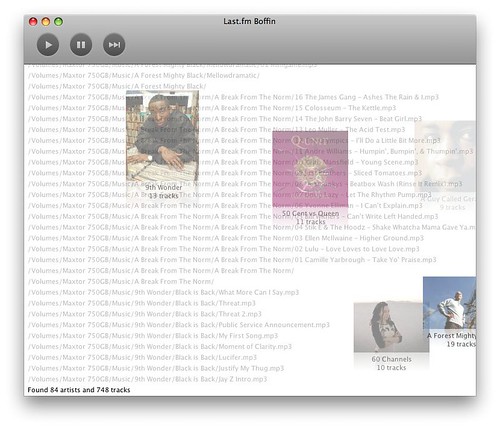
Last.fm Boffin importing

Last.fm is my usual streaming source when I’m at work and even when I am at home where I have access to my pretty extensive digital music library. I use the desktop application for Mac and Windows which lets you access your library, friends and loved tracks directly for streaming. If you use Last.fm and have not checked it out, I would highly recommend it …

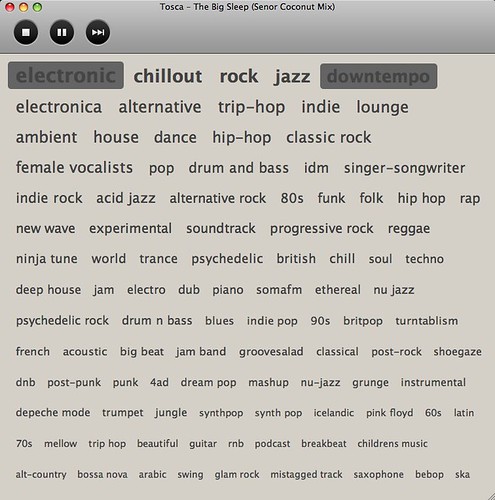
Last.fm released a new beta application called Boffin today which looks at your local collection and then creates a tag cloud of what it finds. It took about 20 minutes to run against my library of about 30K tracks and when i was done I found this:

Last.fm Boffin

Some of the tags are inconsistent which I hope gets cleaned up in future releases, but I love that I can create a “stream” of my library with a couple of tags. Depending on how you arrange your music in iTunes, you might be able to do something similar with a smart playlist, but this was dead simple and is definitely re-presenting my own music to me in a new way. Speaking of iTunes, it would be ideal if you could just point to your iTunes library rather than a folder but perhaps that will come soon as well.

MetroNorth Bloggers

David Parmet just launched MetroNorth Bloggers which is a aggregator for the wait for it … MetroNorth Bloggers. If you are familiar with MetroNorth, you’d know that this is the primary commuter path for those of us living to the North of teh city in Connecticut and Westchester County.

The site looks like it will be a very cool way to see what’s being said in our local market and I’ve subscribed immediately. It’s great to track the conversations happening close to home. I hope this will actually encourage more discussion and even lead to some meetups as well. Thanks David!

Could the Nokia Skype Deal Activate Mobile Video Calling?

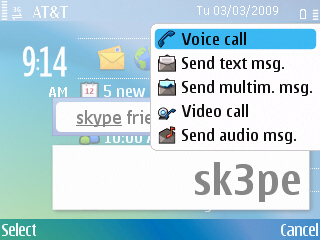
03/03/2009 E71 call menu

While the the obvious intent of a Nokia Skype deal is about voice calling, it could definitely have a substantial impact on mobile video calling.  As noted in the just linked Techlivez post, the Skype deal will integrate Skype directly into Contacts – meaning it’s not a separate application, but rather an available protocol.

It’s too early to know how real that is, but the idea is actually pretty huge and I can suddenly see how this makes carriers nervous as they consider the potential loss to their voice revenues.  As an integrated experience I could imagine seeing another option in my call menu which would include options for sending a Skype message or making a a Skype call much like making an Internet Call appears when you’ve added a SIP account today.  The difference of course is that very few people with the exception of a few geeks actually use the intgrated SIP stack.  I made a Skype video call with my parents over the weekend and Skype reported over 14 Million active connections during that time – that’s some serious potential!

Now back to video for a moment… Video calling usage is low for a few reasons.  First are the data costs, but I think even more importantly is that the service is operator provisioned – at least on the integrated front.  The 3rd party options work, but are also have limiting factors as they require some advanced planning on both sides to make sure everyone has the right applications and connections on either their PC or mobile.  Skype on the other hand is a fairly ubiquitous application and something you can expect to find on the other end of a lot of people’s PCs today.  I’ve even been seeing Skype on national TV lately on Oprah, the Today Show and not a commerical but in actual use as part of the show.  These are programs watched by (again) millions of people who are seeing  Skype in action.  One video call with my parents and they could easily see AND hear (Skype’s voice quality is awesome) the benefits.

I’ve had a front facing camera on my mobile phone since 2005 when I first received the N70.  Since that time, I’ve been able to make a single video call.  Even with a flat data rate and a 3.5G as well as wifi capable device, no carrier supports direct video calling (in the US) without first subscribing to a proprietary service that of course restricts use to a few select phones.  Skype could very easily change all this and if they offer video this change could substantially impact how we communicate.  Sure we still have to get around the data tarrifs, but that is actually happening more and more on a global basis even which is excellent as it enables greater usage … exactly what we need.  As I’ve mentioned previously my own usage is at least 90% data if not more.  Skype would only add to this … even as a voice option and I would expect a considerable shift to data over voice (in time) as more people realize the potential.

Cablevision’s Optimum Voice Control Panel needs an update

My Optimum Voice

I am taking a quick break from cleaning out my home voicemail box which became full somewhere north of 200 saved messages. We never dial-in since we get the messages as MP3 attachments on email which is quite handy – even while mobile.

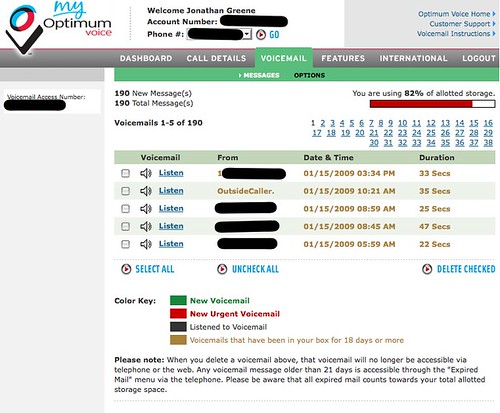
As you can see from the above screenshot, you can only select a maximum of 5 messages which makes deleting everything a rather annoying and time consuming process. Too bad there’s neither an option to auto-delete aged messages or an advanced control to select everything and delete them. Consider this a feature request!

BTW – It would also be nice to know when the box is getting full and certainly when over the limit.

Nokia and Skype – With an Open Phone it Won’t Matter

It was only a matter of time for carriers to make stink about the inclusion of Skype on the N97.  I had first read about the issue via Simon Judge and was surprised it had even take this long to be a public complaint.

Carriers will always hate things that compete with their bread and butter and when you look at the possibility of Skype operating as a voice over data service the carrier is reduced to a mere pipe.  From my perspective as an end user, I’m always looking at more opportunities for just this situation.  I don’t use any operator services currently other than the connection on on either my home broadband or mobile connections.  I have not purchased a phone from a carrier outside of the original iphone since that was released and before that it was years earlier.  When I moved to Cingular (now ATT) I only requested the SIM since I knew I knew I’d be bringing my own devices.

One might argue that Skype delivered pre-loaded on a device would greatly impact the conversion to use numbers and I can’t argue that, though I would suggest that the Skype base is strong and enthusiastic enough that installing it yourself – with or without the Ovi Store – is going to happen anyway.  As it happens there are already no shortage of VOIP options for mobile devices … Skype just happens to be BIG!

I hope Nokia does not back down on the potential for the partnership here.  If it’s really a mobile computer they are looking to sell, I should be able to use any compatible application I want to make the most of my purchase.  That is after all how computers work.

Video: Nokia E75 (Proto) Quick Overview


Nokia E75 (Proto) Quick Overview from Jonathan Greene on Vimeo.

The Nokia E75 was announced officially at Mobile World Congress recently and I’ve been fortunate to have been playing with a near release prototype of the Nokia E75 for a few weeks.

The Nokia E75 is the first Eseries device to support tri-band HSDPA and Quad Band EDGE which enables it to really cover the needs of the global traveler. I’ve used it with both TMO and ATT sim cards and found that I was able to find 3.5G signals without issues on both sides of the Atlantic. The E75 is also the first Eseries to run Feature Pack 2 which offers key some UI enhancements as well as the all important non-destructive system updates.

As you can see in the video, the E75 offers two modes of operation and let’s you choose between the standard number pad / T9 and a very full QWERTY keypad which slides out from the side. The screen auto-rotates when you open the keypad and maintains the state (as expected) of whatever operation you might have been in the midst of trying to complete. I found the keyboard to be very easy to use and would consider it one of the easier keyboards to use on the various mobile devices I’ve tried.

Nokia Messaging is integrated into the E75 and as you can see it can handle both Mail For Exchange along with your personal email accounts. I’ve been using both my work exchange account and Gmail with full push running all day. The 1000Mah battery can easily deal with this as well as my general usage which consists of email, web, maps and Joikuspot though I tend to recharge after a Joikuspot (on all devices) to make sure I can get through the day.

The E75 should will be a great device when it’s officially released later this quarter and I expect it to be very popular for people looking for a highly capable smartphone.

Safari blocks Chrome from being your default browser

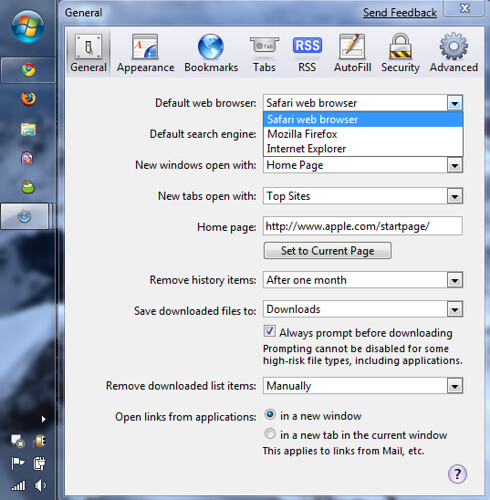
You’ll note, Chrome is not an option and Safari is actually seizing the default browser option away from Chrome where I’ve also set it. I have no idea why there is more than one way to set a default application or why Apple is allowed to do this on Windows, but it’s damn sneaky.

2009-02-26_1214 - Safari defeats Chrome as default

Proactive Savings from Amazon Pre-Order

Received the following from Amazon today which was a nice surprise as I’ve never seen this before – from them or anyone else actually.

Greetings from Amazon.com.

You saved $3.99 with Amazon.com’s Pre-order Price Guarantee!

The price of the item(s) decreased after you ordered them, and we gave you the lowest price.

The following title(s) decreased in price:

War Child: Heroes
Price on order date: $16.98
Price charged at shipping: $12.99
Lowest price before release date: $12.99
Quantity: 1
Total Savings: $3.99

$3.99 is your total savings under our Pre-order Price Guarantee.

War Child is a solid album for a great cause btw …