Is T-Mobile down in Barcelona?

I have 6 phones and 5 SIM cards here in Barcelona (yes I know it’s a sickness) and only T-Mobile refuses to work at all. I can get the network time to update but am unable to connect on any of the 4 networks that are available for roaming. I’m sure I have international data as this SIM has traveled the world with me over the past few months … not sure what gives.

Technorati Tags: , , , ,

Contemplating the benefits of membership

I’m currently sitting in the American Airlines Admirals Lounge thanks for my recently earned Platinum status which lets me get a bit of sanity even when flying coach. For international flights like tonight I also get access to the bar which is a nice perk. The thing I apparently don’t have access to though is the member wireless connection. After entering my frequent flyer number I discovered my credentials are not good enough … instead I’m connected via the pay per use T-Mobile connection which is lame.

Technorati Tags: , , , ,

Helvetireader

Helvetireader

I just installed the Helvetireader Greasemonkey script for Google Reader and it’s awesome. I’ve been browsing in full-screen mode while on my work machine though using Chrome on and off with Firefox and this might be enough to get me to stick with FF for the moment. I can’t get the userscripts to work just yet with Chrome nightlies, but I think I’m just tired after consuming too much turkey.

Disney Digital Copy

Disney Digital Copy - Wall-E

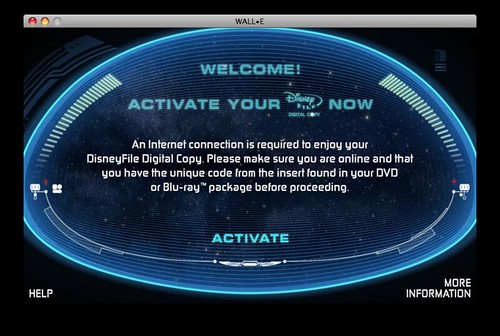
I just activated my first Disney Digital Copy for Wall-E
and I was very pleasantly surprised by the relative ease of the process. I could see my parents easily navigating this process without questions and that’s a definite win on the consumer tech front.

You just insert the DVD (Disc 3 for Wall-E) and run the app which pops up on start. Once you do that, iTunes pops up and ask you for the code to unlock the “download.” Once confirmed, the digital copy copies into your iTunes library and you are good to go. You can copy or stream this version to AppleTV and of course take it with you on a laptop or iPhone / iPod.

Convenience is good!

E71 Firmware Updated

E71 Firmware Update

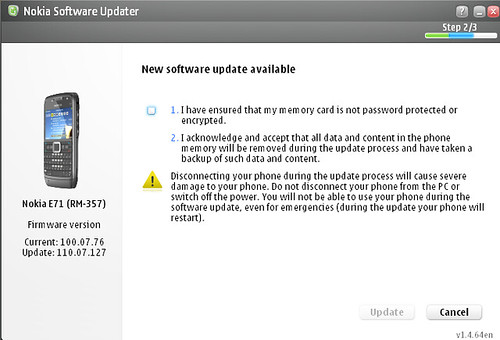
I updated my E71’s Firmware yesterday and discovered that there are actually two E71 Product codes for the North American version … and only one will see the update (for now).

  • 0559585 – got the update
  • 0569371 – no update

So far, I’m not seeing anything particularly new or different.  When the update was initially reported about two weeks ago there was mention of the new Mail For Exchange client being on board. I’ve found that the version embedded within the firmware (2.5) is actually an older one. If you navigate into your Downloads folder and refresh, you’ll find the newer 2.7 is there.

Where’s my Federated Presence?

It’s easy to maintain a single status line across services which lets you report the same update across your social services.  I tend to use Ping.Fm mainly which lets me deliver cross-service updates via email, IM and web including mobile.  What’s missing in this age of unified communications though is the ability to share a richer level of presence.  

By presence of course I mean my actual presence – am I in a meeting, on the phone, on the go or even in a different timezone from you.  All of this information can be relative input for deciding how to best get in touch with someone and there is still no way to do this effectively outside of the expensive enterprise route from companies like Cisco, Avaya, and Microsoft which also require that you use their solution exclusively without taking inputs from other sources.  Of course these inputs should be definable so I don’t share random personal bits with business contacts or important business information across to my Facebookfriends but I realize that’s a degree of complexity that might be more challenging.  Still even the “basic” federation for presence seems to be missing …  

The key thing here is that I don’t want anyone else to have to install or use a particular service for this to work.  I just want this solution to deliver the right level of detail to the right service so my various contacts are informed appropriately.  Not too hard right?

What would Facebook hope to get from Twitter?

Techcrunch is reporting on Twitter’s decision to pass on an acquisition by Facebook and a lot of people are tracking this like a major news story.  I think it’s just the continuation of the hype machine.

I’m not the biggest fan of Twitter … I consider it interesting, yet frustrating given their sheer lack of concern for actual conversation.  While it’s been able to attract a core early adopter set and the blogger “A-List” it’s way too challenging for a mass market audience to use.  In the time since it’s launch we’ve seen the release of an API which has certainly made posting and tracking simpler, but since there’s neither threading nor notification alerts it’s quite easy to just miss a reply if you happen to look away. 

Facebook on the other hand recently redesigned their service with a focus on status updates and seems to have eclipsed the intent of Twitter with a far richer experience.  I’ve found the facebook threading and alerts to be excellent and as a result have actually found myself in Facebook far more often than I was previously.  Granted there is no public timeline in Facebook and discovering new people of interest is much harder since it tends to happen through the friend of a friend mechanism.  

Facebook has a considerably greater audience globally, an excellent mobile experience and a foundation based on sharing between friends.  Twitter has remained a glorified IRC chat room where everyone shouts and you are out of the flow if you stop paying direct attention for a few minutes.  


The Facebook userbase almost certainly includes most of the Twitter base so what’s really to acquire here?  The brand perhaps … I suppose there’s credibility there and the alleged offer of $500 Million even as Facebook stock has to be quite flattering.  That said, it is stock not cash and there’s certainly no certainty playing that game these days.

Trying hard to like the N96

For the past month or so I’ve been using the Nokia N96. I have the N96-1 which as Nokiaphiles know is the Euro edition so no 3G for the US. That has not been too much of an issue because I’ve had regular overseas trips. For the first time since I started writing about mobile technology I’ve been able to fully test the capabilities of a device in a very global context.

The N96 has been a very mixed bag. On the surface it’s a really good looking mobile handset. The hardware design of the Nseries line has evolved considerably since the N70 and particularly in the N9x line, Nokia’s flagship tier of Nseries, there’s a great deal of power in your hand. The N96 continues in the same line as the N95 and shares many functions and even specs. The screen is gorgeous and makes watching video a pleasure in either portrait or landscape modes. As good as the hardware is is pretty muc exactly how unreliably the software has performed. I’ll go into some more detail, but in many situations, I’ve found the software has actually defeated the potential experience I could have been having through the hardware’s capabilities.

First the good.

The N96 is the current headliner for the Nokia Nseries line and has some very serious specs to boot! Coming from an N95 you’ll notice that the media keys around the navi-wheel (which does not offer scrolling) appear and disappear contextually when the media player is enabled and the slider is either up or the device is unlocked and in the closed position. The landscape slider reveals the media keys on the side which also change with (I think they are OLED) as you move between music or video and N-Gage when the center two become your game-pad standard A/B buttons.

The screen is a 2.8″ QVGA display which works great indoors or out. I have the N96 set to auto-rotate which I really like though it can stick for a few moments longer than you might like. Auto rotation uses the sensor to detect the orientation of the handset and rotates the UI accordingly. The side of the device does NOT include the gallery button next to the shutter which is annoying as I used that daily on the N95. I think the lack of a covered lens on the 5MP Carl Zeiss camera is the bigger miss. Why offer such a high quality camera and make it so easy to scratch? There’s a kickstand hiding in the border of the camera lens which flips out to let you place the N96 on a table (or airplane tray) to comfortably watch video. There’s a keypad lock switch next to the 3.5mm headphone jack and after a day of use I wondered why this had only existing on the Nokia Tablets until now.

On the inside, the N96 offers a relatively low (128MB if I remember correctly) amount of RAM, but there’s a 16GB drive to compensate. I saw low only because I’ve run out of memory with a few apps open failry frequently. 128MB used to be cool, but apparently no more in today’s multimedia multitasking world. I’ve also loaded an 8GB MicroSD card so I’m able to carry a whopping 24GB of data in my pocket! USB 2.0 Hi-Speed makes it painless to move large files back and forth with your mac or pc. I’ve been using the N96 as my main media player and have been generally very pleased with the results. Sound quality is solid and I’ve used both my Shure 420 Earphones as well as the Nokia BH903 Bluetooth headset in regular rotation.

The N96 is the first Nseries with DVB-H which means you can receive digital TV over the air in countries in which this is supported. I’ve only gotten a signal and reception in Frankfurt Germany and Helsinki, Finland. The N96 has been with me in Dubai, Saudi Arabia, London, Germany, Ireland, and by the time this post goes live Copenhagen (only had 30 min to run through the airport). DVB-H is definitely cool though aside from the limited market penetration (no fault of Nokia) there are only a few channels of video and then typically a few more of music. I can’t see using it that frequently though I suppose if I lived in one of the active markets it might be quite nice on the bus or train to and from work.

The N96 runs the Feature Pack 2 version of S60 like the N78 released before it. I’ve shown how FP2 works previously and I have only seen one additional feature in the N96 by comparison which I’ll address shortly. A key benefit of FP2 is over the air non-destructive firmware updates! This is a huge enhancement as you can FINALLY update your device as new releases are available without having to start over by reinstalling all your applications.


Now the bad …

The new feature within the N96 is a power saver mode available from the profiles menu (press once on your power key if you don’t use it that way). You might be wondering why the N96 would need a power saver … well allow me to share my disappointment in Nokia’s choice of the BL-5F 950Mah battery. This is the same crap battery that’s in the Nokia N95-1. When I saw and asked about this back in February at Mobile World Congress, I was told there were software enhancements that would enable the N96 to be more power efficient with the same battery. Sadly, I’m not seeing that at all. This is definitely a device that needs to be charged during the day if you use it as it was intended. I’ve found using power saver combined with offline mode on planes definitely helps things out if you are just doing media playback… When the low battery warnings start coming you can get close to an hour of additional use. On the flip side, the battery charges back up qui

I’m on my third N96. I believe the retail unsubsidized price of the N96 is around $900. For that much money my expectations are that I’ll be blown away by both the specs and the performance. Unfortunately, I’ve yet to make it through a day without multiple freezes and restarts. My skill at removing the battery cover to remove the battery while walking is unparalleled!

I’ve also noticed that the N96 is without a doubt the slowest mobile device I’ve ever seen start up. There’s anywhere between a 1-5 minute wait on start from when the homescreen appears and the battery and signal meters become active. This delay can actually take even longer and is rarely on the low end of the range. Every other device I’ve ever used has been ready to go within seconds of a cold start. Until this happens the N96 appears to be stalled — Key presses are not recognized and you are unable to make or receive calls. Because the N96 tends to need a restart more than once a day, this aspect of things is particularly annoying.

My first N96 was apparently an early release – not a proto – but a very early model off the line. I swapped that out for the next one which received a new firmware update soon after to remedy some of the issues, but these issues remained. The third device and the one I am currently using has the most current firmware available officially – 11.101 23-09-08. I’ve heard some rumblings about v12 which can’t possibly come soon enough.

Final thoughts

Until this particular device arrived, I was not able to find the Transformers movie which has been touted on all three boxes. Clearly someone missed fired on the printing before the software was ready. I have watched the movie a few times now on various flights and it looks and sounds excellent! The negative here is the forced inclusion of subtitles which are on by default with no way to remove them (at least none that I could find). I’m not sure why you’d want subtitles on the small screen – especially given the movie is in English and easy to hear.

Nokia Care has taken excellent care of me here and I have to really call attention to the team there and to the blogger relations program which has enabled my priority access to support. At this time though I would have a hard time recommending the N96 to someone looking to make a purchase. I’m hopeful that another firmware release will fix things up. I do recall a similar process with the original N95, though I would have expected past lessons to have been learned for this release. The N85 which was just released and something I hope to test soon will definitely give the N96 a solid run for attention.

Technorati Tags: , , , , ,

Data settings should be locked to a SIM

Do you use more than one sim and more than one device? If you do then I would imagine you’ve also experienced the pain that’s associated with re-configuring EVERY data-centric application to a new access point each time you switch!

Why can’t phones be smarter to see that once the SIM has been switched the prior preferred AP is ready to be used. Voicemail is the only function that auto-programs itself when you switch .. While I certainly appreciate this effort, it’s quite minor as my usage is at least 90% data.

Given my travel as of late, I see this all too regularly. I switch my phones based on where I can take advantage of the 3G services and to avoid incurring personal roaming charges. Why can’t mobile devices support this with smarter switching capabilities?

T-Zones needs to be taken out back and shot

I have two active phones – A Nokia E71 running on an ATT SIM and an N96 running on a T-Mobile SIM. Because the T-Mobile SIM was initially provisioned for Blackberry service it seems to only have access to the T-zones access point which absolutely sucks. For starters, you can only have two simultaneous connections which means a multi-tasking device like the N96 (or any other N or E Series) bumps into this limit REGULARLY. In ordr to proceed past the warning about reaching the maximum number of connections, you must first request that an “offending application” stop doing what it was doing in order to try again in your current app. I would not be exaggerating to say I see this within 2 minutes of active use and continuously thereafter. WTF?!?!?! I never noticed this when the SIM was in the Blackberry and I’m guessing that because you pay such a premium for Blackberry data service it does not count against the two connections. Additionally the Blackberry really does not actively multi-task so it’s quite difficult to get two things competing to connect on the access point.

I’m aware this should be resolved with a change to my service agreement, but am unable to make those changes myself as the SIM and device are part of corporate plan. Regardless T-Zones is really a poor excuse for a data plan access point. People are using more not less. The limit should be the volume of data, not the way in which you connect.

Nokia Sportstracker Mobile Mapping

Sportstracker mobile mapping

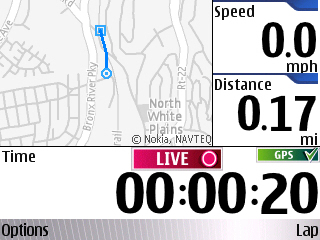
Thanks to Jaiku and GerryMoth I just learned about a new release of Sportstracker which offers a real map of your location as you track your progress.  Previous versions showed a visual progress, but based on coordinates rather than a real map.  i believe this is the first integration of Navteq data outside the Maps application and it is working really well.

iPhone opening new market opportunities

One of the things most people assume is that the iPhone is a luxury device and while that was true initially based on both the cost of the hardware and the data plan you are required to add, things appear to be evolving. According to a recent Comscore study:

“These data indicate that lower-income mobile subscribers are increasingly turning to their mobile devices to access the Internet, e-mail and their music collections,” said comScore’s Mark Donovan. “Smartphones, and the iPhone in particular, are appealing to a new demographic and satisfying demand for a single device for communication and entertainment, even as consumers weather the economy by cutting back on gadgets.” Comscore via Moconews.net

While in markets like India and China people tend to have fewer options for connectivity and digital entertainment, in this case people are proactively cutting back to cut costs as the mobile / portable experience is quite good. Apple continues to show that the user experience is THE key factor over just features and specs. A great deal can be achieved within their toolbox that suits a very mass audience. I hope others are paying attention …

A DUN Good Travel Companion

29/10/2008 - Nokia CA-100

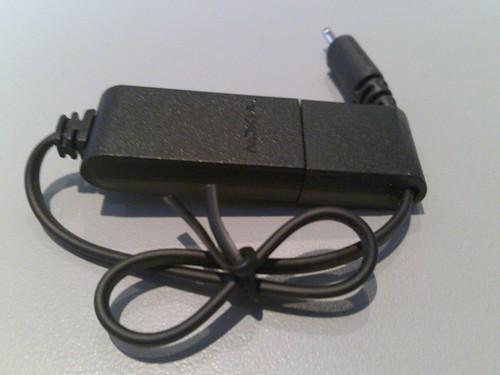
I’ve been traveling rather extensively for the past month and it’s not always easy to find a WiFi hotspot which is not that much of an issue when you have a DUN capable 3G mobile. The Nokia CA-100 accessory (above in action) is a killer addition to my gadget bag as it uses my laptop’s power and charges the phone while it’s providing connectivity right back.

The Nokia CA-100 is designed to charge from USB to the Nokia mini-plug. It works with all of my gear which is quite excellent as I usually have an assortment on hand and it’s great to be able to top up without looking for a plug. As you can see, I have not even unbound the cord. The shorter length has been suiting me just fine and the whole thing closes back around itself making it very easy to carry around.

29/10/2008 - Nokia CA-100

I’ve wanted one of these for a long time and it took a trip to Finland to finally see it in an electronics store. For some reason it’s not easy to purchase at a Nokia Store in the US.

Optimumwifi goes live in Westchester

I believe I’d previously covered the announced rollout of Cablevision‘s metro wifi network and it seems to have actually gone live now. I see it along my Metro North commute as we pass through the various stations and while I have not had a chance to test the connection speed it feels quite peppy. As a Cablevision Optimum Online subscriber I get access for free which is a nice bonus. I think everyone else is SOL as Ii did not see any way to pay for the connection when I started browsing from my Nokia E71.

Before you get too excited about wifi on the train though, this service has been clearly designed for fixed mobile connectivity. It only works within range of the stations – not while the train is cruising along. I realize that’s considerably more challenging and expensive but it actually offers some real value as well. 3G from ATT, Sprint and Verizon is easily accisible and while it might be slow and victim to things like the dead spots we all deal with in our part of the woods, it works at 70 MPH from the comfort of your seat and was the only way I could connect and post this from the train.

I suppose the main beneficiaries of this service are the businesses near the stations who can suddenly offer wifi connectivity to their patrons. Of course you still need a login from your home connection unless someone wants to get more creative and re-stream things with a router…

I would like to suggest that Cablevision alter their authetication method a bit for mobile users. The page certainly rendered well for the handset, but keeping a browser window open to stay connected is ridiculous. I’ll have to try using devicescape one of these days to see if that makes things easier.

Nokia launches the 5800 XpressMusic along with Comes with Music

(I’ll add a picture here soon)

Today is the official launch for the Comes with Music Service, Nokia’s subscription music service along with the Tube, or Nokia 5800 XpressMusic as it’s officially known. While the Tube was not exactly a secret, it’s still an exciting new launch and represents the first device with S60 5th Edition as well as the new Touch UI.

I’ve yet to see the 5800 (anytime you’d like to share I’m ready) in person, but it looks like a very strong device. The new contacts and media bars add a new level of interactivity to how we’ve come to know S60 and Nokia devices. The media bar slide opens offering deeper access to the web, sharing services and your local content, while the contacts bar shows recent contact history along with activity feeds you’ve added from your friends. I think the contacts bar is a really compelling feature for social media enthusiasts and can’t wait to see that added across the lines.

I’ve known about it for a while and have some mixed feelings about the Nokia 5800 XpressMusic as an NSeries enthusiast … is it enough , but even though it lacks the NSeries label the Nokia 5800 has all the multimedia you know and love. The cam is 3.2mp AF which is solid and the 5800 XpressMusic is as you might expect optimized for music over other features. I know it supports games, though it’s not clear when / if the NGage offer will make it’s way. There’s haptic support which gives you feedback as you touch and type on the screen. This feedback is something that really adds to the engagement of the experience and should make using a touch screen much easier and should add some new elements to gaming as well. There’s no sign of multi-touch yet … have to see if it’s hiding within once people get their hands on the live units.

Comes With Music is a unique take on the music subscription model offering unlimited downloads – for keeps in the first year of ownership. After a year you can still keep the tracks you’ve downloaded, but will need to pay to continue for future downloads – at least as I understand it. For people like me, that’s not too much of an issue as I tend to update my device at least annually. For more normal users it’s still very compelling as it’s the first time the idea of a subscription is actually for keeps. Yes there’s DRM, but assuming (a strong notion here) the DRM is not in your face it should be pretty straight forward.

We should see the Nokia 5800 XpressMusic rollout globally as the Music Offer arrives in each market. While I could not any sense of timing, there will be a US Release for both. Yes both. Now we are talking – or perhaps rocking! I’m getting started with Nokia Music for PC which was updated and released today as well. I’ll have to do a follow-up after using it for a few days …