N95 Battery makes me want to seek out specific devices…

A while back I posted about considering a new mobile to use specifically as a modem. I was originally thinking of a second phone to use purely as a 3G device since none of my current phones work on US 3G networks. As I’ve used the N95, I realize that unless I actually have a pocket modem, the N800 tethering I do regularly will render the N95 as a half-day device at best.

I really don’t mind the idea of a second device specifically as a modem, but knowing that my N73 can easily handle this task as well as anything else I’ve asked it to do in the course of a day, really rubs me the wrong way. I’m not sure how much extra real juice you get from 150mAH, but apparently it’s enough to make a difference here.

I don’t want to be in the position to have to make compromises — especially given the promise of convergence with devices like the N95. Today though I am not comfortable using the full capabilities of the N95 without being within range of a charger. I love what it can do, but expect it to handle the job for a day. I don’t think that’s too much to ask.

Technorati Tags: , , , , , , ,

Tough battery life on the N95

I’m frustrated to report that the N95 battery just can’t cut it for a full day of use. Yesterday was my first real test of tethering, calls with a touch of GPS. My battery died a bit after 4 PM. While this is considerably better than the N80, it pales in comparison with the N73.

The real rub is that you have to think in compromises in order to make a full day of use. I like to use my phone as modem paired with the N800 tablet throughout a day when away from my desk. This battery issues is making me consider disabling t auto-connect function with my phone – in my window limiting a second device!

I still really like the N95 and hope that someone either develop a higher capacity battery or that Nokia can tweak a bit more with a firmware update.

Giving things another go today after a night powered off and charging…

Technorati Tags:

N95 – Video Fun

I’ve been having a great time with the N95 and especially the video feature. I find the quality to be outstanding and it’s very responsive once activated (takes a few seconds to initiate). The video is crisp and clear and sounds great too.

Last night I recorded a small adventure for our cat who escaped through an open door on our deck. Here are a few samples I thought I’d share so you could get a feel for things as well. The first is the straight video, the second is edited with music on the N95 and the third is a Muvee I auto-generated. I’ll have to spend more time with the editing ability as this is actually pretty amazing — there’s a timeline and you can add and merge multiple clips. I ended up killing off the music only portion in Quicktime at my desk… Muvee outputs a file that can be sent via MMS so the quality and length are quite different.

(Please don’t mind the lawn … we’ve had some excavating done here in past months and are working on growing things back)

Original:

Movie Editor

Muvee

Technorati Tags: , , , , , , ,

Western Digital MyBook Tip

I’ve had trouble with the Western Digital MyBook staying mounted on the local computer I’ve used — and tried a few computers and all three connectivity options. The trick (so far) seems to be mounting the drive from another network machine. I’ve been connected with the drive accessible for about 24 hours now…

I guess the minimal activity that occurs prevents the drive from sleeping to the point where it unmounts. Since I use this as my main music system, it’s important that it actually be there when I want to hear or see something from iTunes.

I’ve contacted Western Digital support through their site about this issue, but have yet to hear back and given that it’s been weeks I’m not counting on hearing anything either. Until we add true network storage here, this seems to be the answer.

Technorati Tags: ,

Loving the N95

If you’ve been tracking my real-time updates on Twitter you’ve certainly noticed that I have an N95! Since unboxing the device, I’ve been very actively putting it to the test and I have to say outside of a few exceptions, I’m very impressed and pleased.

The N95 is about as thick, but a tad wider and lighter than the N73, thinner and lighter than the N80. I was actually struck by how light it feels in your hand. This does not take away from build quality though I’ve heard and felt a few creaking sounds. This seems to go away once the slider it open as there is noticeably less flex in the system when it’s open for some reason.

My gripes are ones I hope get addressed in firmware updates. There’s definitely not enough memory for the power user and you will immediately begin to see the lovely low memory warnings and find apps have shut down when you put the N95 to the test. I’ve been working around this, but hope that since this is the flagship N-Series it gets better. The other N-Series I’ve used seemed to actually have more memory available for multitasking. My other issue is a personal thing I’ve again been learning and more willing to accept as this is a new device and things are different… I find the main buttons to be pretty tight for my hand. It’s very easy to accidentally hit the wrong key (like End) or tough to use both Down and the Pencil when selecting multiple things. I’m getting better with practice! Last, GPS takes longer than you might like to get an initial signal (cold start) but once it does, the system is quite solid.

There’s a whole lot to love here and in general am very impressed with this device. I’ve been able to freeze and reset it, but I’ve done that with every Nokia to date. When you realize that you can shoot awesome DVD-like video, snap beautiful 5MP pictures, Navigate with GPS, use any type of messaging, make crystal clear phone calls and even use the phone as a high speed modem, there’s much to love!

I’ve installed the N95 iSync plugin and decided to test things by syncing my contacts (over 2000) and had no issues with cluttering performance. My N73 did not like when I did that and while I initially did this as a test, I’ve kept them all on since – why not be able to reach anyone I want… just in case!

On the phone I’ve had issues with Shozu working well and tried before and after the initial firmware update, so that’s a pass for now. The Flickr and Vox integration is solid, even if it takes a few more clicks. I have Truphone installed, Handy Taskman, Handy Weather, Handy Clock, Nokia Sports Tracker, Gmail Mobile, Google Maps Mobile, and the Nokia Wellness Diary – though I’ve yet to get this one even open yet.

I’ve paired the phone with a few computers here, my N800, BH-800 headset and our car — no issues there and I like the prompt to auto-connect, which is new to me. Not sure this is a Feature Pack 1 thing or was available in newer firmware, but I like it.

Here’s a “quick” video walkthrough for some more detail. (Yes I know I said N93 instead of N73 a few times… get over it.)

All in all – the N95 kicks ass!

GrandCentral mobilizing!

I was fortunate to be able to meet with Craig Walker, the CEO of Grand Central last week, thanks to Andy Abramson. The purpose of our meeting was a meet and greet as well as be briefed on some new things brewing in the Grand Central labs. Now that things seems in the clear, I can share…

First, in case you have not heard of GrandCentral, they are (in my humble opinion) the leader in a new class of companies which all play in what’s being called Voice 2.0. GrandCentral is unique in that they provide a total solution, where many other players in the game offer one or two of the features that are all found within the GC platform. You start by selecting a new free phone number – I went for a local number. You then tell GrandCentral about all your other numbers (work, cell, home, SIP, Gizmo, Skype, Truphone etc etc…) as well as upload your address book. Now the system is read to rock and roll!

The basic premise is that when you are called on your GrandCentral number, all your phones begin to ring so you can easily be found. You can assign rules as to how you’d like callers to be handled based on how or if you know them, how they might be calling you or even just by time of day. Your home number defaults to “not ring” during business hours, assuming you are at work or on the road though you can easily override this if you like. As calls start coming in, you’ll immediately realize the power of the system. You can choose to use ListenIn, by pressing 3 when a call comes through to hear part of the person’s message before answering (press *) if you like. If you start having an important call and need to keep track of things, you can record the call with a press of 4. As if that’s not enough, GrandCentral also let’s you transfer the call over to any of your other lines with a simple press of *, which then starts your ring chain, so you can easily move from home to cell or visa versa if you like. David Pogue summed things up nicely in his video homage a short while ago.

The new stuff, which I saw last week and have been using a bit to explore more deeply is more closely connected with the mobile experience. Craig enabled my cellphone voicemail to route to my GrandCentral account with a forwarding code so my messages would start to aggregate in one place. Previously I was still getting cellular voicemail separately from my GrandCentral line and this centralization has huge benefits. It instantly simplifies my life and because it’s integrated with my GrandCentral account, I am connected to a much more robust contact list than I normally sync to my mobile. The other cool thing I was shown, which launched last night is the GrandCentral Mobile web site! This site which you can log into from any mobile device – I’ve been using my Nokia E61 and N800 to test things the past 24 hours and it’s very cool. Grand Central mobile logs you straight into your voicemail log, giving you instant “Visual Voicemail” access. You can listen, manage or respond to calls from your phone’s browser. I’ve found it to be quite responsive — even on my EDGE connection. The site is very efficient and something I think most power users will get a great deal of utility.

While everything is currently free, I asked Craig about the ways in which GrandCentral might begin to charge for services. I don’t think anything we discussed is ready for primetime, but it’s clear the basic service will remain free. As Craig and I talked, we were joined by Phoneboyand our discussion continued into how we are likely to merge even our land line voicemail into the Grand Central system! This is very compelling to me personally and it seems to Craig as well – since both our wives generally do not actually answer the home phone!

I’m confident from my discussion that GrandCentral’s development plan is far from complete and that they will continue to revolutionize how we use the existing as well as new and emerging voice technologies and services. Even the average consumer has two phones which can easily be consolidated into a single free number. Once it’s all connected the power and control is truly in your hands.

Technorati Tags:

My Love / Hate relationship with the Nokia N80

Yesterday I switched my Cingular SIM from the N73 to the N80 as I am testing a piece of software and needed to use the WiFi in order to make use of certain features…

This morning I took the N80 from the charger at about 7:30 and at 11:40 it was dead. I had burned through all the battery had to offer and was without a charger in the car. Fortunately I was only a few miles from my home base and able to reconnect soon enough, but this is simply dreadful performance.

I actually really like the N80. I love the form factor (great slider and keyboard), love the WiFi with VOIP support (though use it sparingly) and today for the first time, seriously noticed how much faster it felt than my N73. I’ve installed fewer things on the N80 as it’s been more of a secondary device, but it’s seriously fast when moving through the UI and in particular when dealing with SMS messages.

This am, soon after disconnecting from my charger, I activated Twitter SMS and began to receive a steady stream of updates. I checked a few links out via EDGE while still in the house (keeping WiFi off with scanning off) and checked GMail once before taking my daughter to school. At that time, my N800 Tablet switched from my home WiFi connection to bluetooth DUN with the N80 and continued to be connected that way until I eventually ran out of juice before Noon. Through the course of the morning I made 4 calls, checked GMail on both the N80 and N800 and did a slew of SMS (probably close to 50 messages) with Twitter. While waiting to pick my daughter back up at school at 11:30 I noticed I had two bars left on the battery and received my first low battery warning shortly thereafter. The phone died before I got back home…

This is a great device that is severely hamstrung by an abominable battery. The N73 I’ve been using daily for months easily handles the same tasks (though perhaps with considerably less SMS) and can easily go well into the evening without issue. When the battery on your phone can’t even make it to lunch you start doubting how you can even use it without being near a constant power source — which completely kills the mobility!

Technorati Tags: , , , , , ,

Google Earth – Darfur

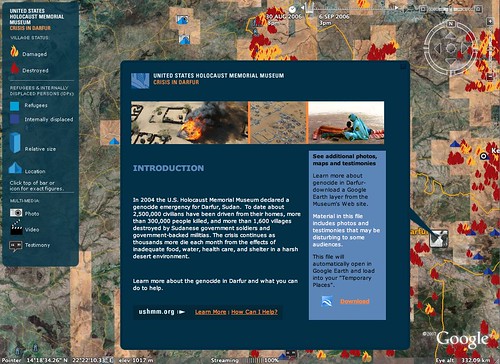
If you’ve wanted to know more about what’s happening in Darfur, Sudan, allow me to suggest you download the AAAS Darfur layers for Google Earth. Amnesty International and the US Holocaust Memorial have collaborated to provide rich multimedia coverage of the area to cover the latest attacks as well as provide coverage of what’s already happened in the area.

I suppose I should also mention that the Sudan has now banned Google Earth as a result of this project!

Google_Earth_Darfur

Technorati Tags: ,

EyeTV 2.4 FINALLY controls your set top box!

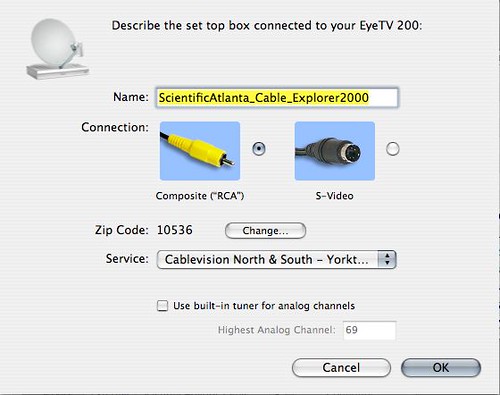
I received an email from Elgato yesterday and was very excited to see that there’s native support built in finally for set top box control! You still need an external device to handle the IR, but if you happen to have either the ZephIR or iRed system running you can now effortlessly change the channels on your cable or sat box to record any channel you want.

EyeTV Cable Box Config

Previously this took a considerable amount of effort with a third party software tool like iEye Captain, which I have to confess I really had a heck of a time mastering and neevr really did get it working right. Without an proper control, you were limited to recording analog cable and non-premium channels. Now though, I can record anything from the Sopranos on HBO to 24 on Fox and know that my EyeTV 200 can even have things waiting in iTunes for my iPod or (pending) AppleTV. I can even remotely set up a schedule (which you could always do previously as well) with TitanTV.

This rocks!

Technorati Tags: , , , , , , ,

Netvibes via Widets

via Nokia Press Release

The Netvibes Ecosystem’s entire collection of 85,000+ feeds includes recently announced content from major media outlets including CBS, CNN Money, Entertainment Weekly, Forbes.com, InStyle, LATimes.com, Newsweek, People, Real Simple, Sports Illustrated, Time, USA Today, and washingtonpost.com. Netvibes Ecosystem also hosts official content for many celebrity partners including 50 Cent, Ben Harper, G-Unit, Ice Cube, Mandy Moore, Moby, and Snoop Dogg. As a leading provider of user-generated feeds, the Netvibes Ecosystem comprises a large collection of entertainment, lifestyle, news, sports, and television feeds.

I think Widsets is either something you love and use all the time or something you choose to ignore. I’ve been in the ignore camp, as I have more than a few ways to get my data on the go. I still find this interesting however as this is still a cool way to mobilize content — especially if you use a personal Netvibes page.

Technorati Tags: , , ,

Nokia to launch WiMax mobiles in early 2008

“Nokia plans to bring its first WiMax-enabled mobile device to market in early 2008,” Nokia said in a statement. via CNET

Note they did not say phone. I believe it will be the successor to the N800 (though there may be one in between) and will support the Sprint WiMax partnership they’ve committed to already.

Live Nokia audiocast – S60 Browser from FP1 to be available!

It will be one month to the day tomorrow from the evening with S60 and exactly when I was informed the browser would be available to download… at least that’s my educated guess as to what the real content is about. Check out the clues below…

S60 was the first to bring full HTML browser in mobile devices providing a desktop-like browsing experience.

Now, S60 cordially invites you to attend a live audiocast as Chief Technology Officer Tero Ojanperä, Nokia, presents how Nokia and S60 enhance the Internet experience further.

The audiocast takes place on Monday April 16, 2007 at 1.15 p.m. CET.

To listen to the audiocast log on at www.s60.com/business/newsevents/audiocast on Monday April 16. A related press release will be available on the same day after 12.00 CET at www.s60.com and www.nokia.com prior to the audiocast.

The audiocast together with the presentation will be available for view on demand approximately one hour after the audiocast. [Ring Nokia]

Technorati Tags: , , ,

My Symbian History

Ricky tagged me to share my S60 history, but I thought I might also add a deeper sense of history to my device usage as a reference.

Given the amount of content here focused on Nokia, readers might be surprised to learn that I don’t have a very long history as a Symbian user. In fact, my Nokia phone experience is completely due to participation in the Nokia Blogger Relations program. Before I share my device history, let me provide a brief background on where I’ve been …

I had used a few mobile phones (Qualcomm Candybar, StarTac), though nothing particularly interesting until I became a Nextel subscriber and got the i1000 which had a very (for the time) capable WAP browser and was quite good at messaging. I used a Newton MessagePad 2100 which was truly a smart device and way ahead of it’s time. When the Palm came around, I moved on …

I became a longtime and loyal Palm owner and have been through much of the line from the original through the Treo 650. I’ve had the Palm Pilot (upgraded the memory to 512MB if I recall correctly), Palm III, V (updated to 8MB) + OmniSky Modem, Vx (when the V died), m505, TC, T3 (paired with a SE T610), Treo 600 and Treo 650. I wrote a lot about the Treo on both this site as well as Treonauts for about a year…

During the course of my travels I had certainly heard of Symbian and knew about Nokia but was never tempted to switch. I was particularly interested in the communicator future devices which seem to have evolved into UIQ and the SonyEricsson P series though the price was out of reach for me when they finally arrived – not too mention I was deep in Palm-land. The Nokia 7710 was very appealing to me courtesy of The Matrix, but again I stayed with Palm. Actually now that I think about it the 6600 series also attracted me and I almost purchased this phone via Craigslist.

And then the Nokia Blogger Program came knocking… (Fall 2005)

The first device to arrive was the N90, followed by the N70 (with LD-1W GPS) and then the N91. In the next round the N80ie, N73 and N93 arrived. Somewhere in the midst of all of this I purchased the Nokia BH-800 headset, the E61 and then the N770 Internet Tablet.. Recently I’ve updated my GPS to the LD-3W… and Tablet to the N800.

Some notes… I was using a Blackberry as my primary device at work when the Blogger Program started and had put the Treo in the drawer. I needed to have Exchange access and IT refused to support the Treo… I received a GPRS datacard (which sucked) but pulled the SIM out and used it in the Nokia’s with phone forwarding from the Blackberry. Two pieces in my pocket.

From the first round of devices I was hooked! The N90 was (and still is) very slick and I prefer the rotation of the viewfinder more than the current N93 and N93i. I also really liked how I could snap photos without opening the phone. The N70 was a preferable size than the N90 or N91, but the N91 with WiFi was awesome until I bricked it. It never recovered even after a repair from Nokia and I ended up using the N70 daily for quite a while. With the second round of devices, I tried the N93 for daily use, but I need 850Mhz where I live and it unfortunately does not offer that. The N73 however is a fantastic quad-band phone and has been my daily phone for many months. I like the N80, but find the battery far too weak for my data needs to make it through a day reliably. I did switch to the E61 during the work week since it offered Mail4Exchange and synced with a more recent (and now prior) job, but switched back to the N73 for weekend use and once I realized that I could install the Mail4Exchange client on the N73 I actually used it most of the time. Camera wins…

So that brings us to today… I am very happy with the N73 still today though admittedly am getting a bit restless now that the N95 is out. I’m hoping my gadget crack dealer (aka the blogger program) will kick back in soon and offer one up!! There are some other options out there like the N76 and E65 or even E61i, but have been eyeing the N95 since it was first announced. I have a feeling it will soon replace my N73.

Ok – that was probably far too long and rambling, but I suppose that’s the point of this exercise. For the next round, I will tag people from my Twitter and Jaiku contact lists and ping Matthew Miller, Roland Tanglao and Ken Camp.

Technorati Tags: , , , , , , , , , , , , , , , , , , , , , ,