Free Data Roaming With 3

Caught this one yesterday …

I could hardly believe my eyes today when I read in the press that 3, a mobile network operator in a number of countries, will no longer charge hyper-exorbitant roaming fees for UMTS data usage in their sister networks abroad. Their new offer is called “3 Like Home”. [Martin’s Mobile Technology Page:]

If you’ve ever traveled into another country with your mobile, you’ve no doubt encountered a painfully expensive bill on you returned home. Roaming data charges add up extremely quickly! This aggressive move from 3 is welcome and something we can hope leads to greater participation from other carriers as well. If I lived in the UK, I’d definitely be using 3….

Technorati Tags: , , ,

A Child’s Insight

I was watching a DVD with my 3yr old daughter Hannah yesterday and it skipped, paused and actually restarted.  She said immediately “maybe the TV is tired of playing this DVD, Dad.”

I had been thinking how tired I was of watching this particular show myself, but found it amazing that she considered this notion for the TV itself… 😉

Nice iPhone Video Overview

Just watched this (thanks John!) and realized that unlike other smartphones, iPhone applications either politely quit or are able to be minimized to such a degree that they are always running. When you watch this, there does not seem to be much difference between returning to an app (state is saved) or opening it fresh – which seems hard to do with the exception for the iPod function which seems to start at the top of its menu.

Pretty slick. I’m far too used to having to choose whether I want an app to remain open or if it’s ok that it quits when running Symbian and this looks like a nice change.

Technorati Tags: , , ,

Geared Up

I’ve been watching a new gadget show on TV called Geared Up which is available on INHD or Mojo (their nighttime name) and I have sort of a love hate relationship with it. The show fills a gaping hole for gadget and tech content and of course the HD bit gives it an extra boost. They’ve had some great guests speaking both about their companies as well as industry experiences, but they don’t seem to be current – for example, where’s the CES or MacWorld coverage??

The real kicker though, is that at times it actually feels more like an advertorial, than editorial.

Brand Experiences – Nokia, Sony and Apple

Last week I had a day in NYC and after I took care of a few matters I wandered (ok made a beeline) to the Nokia Store, as I’ve been an enthusiastic user now for quite some time. I then walked a few blocks south to the Sony Style store before heading to SoHo to the Apple Store which happened to be near my planned evening destination. Each store carries the essence (or tries) of their respective brands, but they clearly serve different masters. While each store seeks to represent their brand in a unique way, I found drastic differences in how they represent both the products and their brand experiences – not too mention how customers inside were doing things.

First Stop Nokia…

I was really excited to check out the Nokia Store for the first time. I had tried to make it over on previous trips to the city, but had run out of time each prior trip. They’ve got a sweet piece off real estate – across from Tiffany’s on 57th and while narrow is packed with technology! You can see a at least 2 of not 4 of every device currently in market – though I honestly don’t recall seeing the E61, instead the E62 was there since that is the device matched for the US market. The store design is sleek and very modern and product is very well lit. It’s easy and fun to play with everything there and the staff essentially stays out of your way so you can go to town. They have every accessory I’ve ever seen on the Nokia site, which is nice – If you want Nokia Kit, this is clearly the right place.

The store is three floors – 1- the main array of devices, 2 NSeries and 3, Vertu. It did not seem like anyone was actually making a purchase. People (maybe a dozen) were milling about and just checking things out. One woman was actively shopping, but I don’t think she was leaving with a unit. Staff was young and very friendly … though I actually had a specific request and was refused. Apparently the store has no desire to service unlocked phones (mine actually come directly from Nokia courtesy of the Blogger Relations Program) and will not help you update the firmware. I was directed to the software available for download – though as I mentioned and will repeat here – as a Mac user you are completely SOL in this regard. It is impossible to do a firmware update without a Windows PC. There was a PC there, but there was no way for me to connect and update – at least not in the middle of the store!

The NSeries and Vertu Floors are smaller than the main floor as they show a more limited set of devices. The main difference is on the Vertu floor. The only way to view the devices up close, is with the assistance of the staff. There were a few younger guys up there checking the phones out, but given the asking price (thousands) this looked more like your tourist browsing in Tiffany’s than a buying customer.

Second Stop Sony…

I’ve been to the Sony Store on Madison quite a few times. It’s divided into two physical stores. On one side, you have DVDs and Playstation stuff and on the other is the main place for the rest of the CE gear. Downstairs on the right side is more like a higher end home theater salon and you can check out all the higher end Displays, TVs and watch some Blue Ray if you like. I find the Sony store – particularly the upstairs parts – pretty cold to be honest. There’s usually a few very visibly security guards standing around and unless you really want to see something specific, is not all that much fun to browse. I like the downstairs more personally as you can spend more time just sitting and checking things out. There are even a few rooms with higher end gear which one of which even used to carry the Qualia ultra high end gear. Not one person was actively shopping downstairs, though a few of us were just lounging about which is perhaps just fine with Sony. The upstairs left side (playstation) was bustling as it usually is with people playing games and making the occasional purchase.

Final Stop Apple…

It never ceases to amaze me just how many people are in line to purchase when you walk in the Apple Store in SoHo. It’s seriously intense. The line usually wraps around the downstairs and this day was no exception. I did not stand around long enough to see if there were store employees using their wireless checkout system, but I’m sure it was in place or would be soon. There was a line to touch most of the products and people were not just looking at things, they were using the computers – checking mail, posting to social sites and blogs etc. Apple seems to encourage this and even makes their wireless network open for anyone nearby or in the store to use as well if you bring your own system to hang out.

As it happened I had some time to kill and spent it upstairs near the Genius Bar. While I did not have my laptop, I did check mail and read a few things on my Nokia 770 Tablet. While sitting there, I witnessed a tutorial from someone in the Pro Care team and was also observing a walk through in the Theater – though I honestly don’t recall on what. The Apple store as I am sure you know is sleek, yet inviting and extremely well organized so you can browse hardware and software in a very straight forward fashion, by interest as well as by use. I always enjoy browsing there and even though there’s always that line to purchase, the wait seems to pass pretty quickly.

Technorati Tags: , , , , , ,

ReaderMini Rocks Google Reader On The Go

I find myself doing quite a bit of feed reading and email on mobile devices (I’m sure your shocked to hear) and have been working around the limits of the Google Reader Mobile edition. In short it’s pretty lame. You can’t easily read through rivers of your tags for starters and I’m constantly loading up full pages in the Google mobile proxy which is not what I want with no way to turn it off. The desktop version is really quite excellent, but it’s just much too complex a page to work on the N770’s Opera browser…

John Tokash took it upon himself to remedy the severely limited mobile edition of Google Reader and has replicated a very close desktop experience for the mobile browser in ReaderMini. It works very well over both EDGE data and WiFi and has really enabled a very slick experience without limits. John’s been putting in some late nights, taking all my feedback (gotta love that) and released quite a few updates in very short order. There are a few todo’s still active for the 1.0 release (currently at .9) and it seems he’s already scoped out the 2.0 release. You can track it all via his blog.

I’ve tried this on my phones and the official release is still ideal for those instances as the screen size is too small for a wide reading verion — the tablet however, is perfect for ReaderMini.

Technorati Tags: , , , , ,

iPhone – Wow!

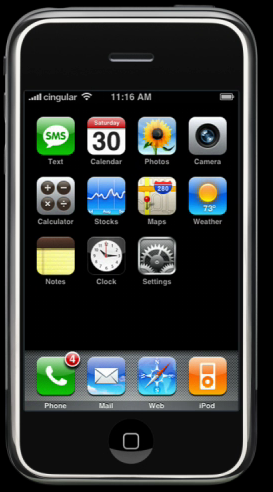
iphone

While the iPhone was rumored for years, I think it’s fair to say it’s still surprising and amazing to see! What Apple has included (200 patents) is truly amazing and I hope it works as well as the flash demo they’ve got running – though I have great confidence it will.

Let’s quickly run down what’s missing…

There’s no 3G data which is disappointing, especially given the year and that Cingular is rolling out their enhanced network rapidly. This seems like a natural fit but is missing for some reason. EDGE and WiFi are a nice combo and I’ll be very interested in how the device switches between the two – Steve said it’s automatic, but did not state whether that was just for data or for calls (VOIP) as well.

A 2MP Camera is fine, though I have 3 Nokia devices sitting here that all have 3MP. The N95 will do 5 with Carl Zeiss optics as well… The jury has far from ruled here – we’ll need to see how the images look and how well images you take integrate into the photos app. There’s only the single camera – so no video conferencing on the go here… not that it works in the US anyway.

Sync — the phone is managed through iTunes which is fine enough since that system is certainly proven with the iPod, but I have to say I am disappointed not to see any wireless sync options with .Mac — perhaps when there’s a more detailed discussion on what’s coming in Leopard.

Otherwise, this is a game changer of a device!

The multi-tap touch screen will enable you to point, click and “pinch” to choose, move or resize things on screen. The screen itself is a beautiful (in photos) 3.5 LCD and with OSX under the hood the visual UI looks stunning. Should be interesting to see how typing is… From my experience on the Nokia 770, you can actually go pretty quickly with an on-screen keyboard…

The widgets look amazing and if they are anything like the desktop widgets to develop, it will not be long before we see a massive software ecosystem develop. The built-in sensors flip the screen based on orientation and a proximity sensor automatically dims the screen when you pull the unit up to talk.

I like how they showed location aware mapping with Google, even though there was no mention of GPS which is quite slick as is the desire to offer push email through Yahoo. All in all the iPhone looks like it will offer a VERY personal mobile computing experience. I look forward to owning one!

Technorati Tags: , , , , ,

The trouble with the wonderful Symbian browser

An interesting title I suppose… but a particular issue with the fantastic Symbian browser is that it is greets web servers as a full – not mobile browser. While this feature lets you browse the full page of sites – something I really like – it also prevents you from being able to login to the mobile version of a site or service automatically.

Here’s the current browser string you’ll see from your logs if you watch …

Safari 2.0
Mozilla/5.0 (SymbianOS/9.1; U; en-us) AppleWebKit/413 (KHTML, like Gecko) Safari/413

I suppose it would be easy enough to pick off the Symbian bit in order to redirect you to the appropriate mobile URL, but I’ve yet to find anyone who’s doing this. Instead you need to know that you’ll need the mobile URL in advance.

Technorati Tags: , , , , , , , ,

Is it really Gizmo?

Alec Saunders takes a shot at the Gizmo implementation for Nokia stating:

It’s very cool to be able to make WiFi SIP calls from the N80i, but the software:

* Doesn’t give easy access to my Gizmo buddy list.
* Doesn’t make it easy to create a conference call.
* Doesn’t include the fun sound effects that Gizmo has.
* Doesn’t record calls…

And so on… [Alec Saunders .LOG]

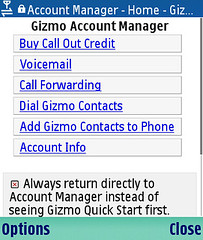
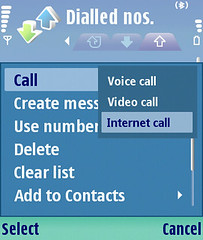
Gizmo on the N80i is certainly Gizmo – but not the full application. This may actually work to your advantage on the phone since SIP is already built in and you don’t need to run a memory hogging app to make a call. I can live without the IM piece for now since that is not what I really use Gizmo for when I look to it but there is actually a very nice additional piece that’s been developed which Alec may have missed…

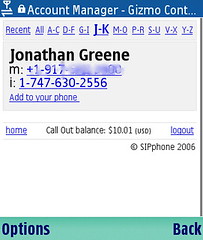
Gizmo Account Manager Gizmo Address Book Nokia Dialing Options

If you connect to Gizmovoip.com from the browser on your phone, you can login to your account and actually access your full address book. With a simple click you can even add a contact to your phone’s address book! While this is a few clicks (after you bookmark the site) it’s not that bad and considering you’ll probably want to add people you call with any frequency to your contacts it’s actually pretty slick.

BTW – Gizmo on the Nokla 770 is the full app optimized for the tablet. It’s also quite nice to have the full version here, though I often wish the 770 was already ready to rock rather than having to launch an application to make a call. Then of course if Nokia had enabled the bluetooth to handle a headset we’d really be talking…

Technorati Tags: , , , , ,

Sunset from the home office


Sunset from the home office, originally uploaded by atmasphere.

Beautiful sunset outside tonight… the N80 did not seem to capture the rich reds I was seeing, but, you will hopefully still get the idea.

Gizmo Port opened for N80 access on my home AP

Here’s a great way to start the year…

I’ve previously reported issues getting Gizmo to work on my home network and I’ve finally nailed the problem… my router (D-Link DGL-4100) was blocking Port 5060. Now that I’ve defined Gizmo as a special application on the router it’s open and working! I had posted on the Gizmo forums which is where I learned which port needed to be adjusted.

Technorati Tags: , , , , , ,

Happy New Year!


Happy New Year!, originally uploaded by atmasphere.

May 2007 bring health and happiness to all!!

Nokia N80 Internet Edition … longer term use

I am really liking the N80 now that I’ve had it for a while. Thanks to Andy, I’ve been able to overcome a few glitches it seems were perhaps pilot error than the fault of the device….

For starters, there is a zoom function in the camera — you just use the 5-way and press either up or down to zoom. Easy. I was getting a bit used to the more advanced functions on the N73 and N93 to realize this was right there – doh! The pictures are not as good as either the N73 or N93, but quite good for a camera phone…

Disabling Birdstep, smartroaming has made a drastic difference in my battery life. In fact, since disabling it I have not seen the low battery message. I charge each night so I can’t tell you exactly how long the battery does last but in my case a full day is sufficient with limited WiFi usage.

I’ve also been able to get Gizmo VOIP working – confirming an issue on my home network. I spent the last couple of days in Philadelphia and successfully activated Gizmo on both my parent’s and sister’s home networks…

Technorati Tags: , , , , , ,

WordPress Wii Edition

I just enabled a new plugin for my blog…

WordPress Wii Edition is a plugin that shows an interface designed for the Nintendo Wii when visitors come to your site on a Wii with the Opera browser. Wii’s are automatically detected, there is no configuration needed. Inspired by Alex King’s Mobile Plugin. [David Harper’s Different Things]

The process like most WP plugins took about 30 seconds. After a quick FTP and trip the the WP Admin, I was ready to view on the big screen… Seems to work very well. The Wii browser displays your posts as a text listing similar to mobile viewing, but when you then click on a post, you can see pictures and the full details.

Technorati Tags: ,

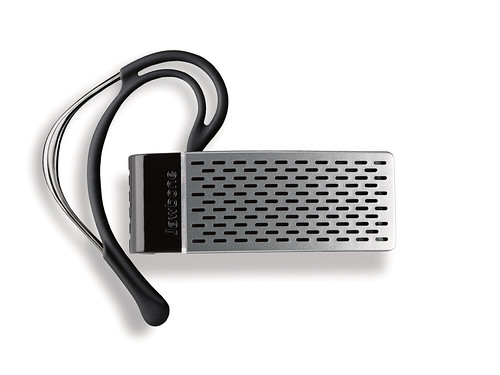
Aliph Jawbone – Military Noise Cancellation & Ultra Modern Design

jawbone

As much as I like my Nokia BH-800 headset, the Aliph Jawbone is suddenly something seriously worth considering. Aside from the Yves Behar design styling, you get the benefits of DARPA noise cancellation research which seems to actually work and make a rather profound difference in call quality in extremely loud environments. Check out the videos on the Jawbone site for yourself… Cingular is going to be the first carrier to sell it and I think the price is supposed to be around $120 for your choice of silver, black or red.

If the Aliph guys are reading – I’m game for a test unit. Red Please. 😉

Technorati Tags: , , , , , , , ,

Barcode to Phone to YouTube to Blog

I snapped a pic from my N73 into the newly released barcode reader which prompted Shozu to want to upload to YouTube… I did and then posted it back to my blog. I would have actually done it all from my mobile, but YouTube did not allow me to login from either the main browser or services app…

Regardless of what you think of this actual video the notion of what I just did is pretty amazing. Snap a pic, which links to a download. Save it and upload to another site via wireless service.

The mobile is far more than just a phone.

Technorati Tags: , , , ,

Not a Submarine


Not a submarine, originally uploaded by atmasphere.

This tank is getting buried in the ground at our house to power a generator we’ve just had installed.. should be online by next Wednesday — just in time for the force of Winter.

Note the cigarette butts… thanks electricians!

Technorati Tags: , ,