
Sometimes it’s the little things that make me nuts!
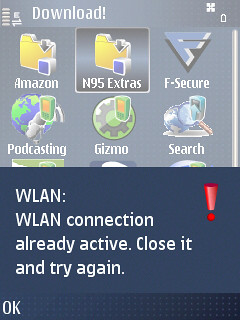
I was just trying to explore the Downloads folder on the N95 and kept running into an error about my Wifi connection already being in use, which is one of the more annoying errors to find, though at least it’s descriptive.
I snapped a screenshot to share and tried to use Share Online to upload and again ran into an error though this time it was considerably less descriptive: System Error -30207. For the interest of future googling, I decided to post this so it might help others… The problem is that again, the WiFi connection is in use.
I can’t think of a good reason why any data connection can’t be shared across applications. This is a “multimedia computer” after all.
Technorati Tags:
broken, mobile, N-Series, N95, Nokia, WiFi, wireless
great point..was thinking about this the other day too. Nokia’s appear to open a network connection and manage it for each application, which is why you see that double arrow symbol.
I don’t understand why the S60 OS can’t open network connections and manage it on behalf of the apps. The same why as a standard windows/linux PC does. So you open one 3G or wifi connection and the OS allows all the apps to route out over that connection. Would make apps smaller and would use less ram as only one instance of the ‘network controller’ would be needed rather than one per app.
But to implement that now I guess would mean a rewrite of the OS and all the apps..so I doubt it’s going to happen any time soon.
Rob – We are totally on the same page here. I can share my computer’s wifi with all my apps and even other computers without missing a beat.
I don’t have enough experience with 3G data connections, but this never happens on my EDGE connection. I do get the occasional web connection error, but I think that is based on drop-outs not the sharing issue.
Excellent point, Jonathan. Totally a bummer!
I wonder if this is an N-series issue – I routinely use Jaiku, Gmail and Web at the same time on my E61, both on EDGE and Wifi.
Not sure … it really only seems to happen with wifi though for me. Jaiku stays on cell while I try to do Web with the WiFi if I can and Gmail tends to float between connections…
I’m quicker to blame my router when things like that happen to me. That’s what I get for spending $12 on it.
I see this same error via WiFi whenever I try to run SlingPlayer Mobile for S60 after a browsing session. I love S60, but it needs to be smarter in regards to managing WiFi connections.
Definitely not the router as it’s happened in multiple locations.
@palmsolo – Seems the connection is being hijacked right? They definitely need to fix this…
Thanks, that was helpful!
Thanks, that was helpful!