
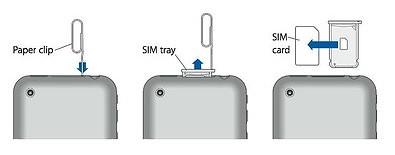
Free your SIM for a faster data connection!
I honestly have no idea why this is working now but it is, and I’m very happy!! I know I ranted about this earlier this week and I still think that there is something wonky with the iPhone SIM. I had a lot of trouble getting my MacBookPro’s Bluetooth Internet Connection to stabilize but thanks to some coaching from David Pitkin I finally just nuked the pairing with the N95 and started fresh. I had to reboot a few times in the process of sorting this out due to my Mac automatically going into disconnecting mode with the phone even though a connection had not been activated. Quite frustrating!
If you’ve connected with Cingular or ATT in the past with other devices this will look familiar as it’s the standard setting
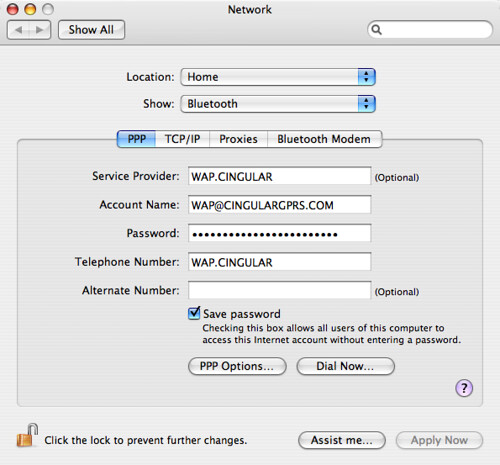
The Password for Cingular / ATT is CINGULAR1 (all caps). I believe the settings are case sensitive so be sure things are ALL CAPS! While you can’t see it, I have TCP Header compression on in PPP options. This should be a default setting…
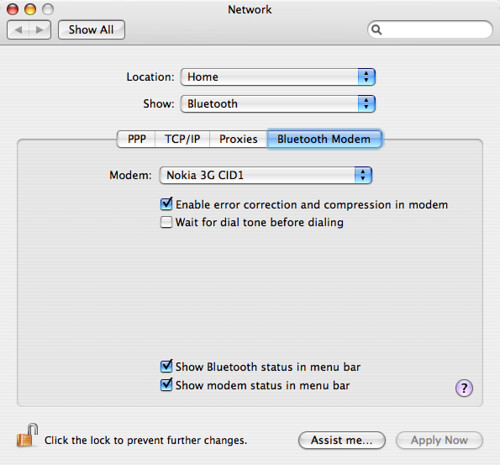
Error correction is on and I am using the Nokia 3G CID1 script which can be found on Russ Barkman’s excellent site. When you download the modem scripts they need to go in /Library/Modem Scripts – that’s the machine level, not your user folder.
From there it’s a matter of just connecting either from your Menubar or from the Internet Connect and you should be online with your phone – in my case the Nokia N95-3.
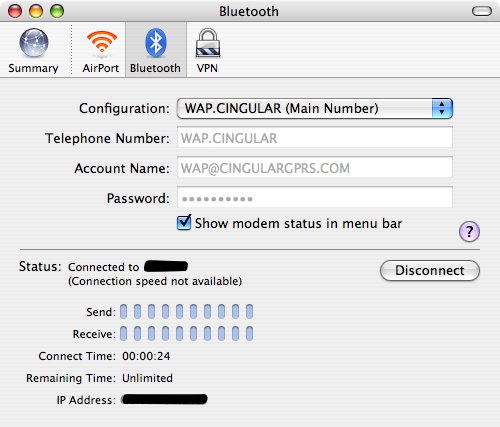
This has been seriously harder than any other DUN connection I’ve tried to get working and yet amazingly it’s using the standard settings. I was given a glimmer of hope earlier in the week when the Nokia N800 Internet Tablet connected after I tried adding a fresh setting. That did not have the same initial impact on the Mac. I’m 99.9% sure I was typing everything correctly based on the number of times I’ve tried to get this going. I think I would have hit it at least once! I still don’t seem to have MMS working, but I can let that slide in exchange for DUN.
Anyway… it’s working and I am ready to rock my 3G Bluetooth DUN connection when I travel. Who needs airport wifi?
David – I definitely owe you a beer in San Francisco this week!
Technorati Tags:
3.5G, 3G, Apple, bluetooth, DUN, HSDPA, iPhone, Marketing, MMS, mobile, N-Series, N800, N95, Nokia, open, wireless, PAN
Jonathan,
Thanks for this post. Any chance you have the settings for the old AT&T Wireless? So instead of being wap.cingular it would be the AT&T Wireless settings.
Thanks,
Jeb
Looks like there is a setting you can try here – http://home2.btconnect.com/Taniwha/gprs.html scroll all the way down…
Wow, don’t know if it’s an ATT/Cingular thing or what, but I had my macbook tethered over my N95-3 to the T-Mo EDGE network in about 5 minutes the first night I got it… glad I haven’t had the same issues you have!
-olly
Nevermind, just realized it’s because you are using your iPhone sim, scratch the previous post!
I am trying to get my iPhone sim to work as DUN modem with my N75. I wonder if I need to ‘unbrand’ my phone to get it to work . That will be tough since all of the software needed for unbranding is windows only. Sigh….
@Michael – I’m not sure though my experience has only been in using the iPhone SIM on open devices…. I use parallels to flash my phones from the mac.
Thanks.
I did finally get it working. I am on Leopard (10.5) so my network options are laid out a bit differently.
Here is how I got it to work for an N75 (branded).
Under phone number I tried several options but ultimately left it blank. Account name and password was the same as yours.
Then I clicked the “Advanced” button. In the first tab “Modem” I set the APN to WAP.CINGULAR. Under the PPP tab – there is an option for header compression which I left unchecked.
It is not feeling very zippy, but at least it works… for now.
Thanks for your post.
@Michael – Glad to hear it’s working! I wrote this post with Tiger… and mainly use the DUN connection with my Nokia Tablet actually more than my laptop though its’ worked fine on both.
Happy Surfing!
I just found this page as I am getting ready for CES. The settings were a bit different in Leopard, thanks for that Michael, but I do have it up and running now on my N95-3. I plan to primarily use my Nokia N800 to blog from the show floor, but need a connection with my MBP for final editing and other work at night in my hotel room.
How do I transfer my sim contacts to IPhone
not sure you can do that directly as the iPhone needs a unique sim that is locked to the device. Your best bet is to sync to a desktop first and then to the iPhone