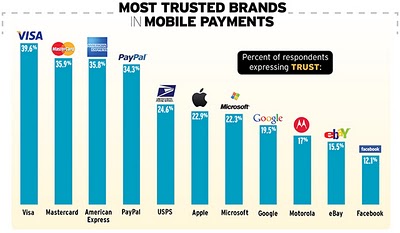
Apparently Consumers Don’t Trust Google or Apple With Mobile Payments

An interesting study from Ogilvy … and a not so surprising response given our historical payment relationships are with the traditional payment brands. Should be interesting to track changes here though as it’s quite clear that Apple and Google will both be evolving considerable solutions. Even though Apple has yet to formally announce payments, they already have over 200 Million cards on file and are ready to roll. With or without NFC.

via Adage


2011 Tour of the Catskills: Assault on Devil’s Kitchen


Yesterday I competed in my second road race, the Tour of Catskills and it was awesome! I chose a one day race option over the 3-day stage and of the two possible days picked the Assault on Devil’s Kitchen which turned out to be the hardest climb I’ve ever tried.


My race was a mixed class 4/5 65 mile road race and as you can see from the results, only 36 of the 47 registered riders competed.  I placed 7th which I’m quite pleased with knowing I trained well and raced hard.  We left from Tannersville, NY which is on Hunter Mountain and raced through some gorgeous roads in the Catskills.  There were a few climbs in the early stages of the race, but the Devil’s Kitchen climb at the end would clearly define how things resolved in the end.

From the prior race I had entered I knew I wanted to be up front early to avoid any chaos or potential crashing and while I did not start right in the front, I quickly found a hole on the side of the peloton and moved right up the line.  I guess everyone thought I was crazy, since no one followed and I was easily off the pack and riding alone which was quite exciting even if it was only the first few miles.  Unfortunately my chain dropped after a quick descent as we turned onto Scribner Hollow road and into the first small climb.  It took two tries to get the chain looped back and by that time the group had passed me again.  It took a bit more effort than I would have liked to catch back up, but I managed to reconnect with the bigger group and recovered from my adrenaline burst of nerves.  I fought back some cotton mouth as well and soon enough settled back into the general pace.

Throughout the race I found myself either with the lead group or in the chase group which was generally right behind a small gap.  I was taking note of the guys around as we rode and it seemed there was some aggressive posturing going on with a few guys mainly on the flatter portions but those guys quickly gave way as we hit each of the climbs along the way.  I knew I was in a good position within this group as I felt I was one of the stronger climbers – not really knowing what was in store towards the end of course.  There were a few really nice descents including one amazingly long smooth and ridiculously fast run down where I hit a new top speed (55mph!).  During the descents I was generally careful and more cautious than if I’d been by myself allowing guys to float by and to make sure that I had enough space around me.  I don’t generally ride with too many other people and felt it would be best to be safe here.  During that major descent, I think down County Rt 20, I was able to bridge a big gap which was a pretty exciting moment in the race for me both from the adrenaline pumping at that speed, but also as an achievement to ensure my position.

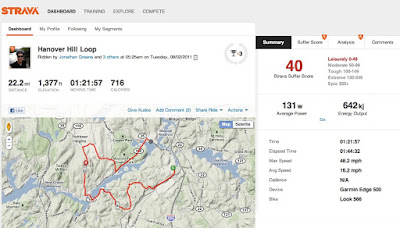
Over the next 20 or so miles the ride got a bit windy and the group really started to thin out.  We dropped a bunch of guys including 3 in a crash which I think happened when a rider lost his chain and was a standing target for guys coming around the corner.  There was a small break of 2 and then 4 guys and they stayed about 30-45 seconds ahead of us for a few miles, but leading up to Devil’s Kitchen we finally caught two of the guys.  We had a really pace line going and I did a pretty long pull to ensure I did some hard work.  The line up chase group leading to the climb was four guys including myself and then … well then Devil’s Kitchen arrived.  Platte Clove Road is a 5K Cat 2 climb that goes up about 1400ft and appears to be mainly straight up.  There are a few slight steps and a few mild curves … it’s absolutely brutal.  Of the four guys, in my group two escaped and I fought on with another rider until we frankly had to dismount.  I was pretty unhappy that it got to that point, but after about 2.5K of climbing I wasn’t sure I could turn the pedals around fast enough to stay on my bike.  I ended up walking much of the rest of the way to the top – though even when I eventually pedaled across the KOM line, the damn hill kept on going!  Amazingly the guys behind and those I passed on the way up from other groups never caught any time on me and for the next six miles I went into time trial mode, pedaling as hard as I could over the rolling terrain.  As the signs starting counting down the final 5K, I could feel the excitement of finishing my first road race and cornering into the crowded town of Tannersville I fired away my last bit of energy to sprint in.  I heard the announcer call me the Man in Black as I crossed the line and I felt great bringing it all to a close.  Full details on Strava

The event was awesome — well organized, guys were great – competitive, but friendly and I look forward to competing again soon.  I’m hoping to do the Tour of the Adirondacks in mid September which is also put on by the same organization.  I pre-rode the main loop a few weeks ago near Lake George and it’s a beautiful run as well.


Strava’s Social Fitness Works You Harder

I’ve become a huge fan of Strava for tracking my cycling workouts as well as sharing and tracking friends and pros.  The data viz portion of Strava is really solid, easy to understand and actually quite robust.  I’ve been a Garmin Connect user since I bought my bike (and GPS) three summers ago, but Garmin has always lacked social connections.  As a result of Garmin’s lacking social functions, I’ve also been using DailyMile and while I really like DailyMile as well, I can see how the updates and strides Strava continues to make will probably assist in my full migration soon …

The basics … Strava gets cycling.  More than any other service, they break down hill sections of your rides into competitive segments and allow you to automatically compete against yourself as well as all other riders who also sync their rides into Strava.  Initially I missed this piece when I first tried it months ago as I was early in and did not appreciate the difference with Garmin.

The ability to quickly see that I’ve climbed my best that day (regardless of how my legs felt) is immediately rewarding, but it’s also quite motivating to learn that even though I felt strong, my time was better on a prior ride.  This gets me thinking of the conditions of that prior ride and how I can do better the next time out.  Adding in the social layer makes it even more competitive and even passively (without actually knowing the other people) you can still compete and set goals to try and ladder up the King or Queen of the Mountain competition for a particular climb.

Another really excellent feature within Strava is that it automatically groups you with the people you’ve ridden with that day as everyone syncs their data.  Today as you can see from the screenshot below, I rode with 3 other people and Strava automatically grouped us so we can easily compare and discuss how things went afterwards.  This type of discussion is happening naturally even with people I’ve just met (like today) and it’s quite powerful stuff.


The updates that Strava added today have only enhanced both the views of your ride data as well as the ability to slice the competitive ladder more discretely (even fairly) so you can compete on age and weight which certainly play a factor in some rides.  I particularly like the Suffer Score and also how your power and heart rate are displayed to show the real level of effort for a particular ride.  Strava calculates power using some algorithmic special sauce.  I don’t have a power meter currently so there’s no way to know how accurate it really is, but for the moment it’s a great baseline to compare like my other stats on the regular rides I do.  I should note that while Strava does offer a free service, it’s $6/month to get the full range of utility and I believe it’s well worth it.

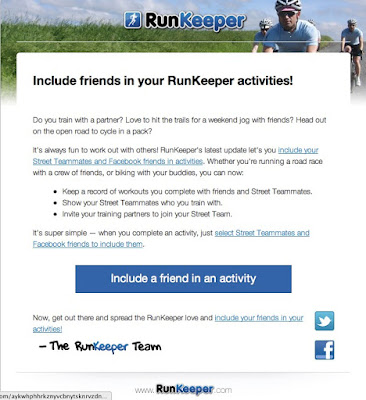
Strava isn’t the only game in town and while today’s update also includes mention of the Running beta and potential for Triathletes, Runkeeper is pushing out their own update to include more social inclusion.  Runkeeper already has Street Teammates which work like DailyMile’s and Nike+ friends.  You can track how each other do each week and cheer people on.  I consider that the basics … Today Runkeeper sent out an email pushing their new update which like Strava will let you digitally run with friends.

You’ll note as it mentions in the email above, you need to do this afterwards by selecting your Street Teammates or Facebook friends.  While this isn’t hard to do, it’s that extra step that Strava does automatically that ensures you are actually using it.  I’m really interested to see how Strava continues to evolve around new sports and particularly how deep they go with Cycling.  If you’d like you can follow me.  I’ve also recently added a widget that shows my recent rides on the ride sidebar if you still visit the site.

Ride safe!


Consider the user …

I know it’s obvious, but it’s amazing how some companies don’t take user experience into account when designing their products.  Take for example the bike route mapping sites MapMyRide and RidewithGPS … MapMyRide appears to be the market leader given they’ve been around for a long time, but man is it painful to use.  They have a decent number of routes if you look around, but the site compresses the map to a small area and there are really a pretty gross number of ads on the page as well as on the map itself.  Their goal is of course to get you to upgrade to a paid account and certainly the incentives are there given the volume of ads … The problem for MapMyRide though is that they are not the only game in town and RidewithGPS arrived on the scene with an excellent route planner and a great map browser.

Take a look at the two screens …

From Route Planning
From Route Planning

Both are views of my local area and show available routes … so the experiences are as “parallel” as they can be to show the difference.  I went into fullscreen mode to try and maximize as much of the view as possible.

Which would you prefer to use?

Social fitness can really get you going

I enjoyed +Kevin Tofel‘s post on social fitness at GigaOm… I’m a big fan and love the data.

I don’t particularly care about the live streaming aspects though.  To me it’s more about comparative results, challenges and motivations of the community. I now have social sports friends met through DailyMile and even here on G+.

I recently started to really use Strava which is a cycling community site that greatly enhances the experience Garmin let lag on Garmin Connect through social features and specific breakdowns of events like climbs which even get classified. Whether the data is being used to motivate (like Kevin’s insane number of continuous running days) or note personal bests, firsts or other achievements it’s all easily possible thanks to the data.

As has also been discussed recently on Google+ getting access to and enabling the meshing of our data for maximum use is still really missing in the market.  Runkeeper seems to be leading the charge with their goal of becoming a fitness hub through the Health Graph API, but it’s still quite early.

Firespotter Labs launches their first product – Nosh

Today, Firespotter labs has revealed their first product called Nosh. As you may know, Firespotter is a spinout of some former Googler’s including Craig Walker of Google Voice / Grand Central fame. They received funding from Google Ventures in April of this year and sprinted towards this month with their initial release.

So what is Nosh? Well it’s a social recommendation system for restaurants and food, though unlike other services which focus on the restaurant, Nosh is looking to get down to the item level. This detail will provide much better insight into what’s good and importantly what’s not so great at restaurants all around you.

They’ve posted a nice video overview which I’ll share here to give you the full pitch.

Nosh: Three Dinners from Firespotter Labs on Vimeo.

Nosh works on both Android and iPhone which is great. The experience is quite similar across both systems. Here’s how it works – First either browse your feed for interesting posts and pictures to find what’s good to eat nearby. Or if you like you can explore the local establishments in the directory or even add your own. When you get to the place you’ve decided to dine, you can add the item you’ve chosen, give it a quick rating and snap a pic. Everything is synced up on the Nosh website though I believe you need to be initiating posts via mobile to confirm (via GPS) that you were in fact there …


While Nosh is just getting started, it’s a very interesting service. The goal of Nosh and Firespotter according to Mr. Walker is to empower users with information in industries that are ripe for change. Given that the essential dining and discovery experience has stayed the same for quite a while, they prioritized Nosh as their first shot. There are currently about 150,000 menus in the system to ease the process of reviews, but there’s also quite a bit missing, which isn’t a ding it’s just the reality of starting something so large.  I look forward to sharing and learning from you … be sure to add me as a buddy if you signup, I’m just getting started myself.

Google Sync For iPhone

I guess I knew about this, but had yet to consider why I’d want to switch my Gmail config over to Google Sync.  5 minutes later I can assure you that it’s the right move.

Thanks to Business Insider’s quick guide, you can setup sync for Mail, Calendar and Contacts which has immediately reconciled my years of .Mac BS sync conflicts and duplications in contacts and added a multi-calendar view as well.  Mail remains the same …

With the addition of Google+, I’m  deep in Google services and this just keeps it all nicely together. And no I don’t have any invites at the moment unfortunately …


After all these years … iPhone goes unlocked

Waking up to see the iPhone finally and officially offered as an unlocked device made me quite happy. It’s somewhat ironically showing up the day Apple also agreed to settle with Nokia over their long debated patent issues which is interesting given my long history using Nokia unlocked devices.

If you don’t want a multiyear service contract or if you prefer to use a local carrier when traveling abroad, the unlocked iPhone 4 is the best choice. It arrives without a micro-SIM card, so you’ll need an active micro-SIM card from any supported GSM carrier worldwide. via Apple Store U.S..

In the years since I’ve left Nokia, I’ve also gone back to buying on contract for my personal devices as the Apple / AT&T upgrade plan has worked just fine and I’m fortunate enough to be able to migrate devices for business using a work-provided SIM. I haven’t seen anything but positive reporting about the changes to iPhone availability … some noting of course the “high” pricing though those prices are close if not even more expensive than the historical “expensive” unlocked Nokia devices which used to be counted against them.

As times have continued to evolve courtesy of the pressures Apple has been able to provide in the industry it’s likely the real buyer is the more niche traveler (able to find micro sim cards) but really the grey market. With an unlocked iPhone now available you don’t even have to jailbreak it to resell in a capable GSM country. It’s ready right from the box ….

Not my favorite color

Last night’s launch of Color is certainly getting a ton of press. They have a great team, a ton of cash and an interesting app – at least on paper. Having tried to use it a few times in the day as well as last night, I’m not sure I’m really going to care all that much.

The purpose of Color seems to be enabling social through the intention of proximity. In other words, you are able to share because you are close to someone else. You might not (and probably don’t) know these people but because you are nearby you can gain a new and shared perspective. I think that’s a pretty cool idea. What I would really like to see however, is the inclusion of my existing social network so that I can also get a prioritized and shared view with people I already have a real interaction with — even if these are just digital buddies. I love social discovery, but not at the exclusion of my existing base.

I transitioned from Instagram to Picplz and much like my journey from twitter to jaiku (and back to twiiter). I engaged with a community of people with shared interests. In many cases these interests actually came from using the services. Picplz and instagram are really quite similar. They are both simple, let you have fun with your photos and make it very easy to share externally as well. What I also like about both is that I can use an existing picture and then push it out which means I have the original locally to my device – and in the case of picplz also backed up on dropbox. Color forces me to snap a new picture of myself as an ID and then continues to “force” me to snap a new picture if I want to share. Perhaps part of this is due to the focus on that shared perspective of a location (the context of the social to begin with), but it forces a very strict type of sharing.

Color comes with no instructions and initially the UI while completely fresh, is far from easy to use. There don’t seem to be any guidelines with how things are used or shared and that actually bothers me. Because it’s far from self-evident, I find a level of discomfort here and that’s not good. Also, because Color is complex not actually that fun. When I installed it a second time on my Nexus S I had to start over. My presence from the iPhone was in no way transferable … in fact it seems as though you are essentially disposable. Without a way to associate yourself to your content or contacts, you just float through.

I shared the hype of Color last night with some co-workers and quite a few people actively played with it today around the office so it’s easy to see how a collection of people and images starts to work. I’m just not sure it’s actually for me.

I usually get a good feel quickly and Color is making me work too hard to use it.

AT&T and Metro North Testing Wifi?

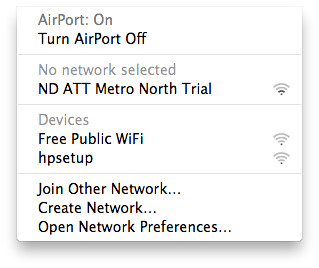
I spotted a new hotspot while waiting to depart from Grand Central tonight …

ND ATT Metro North Trial

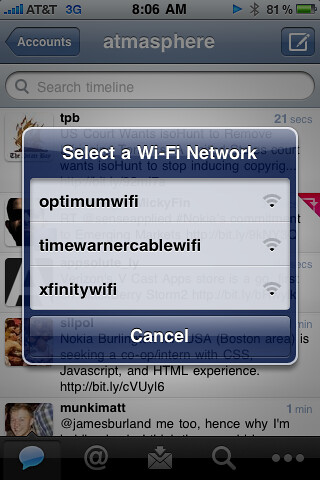
Unfortunately, I was unable to connect from my iPhone or laptop, but signal was pretty decent for a few fleeting moments regardless. I really hope that this is an active test and that wifi starts to rollout. Currently there is wifi along the train line via Cablevision, Time Warner and Comcast though it’s impossible to actually use on the go.

Battle of the cable company wifi networks

I obviously have no helpful information on this possible test, but can say I’d be very interested in using it and would even pay.  AT&T is looking to glean an extra $45/mo for tethering and while that would be bandwidth I could use all to myself, a slightly slower shared connection would be of great use.  I tend to use the iPad rather than my laptop, but there are plenty of times when the laptop would be handy …

I wonder if Metro North is serious with this and even if they’d consider free.  For pay, I’d love to see it packaged or validated with a monthly rail pass.


Where is PayPal’s gateway to real world payments?

I just caught a post on Techcrunch that got me thinking about PayPal’s mobile strategy a bit … Apparently they’ve finally released a Symbian client following the long(er) standing clients for Blackberry, iOS and Android.

Apple and Google’s competing plans for NFC and the likelihood of competing payment services, you’ve got to wonder what PayPal has in store.  As the current leader in P2P and longer tail transactions, they don’t have a scalable solution for real world commerce.  PayPal is stuck in the matrix if you will.  Bling Nation has enabled tests with NFC tags, but that’s really a bridge to integrated NFC and if the dominant players are unlikely to allow access to the secure elements within their systems (where payment and security live).

The ISIS consortium has yet to announce a handset partner, only that Verizon, AT&T and T-Mobile will all work together with Discover and Barclay’s.   If the Google and Apple plans come forward as expected there will clearly be room for multiple payment options as both have devices on multiple carriers.  I did a quick search this morning and found a piece recently posted on Fast Company claiming instead of NFC PayPal will instead focus on QR via their RedLaser application …

EBay’s solution is the humble QR code: a cheap and common successor to the barcode of yore. Late last year the auction giant acquired RedLaser, an iPhone and Android app that lets smartphones scan QR and UPC codes on retail goods to compare prices at brick-and-mortar and online retailers.

Rob Veres, eBay’s General Manager of Redlaser, says that the company’s recent QR pilot program with Atlantic Records has already proven that QR codes can create leads and drive sales, but he believes what small businesses really want is rewards programs that work as well as major retailers’. “The big guys already have their loyalty plans, but smaller businesses don’t,” says Veres.

EBay plans to change all that by taking a loose approach to geo-targeted discounts. Instead of requiring people to physically show up and “check in” to get deals, as on Foursquare, Veres says merchants can instead stick QR coupons in advertisements around town. Once captured by a user, that QR code can instruct the user’s phone to show information about the shop or product, search for price comparisons or ratings, or even initiate a purchase over the phone’s data connection. [Fast Company]

QR is again a bridge … and while there’s been considerable adoption, device integration and ease of use has not fully reached mass adoption.  RedLaser is nearing 9 million users though so they are making some decent ground.  Until there’s mobile web purchase for retail (particularly smb) this is not going to go too far.  All of these plans lead to a wallet-like solution and you’ll want the full benefits not just a random purchase here or there.

So back to Nokia … I wonder if Nokia might end up being PayPal’s answer to the real world.  While Nokia has effectively stalled in this market they are still the world leader in market share and have suggested all future devices will include NFC.  They don’t have any public payment partners yet … Another option could be BlackBerry which has also said they will include NFC in future devices … again no payment partner here.

PayPal has evolved quickly, though they have stayed within the online realm.  Bump accommodates some limited real-world p2p, but nothing close to real commerce – at least not yet.  They’d better hurry as Visa is working back towards P2P with their own solution …

Google Maps now with Google Earth

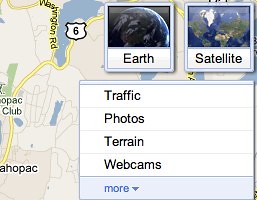
I’m not certain when this change went through but it’s pretty cool to see Google Earth inside Maps itself.  Now if you hover over the Satellite option over in the top right corner, a new square floats out to let you choose Earth.  You can see it here:

Google Maps with Google Earth

You do have to download and install the Google Earth plugin for this to work but given how infrequently I think to use Earth vs Maps, I could see starting to get a lot of use out of the additional detail available.  Google Earth is actually very cool yet I always think to go to Maps first.

Tapping the more link under webcams gives you more options for things like bicycle routes etc.


Apple’s Post-PC BS

Apple’s claim that we are in the post-pc era is a load of garbage. This weekend I had the pleasure of updating our iOS household and it required a lot of tethering a lot of time and thanks to one particular failure quite a bit of frustration.

As anyone who’s purchased an iPad knows to activate even the wifi only device requires a sync with iTunes which of course requires both a computer and a cable. iTunes controls everything. It downloads the updates, confirms your device is authorized and flashes things over … all via the cable. In our house, we sync two iPads and two iPhones on two different computers though we share the same AppleID to ensure we can easly share apps and content.

Things were generally smooth for my devices which sync through my older MacBookPro. The update process on the iPad took a very long time, while the iPhone was processed a bit more quickly. In both cases you have to back-up, acknowledge the update, (though backup first) and the sync and restore … iTunes takes care of this, but it’s quite the process.

My wife syncs against her PPC Mac Mini which is older and slower. Her iPhone updated as expected, but the iPad failed. The failure occurred sometime over night. It had already taken hours for the backup and I just left it running when we went to bed. Unfortunately things did not resolve well … Failure in sync for those who have not lived through this means you have to start fresh. Fresh means nothing on your device. You can of course re-download everything or try to restore. Given how long the initial process ran, I opted for the quicker route … this is where the Post-PC BS really comes into play. There is absolutely no direct way to download everything again from the iPad. You have to hunt for everything all over and download them one at a time … You also really get to appreciate Apple’s design of the App Store which closes out on you for each download.

In contrast, on Android when you sign into your Google Account all your apps, settings and preferences come right down. When I upgraded to the Nexus S from the One, I found even my hidden wifi networks auto-reconnected when I was nearby. When I played with the Xoom recently, my apps did not download immediately (presumable to enable preferences between phone and tablet) but did all nicely line up in the Market ready for a single click to download again.

Apple’s reliance on the computer is certainly friendly for the lower end user, but is incredibly limiting for the more advanced consumer. There’s nothing post-pc about connecting to the pc to do the heavy lifting.

itunes home sharing – auto sync?


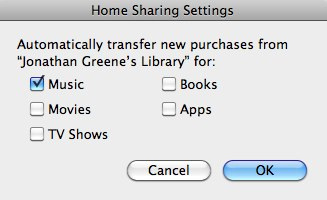
It’s honestly been a while since I’ve actively explored iTunes or tried to solve syncing media in the house so this feature may have existed for a bit.  Tonight however, I was setting up a new machine and activated home sharing and then clicked into the settings (bottom right in iTunes from within home sharing).


As you can see there’s a handy option to automatically transfer new purchases between machines … While I wouldn’t want to have my full collection floating around on multiple devices based on the size, it is nice to have the option to capture the updates.  I just purchased the new Alexander album on my main machine and I can see each track is syncing over as the initial download completes.  Very cool.

Quick thoughts on the Xoom

I got my first taste of Honeycomb this past weekend via the Xoom … or should I say the Motorola Xoom with Google.  Powered by Android 3.0 on the Verizon Wireless Network.  Let’s come back to that mess.

As I am sure you know the Xoom is being considered the first tablet competitor to the iPad and launched a few weeks ago.  I was fortunate to get a loaner via the office and used it extensively over the weekend.  I got myself setup with Google and Exchange accounts and my data synced right over.  I was immediately live with the device and was able to connect quite easily and well on Verizon’s network as well as work and home wifi.

The core Google apps and services are rock solid.  Maps is gorgeous, fast and powerful.  GPS acquired quickly enough and I was able to zoom around 3D and streetview modes which look awesome on the large screen.  YouTube worked great and I spent a good bit of Saturday morning watching some videos which all looked and sounded clear.  Apps outside the core Google suite were something of a mixed bag.  Accuweather failed completely, but WeatheBug worked well.  CNN and USAToday have tablet optimized apps, but frankly I don’t spend any time on their sites regularly so aside from checking the apps out for a few minutes I didn’t find them all that interesting.  They worked fine and look polished … CNN offers and audio counterpart to the reading if you like as well as video snippets.

The browser and email were where I spent most of my time and these are clearly the workhorse apps for any connected device.  Both the Gmail and Email (Exchange) app work very well.   The browser worked well too though can offer mixed results.  While it loads tabs in the background quickly and renders pages nicely there were things I really missed from the iPad.  For starters, while my bookmarkets synced over, I could not get any of them to work.  My work around for this was to use the Share intent native to Android and push links via Seesmic (phone version which is less than stable) or out to mail.  I also found a handy app which lets you setup quite a few more options for sharing.  I could not get any extensions to load and the Chome web store states clearly that it does not support the browser.  I also found myself forced to the mobile view of sites quite often even though I went in thinking this was a desktop-like browser.

The Xoom is more narrow than the iPad and accommodates portrait mode pretty well.  The weight of the device is less balanced though and it felt heavy in the hand more than the iPad which is larger.  When reading through Google Reader I would rotate over to portrait mode and found the bottom edge (now on the left) was a bit too rough on my hand.  This made it less comfortable to hold than I’d like.  The upper edge of the device has a slight curve to it which makes it less sharp.

The Xoom is the first Verizon device I’ve used in well over a decade.  I’ve always imagined that the network was better, but have found myself drawn to GSM based units and so I’ve largely ignored VZ.  While on the commute, I discovered that in fact VZ doesn’t really offer the best coverage.  There was plenty of 1x (the CDMA equivalent of EDGE) and even a lack of coverage on the track in Grand Central where AT&T has always provided a signal.  Additionally the network in it’s current 3G state is (subjectively) slower than what I’m used to seeing with load times.  I didn’t do any real tests …

The whole time I was using the Xoom, I left my iPad sitting idle.  This was a good test to see whether Honeycomb and the Xoom could replace my current usage.  In general, it’s close.  There’s a lot to like here, though there are definitely some rough edges and even some bugs.  Occasionally when installing an app via Market (which only loads in landscape) another application would randomly open instead of installing the new one.  There’s no flash support at the moment, and while that’s not been an issue with my iPad usage for the most part, it failed to load a few YouTube embeds and made using Zoodles (a cool kids app) impossible since it requires Flash for the games.

I have a feeling this platform is going to mature very quickly and that by the summer the range of devices will make this a very interesting choice.  Sure the iPad 2 is here now as well, but it’s good to have options and Android really is a power user OS.  I’m personally very curious now about the smaller form (7-9″) factors and whether something like that might actually fit nicely into my mobile lifestyle.

 

Nokia the OEM

I’ve been tracking all the Nokia news the past days and while it’s impossible to argue that change was required, it seems that Nokia has actually folded considerably more than we’d all expected.  In exchange for access to Microsoft Windows Phone, Nokia is essentially closing up shop outside of manufacturing and some bits of maps.  Near term Symbian will be supported, but that has a pretty clear path to death.

If you read the open letter, everything is spelled out in plain English. My thoughts in italics …

• Nokia will adopt Windows Phone as its primary smartphone strategy, innovating on top of the platform in areas such as imaging, where Nokia is a market leader. (symbian and meego are done)

• Nokia will help drive and define the future of Windows Phone. Nokia will contribute its expertise on hardware design, language support, and help bring Windows Phone to a larger range of price points, market segments and geographies. (Nokia gets a say for some features, probably driven by hardware opportunities)

• Nokia and Microsoft will closely collaborate on development, joint marketing initiatives and a shared development roadmap to align on the future evolution of mobile products. (Nokia earns the right to co-marketing and will probably have some devices featured as core Windows Phone products in direct MS marketing)

• Bing will power Nokia’s search services across Nokia devices and services, giving customers access to Bing’s next generation search capabilities. Microsoft adCenter will provide search advertising services on Nokia’s line of devices and services. (Bing and you’re done, just like Nokia’s ad business)

• Nokia Maps will be a core part of Microsoft’s mapping services. For example, Maps would be integrated with Microsoft’s Bing search engine and adCenter advertising platform to form a unique local search and advertising experience. (Fortunately for MS, Nokia paid Billions for Navteq and we’ll put that to good use in our core products)

• Nokia’s extensive operator billing agreements will make it easier for consumers to purchase Nokia Windows Phone services in countries where credit-card use is low. (Nokia will help MS get operator billing in place for Windows Phone which will potentially help global reach for MS.  Probably does nothing for the US Smartphone market opp)

• Microsoft development tools will be used to create applications to run on Nokia Windows Phones, allowing developers to easily leverage the ecosystem’s global reach. (QT is dead.  An excellent acquisition for Nokia)

• Microsoft will continue to invest in the development of Windows Phone and cloud services so customers can do more with their phone, across their work and personal lives. (More MS for Nokia owners running Windows Phone)

• Nokia’s content and application store will be integrated with Microsoft Marketplace for a more compelling consumer experience. (Ovi is dead)

The best post that sums this up described the transition as a coup and frankly that’s not too far off. Microsoft has a new leader in place at Nokia who owns a massive amount of stock and naturally wants things to work out … for Microsoft.    Microsoft gets a new hero manufacturer to abuse.  If Nokia enables Windows Phone sales he wins – on both sides of the equation. Nokia as a company and brand has some major issues to resolve.

The real issues facing Nokia are remain the same. They still need to attract developers and require some major assistance still in the US, the largest smartphone market. Microsoft has barely made a dent and it seems their sales are in the channel rather than end user. Windows Phone is a fresh start in a race that’s been active for years. Android while more competitive for Nokia as an OEM would have been an easy option for developers to work with given the stratospheric growth and sales of Android products over the past two years.   Windows Phone is certainly nice, but that’s all it is.  There are no standout applications yet even though the growth has been reasonable.  Time will tell, but I’m not feeling this at all.