Starbucks Card Payments for Android

The Starbucks mobile application introduced mobile payments via a “present and pay” mechanism last month.  Essentially the phone (iphone only) serves as a proxy for your card and Starbucks updated POS scanners can read a QR code from your device to debit your account.  This is certainly handy though as discovered recently also pretty hackable via some social engineering.  As there is no password for the QR, it’s possible to snag a screenshot and use that on any other device.  I see this as a low priority issue for Starbucks as you should have a password on your device anyway … but I digress.

This morning TalkAndroid reported on a new Android Widget app which offers Present and Pay to Android users.  I just downloaded it and immediatly noticed that there’s a PIN option for the QR code.  This is awesome on two counts.  First, a developer has enabled starbucks mobile payment system for Android – ahead of Starbucks and secondly they’ve fixed the security issue in the process.  Rock on!
McBain: the Movie

According to Metafilter, someone realized that the Simpons were hiding the McBain movie in parts throughout the series.  That same someone then edited it all together into a single movie.

None more awesome …

Cord Cutting … not happening any time too soon

Gizmodo has an excellent piece covering the challenges of cord cutting for mainstream consumers based on a research project conducted by Hill Holiday over the holidays.

The biggest takeaway for me is just how much we techies take for granted about how TV works.  Sure there’s a bunch of crap on most of the time, but the relative mindless companionship TV offers offsets this quite nicely.  I don’t mean that in a negative way either.  People are accustomed to tuning in to tune out.

An Experiment In Cord Cutting from Hill Holliday on Vimeo.

Content Shifting

I’ve had this post from Fred Wilson bookmarked since this morning and I’m finally getting back around to formalizing a few thoughts.  First the notion of content shifting is something I’ve been thinking about a lot lately.  As someone who works on multiple devices (sometimes concurrently) keeping things (and myself actually) in sync is not so simple.  Beyond just the basics, the actual content consuption bits from my digital adventures are really the parts I’m interested in connecting as I move between locations and contexts.

While I don’t have everything sorted just yet, one thing I’ve been really keen on lately is Pinboard.  I discovered Pinboard during the del.icio.us is closing chaos and am really pleased I did because it is an incredibly powerful, yet also very simple tool.  It’s not perfect in replacing delicious sharing for me, but it’s making up for things with some new features considerably.  The best thing Pinboard does is capture all my shared links from Twitter, Google Reader, and Instapaper in addition to backing up my delicious bookmarks and of course saving any new ones.  This auto-collection process makes it dead simple for me to manage my reading and really has been awesome for making sure I know where all my links have gone.  I can call stuff up or save more from within Chrome via extension, on iPhone with Delibar or bookmarklet and on Android with PinDroid.  This is far more around my collection rather than consumption of content, though one additional feature Pindroid and instapaper manage is what’s been read vs unread.  I can’t say I use that much as I’m just happy to have a simple point of capture, but it’s worth noting …

On the media consumption side of things, Netflix is really the only service I’ve seen that enables stopping and resuming between devices on your account and this has been great for my family and our small army of iDevices.

I’ve yet to find a good music solution for resume … Rdio comes close with the browser player, but as best as I can tell, you can’t pick an album or playlist up where you left it.  Pandora definitely doesn’t work that way at all …

Kindle is pretty bulletproof for books and something I love, but there’s still a lot of room to improve across other content types.

Netflix looking to become the dial tone for on demand

it is going to take (more than) a few years to replace existing TV’s but as we eventually purchase connected sets, this could be quite a big deal. Way to think big, Netflix! This could make earning default status quite a bit more challenging for anyone else …

Netflix just announced partnerships with most of the major TV makers to add a Netflix button to TV remote controls.
Now instead of messing around with a tv, hitting “input” and trying to find Netflix, you can just hit the Netflix button and it will pop up for select internet connected televisions.
We don’t know how many TV’s will be getting this, but it’s pretty huge for Netflix. Every time someone uses the remote for their new TV they’ll see a little advertisement for Netflix.Business Insiders.

Pummelvision is pretty cool

My Pummelvision from Jonathan Greene on Vimeo.

This probably has more meaning to me than you being from my 2000 last images on Flickr, but it’s still quite cool. I wish it included pictures i had marked private since i authorized my account. The family portion of my biographical view is light, and Flickr has a pretty solid record stored. Anyway, as I watched I was able to reflect on the the pretty amazing world travels I’ve had over the past couple of years … Certainly looks like I like gadgets and particularly phones. But I’m sure you already knew that.

ZAGGmate

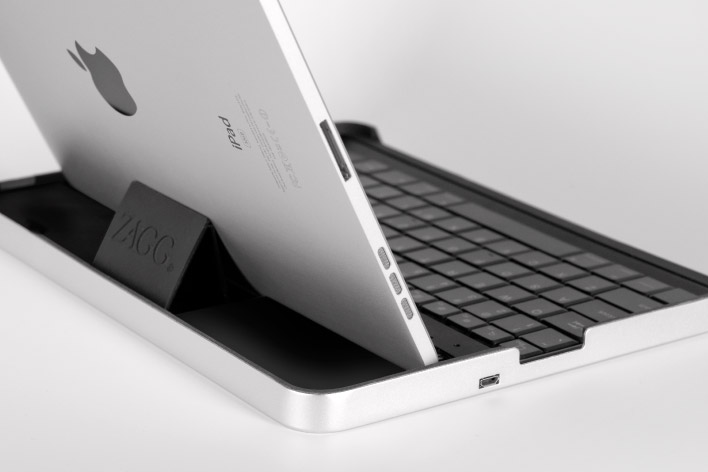
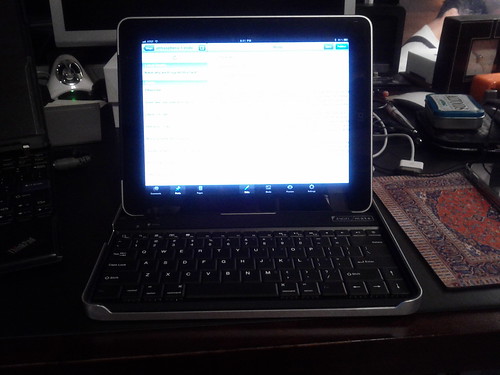
I actually forgot I had preordered the ZAGGmate keyboard case for the ipad and it arrived today which was a pleasant surprise. Since it works as a case it’s a very simple way to enhance the potential productivity without actually adding something new to carry. I’ve become quite accustomed to typing on the screen over the past months, but its hard to beat real keys for speed.

The ZAGGMate itself sets up in a few seconds. Turn bluetooth on, activate the keyboard bluetooth function and confirm the code and boom. Just like every other bluetooth accessory I’ve tried over the years. The keyboard (on which I’m now typing) feels good. The keys are small and I’m actually making plenty of typos, but this is literally the first thing I’ve used it for and I expect that like all keyboards, I’ll have it figured out shortly. I like the key travel and in general I can see really enjoying having this as part of my kit.

There are some special keys and functions which let the ZAGGmate make the iPad function more like a computer. With dedicated keys for search, home, hiding or showing the keyboard and concealing your screen it’s nice… I also like that there are some command functions like undo for example which I’ve also used while typing this. A quick test of of the setup on my lap and its confirmed the ZAGGmate is a solid release.

More perhaps as I really use it …

zaggmate

Good idea, poor execution Sprint

image

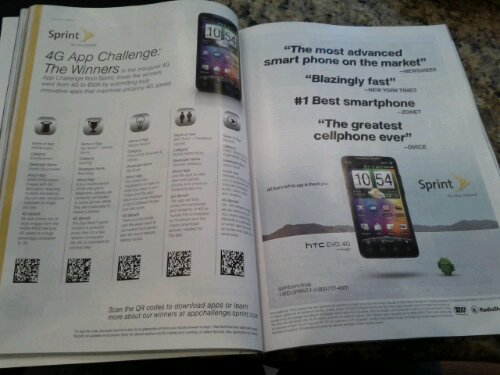
I just caught this ad in the latest Wired and since I’m the proud owner of a new Nexus S I was intrigued by the highlighted apps. The problem was when I went to get them …

Instead of using the standard QR code which works with the android barcode reader, Sprint decided to use scanlife which means I need to download an app before I can even respond to what I’d being suggested.  The mention to download scanlife is quite small and noted via an asterisk … lame.

Let’s keep it simple … unless you really don’t want consumers involved.

Bridging digital with physical

c60 Redux from IDEO on Vimeo.

This is a very cool concept from IDEO Boston. I love the return of physicality to music as it’s something I definitely miss as well. Seeing the use of RFID has me thinking that it will be possible for an idea like this to happen pretty realistically as well. The current c60 Concept is just that … but with phones and NFC quite a bit could be possible beyond this initial view.

Starting next week, a mainstream (one you want) device will be in market with NFC, the Google Nexus S. As Engadget handily pointed out, there are three types of communication possible with the chip: Send, Receive and Exchange. Exchange is really where things could get interesting.

The table shown in the video is really just a proxy for the computer and represents the place where we share together. Through NFC, an enterprising developer could enable all my music cards through the current media player.

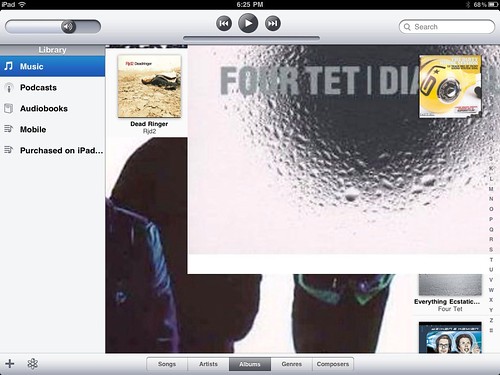
Imagine if the current iPad iTunes layout allowed for more of a tap and share between friends. Hey check this out and you could listen and see the liner notes as we hung out. I know the Apple Remote, GoogleTV, Boxee etc all allow some level of control over Wifi, but there’s no way to easily do this with another person without relinquishing control or first syncing your devices. NFC could provide that simple gestural authorization … because we are close and actually together.

A fair bit has to evolve for the physical to be properly extended here. I would love to see the return of liner notes (not just lame PDFs) but interactive documents we could review while listening and even pass to a friend when listening together. Music is inherently social, yet most of it seems to happen through portable players with headphones now.

This may still be a bit half-baked, but there’s definitely something here …

Print to any printer from your iPad

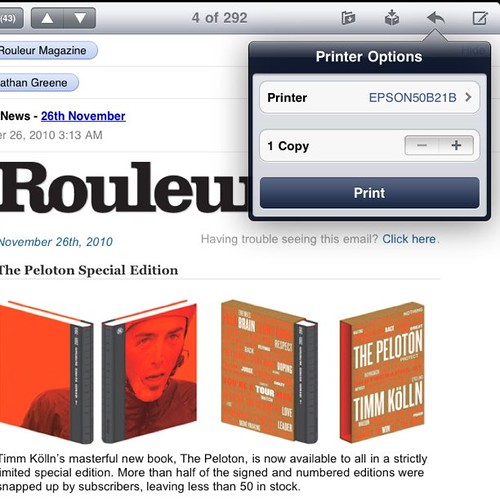
Printing from the iPad ... #handy

I don’t actually print very often, but it’s nice to have the option and given the amount of time spent with an iPad in my hand it tends to be my primary screen. As you might already know AirPrint is limited to a small handful of the latest HP printers and given I’ve got an Epson at home, I’m SOL for the time being … or so I thought.

Volker Weber published a very simple howto to get printing going with any printer via Macs running 10.6.5. Follow the instructions … it worked great for me and I printed my first test page within a few minutes.

Offers are the new check-in

As an early adopter and enthusiast of check-in services i have mixed feelings about the latest move from Yelp to include offers. It seems like a must-have from their perspective given the attention, Facebook, Foursquare, SCVNGR and anyone else enabling check-ins seems to be doing. I hope as the noise floor rises through all these services we retain some actual form of social connection beyond deal finding … You know like the initial purpose for social connection and conversation. I’m all for saving money, but I’m not looking to be a deal pimp for anyone either …

The attention to daily, local and flash deals is quickly becoming noise and as everyone races to ante up their table stake, its also boring given the considerable partity. The services guys still need to focus on experience and not be distracted by simply helping me get my 10th cup of coffee free – especially when everyone has the same deal. While I’m sure someone is crunching numbers to show growth in coupons, deals and discounts … Coupons.com announced a $1Billion for this year … This can’t possibly be what the mobile social evolves to become. Im already deleting the daily deal emails … Next step is to unsubscribe, but first i need to check in at the train.

Online TV Viewers Tolerate More Ads (and get paid)

The only thingI want to know is how much the panel gets paid to endure 16 MINUTES of ads during a 30 Minute show. Who are these people? I’m sure the groups were considered a great success …

Viewers of 30-minute TBS sitcoms like “Meet the Browns” watched, on average, 40 percent of the episode if there was one minute of ads and 37 percent of the episode if there were 16 minutes of ads. Viewers of hourlong TNT shows like “Memphis Beat” watched 59 percent of the episode if there were one minute 15 seconds of ads, and 49 percent of the episode if there was 20 minutes of ads.

via Online TV Show Viewers Tolerate More Ads, Turner Says – NYTimes.com.

Google Maps with Navigation

This past weekend presented my first opportunity to try Google’s navigation service which is built on top of Google Maps in Android.  As with most things in Android directions (walk, drive and transit) are well contextualized within many places.  This contextual awareness is definitely a key strength of Android as a platform …

Anyway, I was looking for a piece of AV gear and decided to try my nearest Best Buy which I found via Google Maps and then took the opportunity to use navigation to get there.  I’ve got GPS in the car already, but figured a live test would be good … and as my GPS in the car has maps that are 5 years old, I thought I might have better luck.

Navigation started right away and the audible directions were clear if not a bit robotic…. to be expected.  When it seemed like I was there yet with no sign of the store, I thought something might be wrong.  I tried my iPhone’s Google Maps which also reported (to be expected) the same information and eventually had to fall on my manly pride and ask for directions.  The address info on the map was completely wrong and while GPS steered me properly, there was no way to find the destination.

I eventually found the store, waited patiently and discovered they did not have what I wanted.  Time could have easily have been saved using Google Shopper, or perhaps even the actual phone. (the horror!)

On the way home, I again used the phone to navigate even though I knew how to go … this time however the route plotted was a bit different than the way out and I lost connectivity a few times (AT&T) and as a result the navigation became confused.  It wasn’t until my connection was restored that my navigation was again able to be used properly.

Two key lessons …

  1. Phones are fickle as GPS devices (still) required a live data connection even for plotted routed.
  2. Navigation systems are only as good as the data on the map.

I’d still recommend Google Navigation … It looks beautiful and the audible prompts are easy to follow.  It’s an amazing free addition …

10 Principles To Work By

Here’s a great list to start your week …

In 1951, Dentsu’s president, Yoshida-san, came up with these ten principles. They ring true, six decades down the line.
1. Create work for yourself; don’t wait for work to be assigned to you.
2. Take an active role in all your endeavours, not a passive one.
3. Seek out large and complex jobs. Trivial tasks debase you.
4. Welcome difficult assignments. Choose them. Progress lies in accomplishing difficult work.
5. Once you begin a task, complete it. Never give up.
6. Lead your fellow workers. Be an example for them to follow.
7. Set goals for yourself to ensure a constant sense of purpose. This will give you perseverance and hope for the future.
8. Move with confidence. Confidence gives your work force, focus and substance.
9. Find new solutions. This is the way we ensure satisfactory service.
10. When conflict is necessary don’t shy away from it or be afraid. Conflict is the mother of progress and the source of aggressive enterprise. If you fear conflict, you will become timid and servile.

hat tip @sushobhan

Having fun with Android

For the past few days, I have been playing with an HTC Nexus One running 2.2.1 of the Android OS (or Froyo).  It’s quite polished, extremely fluid and really fast.  Its also far from perfect, but very close.

After so much time with the iPhone, Nokia and Blackberry Android is a really refreshing change. Like most things it takes a bit of getting used to but it’s far from hard and quite consumer friendly.

The multitasking is awesome and as far as I can tell is actually multitasking unlike iOS. Pages load in the background, apps download in queue and its very smooth.

The thing I like the most is how contextual things are … and his how well considered this is with regard to the multitasking.   You first get a glimpse of how this works with the slick notifications system. As you respond to incoming messages you simply slide back to where you were. In maps, you can go between shopping, latitude, buzz and navigation in rapid succession. A simple back tap can go back to the prior app or screen within an app. These sheets are similar to how the blackberry manages things from the inbox but Android does it everywhere. 

My main issues are the lack of system memory and battery life. I’m very interested in what 2.3 (Gingerbread) can bring and really want to try an even higher resolution screen.