Windows 7 Starter Edition – What can’t you do today?

Microsoft truly can’t get out of their own way … Windows 7 looks so good, yet we’ll have to suffer through a ridiculous number of SKUs when one would suffice. And the worst thing I’ve read yet on the topic is that Netbooks will get something called Starter Edition which limits you to 3 concurrent applications – who the hell wants that??

In a typical session I run Firefox (min 10 tabs), Pidgin, Twhirl or Tweetdeck, Ovi Suite and sometimes Evernote.  I also usually add in iTunes or Last.fm for music. There are few processes like two-finger scroll, Jing and Dropbox running at all times and while  I’m not sure if the smaller stuff would be blocked but it seems I would have to make a choice on the applications running.  I would certainly NOT be able to fire up anything else like Skype for a video chat (which also works quite fine) without first closing down a bunch of stuff.

I run more than 3 applications at a time on my phones … come on Microsoft!

Update – Just ran across another source and it looks like Home Premium will be the standard netbook install for the higher end systems while Starter is really designed for emerging market low end systems.

Is online streaming worth the same as you’d pay for cable?

I don’t think so but it looks like HBO and Neflix do according to a survey that’s being sent around to some Netflix streaming customers.  According to the survey, you’d get access to watch HBO original series and movies streamed to your computer or TV (via netflix set top box).

I’ve yet to see a an interent stream come through at the same quality level as my HD signal which would be the bar for me if the price was the same.  Sure there’s a bit of additional flexibility to use many more devices, but you’d also be sacrificing the ability to use your DVR.  On demand somewhat offsets that need, but the playback controls you get with a recorded program are considerbly greater than with the typical tv show streamed – using hulu as an example.  It’s possible that there would be some different rules to apply here, though given the parallel pricing proposed, I’m betting not.

Where’s the wifi on Metro North?

Aside from my own personal wifi, there is no wifi solution on the Metro North train and in 2009 it seems a bit lacking…  I spend an hour on the train in either direction though the average traveler (based on my observation) spends between 30 and 40 minutes per trip.  There are plenty of devices here – laptops, smartphones, and portable game systems.  Most of these things can connect over wifi and while most people are perhaps not obsessing over their RSS feeds or email, I would see a very reasonable pick-up on a connection if it was available.

I’ve reported previously on the Cablevision wifi which has popped up at various stations, but that’s impossible to use while moving.  Aside from a few dead spots (which could perhaps be filled by the carrier providing the service) wireless connectivity would be a killer addition to the commute.  I could see purchasing it as part of the monthly pass – right from the kiosk.  In fact that would easily work for a day pass just as easily …

This is the New York Metro area … I know we are not the most wired city in America, but it’s 2009 and things should be here by now.

From the WTF are you thinking dept …

NO NO NO! So both the consumer and content provider pay … yeah – no thanks.

The BBC would have to pay ISPs to deliver iPlayer traffic under the government’s new internet policy recommendations. Say bye bye to HD BBC iPlayer.

Lord Carter, the Communications Minister, released his Digital Britain report yesterday, outlining the Governement’s plans for internet regulation in the future, and one of the key recommendations was to allow ISPs to charge for prioritising types of traffic. In other words, providers of bandwidth hungry services like BBC iPlayer would have to pay extra to guarantee that data would be delivered to users at a reasonable rate. Sounds like being held to ransom, if you ask us.

via Electricpig.

Facebook Connects with iPhoto ’09

I don’t currently use iPhoto but this news from the Facebook developer blog makes a compelling case …

We are excited that sharing your photos with the people you care about has become even easier with iLife ’09, Apple’s new suite of applications that includes iPhoto ’09. Users of iPhoto ’09 can easily share and tag photos from iPhoto directly to Facebook. With help from Facebook Connect, photo tags from iPhoto ’09 can be added to Facebook and generate Facebook notifications. Additionally, Mac users can update Facebook News Feed and alert friends anytime they update their websites using Apple’s iWeb ’09 application. [Facebook Developers News]

Amazingly Apple has yet to roll out any real social features and Facebook seems quite content to come in and enable integration and conversation.  Connecting the desktop to Facebook is a very strong idea.  As I consider how our social sharing has evolved as more friends signed onto Facebook over the past year my Flickr usage has become more private family sharing and for my geeky screenshots and photos.  Facebook is where most of our social sharing of media happens and connecting through iPhoto is a very simple way to make that happen.

update – just noticed that Apple has a nice demo online.

Dell Prepping a Smartphone?

Nothing’s final yet, but interesting that they are making it known that there’s an active product before it’s ready.

The Round Rock, Texas, company has had a group of engineers working on the phones for more than a year from an office in the Chicago area, these people said. They produced prototypes built on Google Inc.’s Android operating system and Microsoft Corp.’s Windows Mobile software, these people said.

Dell is focusing on so-called smartphones, higher-end devices that include features like Web browsing and email. One model includes a touchscreen but no physical keyboard, like Apple Inc.’s iPhone. Another is a slider-style phone with a keypad and that slides from beneath the screen, one person familiar with the devices said.

Dell hasn’t finalized its plans and may still abandon the effort, which would pit it against such powerhouses as Apple and Research In Motion Ltd. A Dell spokesman said the company hasn’t disclosed plans to offer phones, adding: “We haven’t committed to anything.”

via WSJ.com.

Unless they do something actually interesting with Android, I can’t see them being anything other than another vanilla WinMo player. Seems like a better option is focusing on the netbook part of the notebook business which would let them take advantage of their existing manufacturing. Not that companies should not spread out, but I just don’t see buying a phone from Dell.

The Best Customer Service Letter Ever

Just go read it.

Richard Branson apparently called the guy personally and invited him to particpate in meal planning as well.  I would be pissed to find such garbage on a long haul flight like this too – especially for a high end airline like Virgin.  Seems they’ve taken the right steps to keep the customer and won some fantastic press as a bonus.  Well played.

Offline Gmail is smooth

I’ve been using Gmail for years like many people and have also had it working on my mobile devices using both the J2ME app initially and more recently the IMAP option via Nokia Email. IMAP via mobile gives me access to a few days worth of mail based on how I’ve set the prefs which is nice, but if I need to search something while either in a low connectivity zone or on a plane, I’m out of luck. Well not anymore!

I activated the GMail Offline option via the Labs button last night and now have YEARS of access ready to search and access in Firefox. On my commute I’m accustomed to seeing messages like Unable to Connect to Gmail, Will try again in … which pops up and makes Gmail pretty useless until the connection resumes. WIth Offline mode activated, Gmail and Google Gears maintain a very smooth transition. Instead of the annoying (and bright yellow message) I see a simple message at the top of my inbox that reads (paraphrasing) that I’ll have access to my offline store until the connection can sync with the server. It’s about time!

Finnish operator DNA lets you use your phone as you wish

DNA & JoikuSpot

Acknowledging what customers want and then proving the right bundle is key as a service provider and mobile operator DNA in Finland seems to be doing just that. Seeing Joikuspot partered with a carrier is awesome! Of course they recommend a flat rate for data service and offer a nice 2mbps connection to go with it. This is the way it should be done!

I keep looking at a mobile data package to add onto my AT&T plan, but I am having an issue rationalizing the price (in these times) which would be $60/mo for 5GB. I could definitely make use of it … that’s hardly the issue. There are obvious benefits to a dedicated device – battery drain being the main one. But when you can easily connect your phone over bluetooth or wifi using Joikuspot it’s hard to see paying such a high premium.

via IntoMobile

Palm vs Apple

There’s no doubt in my mind that the Palm Pre is going to be a winner …. if they don’t get sued by Apple for patent infringement for the multi-touch BS that just went through. Engadget has a great analysis on the topic and shows how Apple actually borrowed a few tricks from Palm’s IP library … Should make for an a fascinating court case if it goes down. If the Pre does make it through without issue, it opens the door for others to implement multi-touch in a similar way … everyone could win.

Do you Understand the Mozilla video investment?

I thought I was missing something when I read that Mozilla was investing money in a new open streaming video format.  Yeah I get the proprietary thing, but do we really need another way to get video into a browser?  I’ve installed Flash, Silverlight and Quicktime (try to avoid Real) and can play it all.

Apparently I was not alone in trying to grok this one … and while this awesome post is clearly biased, it’s well worth a read – if not just for the humor.

Regardless, I don’t get this … I’m not seeing an issue as either a viewing consumer or a content producer.

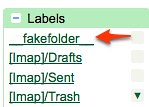
Gmail’s fakefolder

Gmail - fakefolder

While checking to see if my Gmail account’s offline mode had been activated I noticed that I had a new folder over the side … What the heck is the fakefolder?? Not surprisingly, it’s empty.

My Kindle is dressed in leather and ready for bed

M-Edge Executive Jacket

That’s about as racy a headline as I could think of for the Kindle, and though it might grab your attention!  I picked up an M-Edge Executive Jacket and e-Luminator on Matt Miller’s recommendation and know immediately this was a wise move.

M-Edge Executive Jacket

If you have one, you know the Kindle’s case is lame.  It only holds the device on one side and it can easily slide out and fall if you are not paying attention.  I tend to only keep my Kindle in the case for transport and read with it removed.  The M-Edge Executive Jacket may serve the same function though without risk of the Kindle falling out and with considerable style.  The e-Luminator light is a paired accessory that as you might expect illuminates the screen and lets you read in low to no light situations – something that is basically impossible without an external light source.  The light slides into a pre-made slot in the case which is an excellent touch.  The battery is  an A23 (first one I’ve seen) and is reported to last for hours … I’ll let you know if it’s not something you can count on.

I’ve got some more pictures on flickr if you’d like to get a feel for how the Kindle is covered when the case is closed.  So far so good!

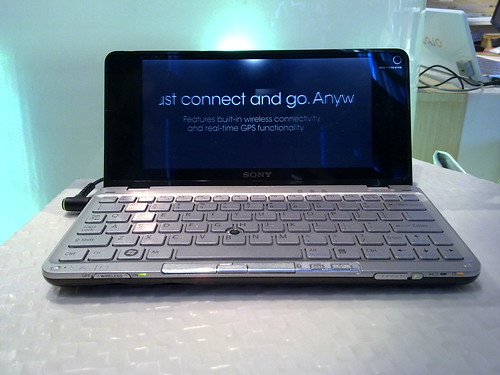
Sony Vaio P is not a netbook

01262009097

Sony’s Vaio P (not a netbook) netbook is on display at the Sony Style store and over lunch I went to go check it out.  It’s a beautiful piece of engineering and design, but considerably under-powered and way over priced.  I found the keyboard to be manageable and the screen was really beautiful though definitely small for the 1600 x 768 screen resolution.

Build quality was solid though these seem like pre-production models (no number just xxxx) and I would hope to see it improve even more as release units arrive. The mouse pointer system is similar to what lenovo has on the thinkpad, but the button layout is harder to reach. I found the trackpoint device was also pretty slow though I tried a second P and it was a bit better. Still not anything close to the relative prevision I’ve become accustomed to on the X61 I use for work.

01262009098 01262009100

After a few minutes of playing around just testing the keyboard and seeing what was installed on the system, it feels slow.  Perhaps due to Vista though more likely a result of the slower 1.33GHz processor (with Vista).

In theory this is a terrific machine, but it seems like you are really just paying the Sony tax for styling here rather than getting anything serious from a performance perspective which is pretty disappointing.  A device that costs way more than 2x what the standard netbook costs should deliver more than simply a pretty package.

Mobile Peer Award Finalists Announced

Mobile Peer Awards Logo

Congratulations to everyone listed below for making it to the final round of the Mobile Peer Awards.  I’m pleased to have been part of the initial jury to help finalize this list! The winners will be announced next month at Mobile World Congress in Barcelona.  Anssi Vanjoki, EVP and GM, Markets at Nokia will be kicking off the event with a keynote.  If you you’d like to attend, please be sure to RSVP.

EARLY-STAGE STARTUPS

EMERGING STARTUPS

Are netbooks bad for the industry?

intel atom logo

Thanks to NetbookNews I watched this interesting interview between Xavier from Notebooks.com and Rahul Sood, the founder of VoodooPC and currently the CTO of Voodoo at HP…

Rahul has written a great post which led to the interview on his blog and I definitely recommend you read that as well for a very insider perspective on netbooks and Intel’s Atom.

While listening to the interview and reading Rahul’s post I’ve considered my own experiences with the Samsung NC10
and I would have to agree with the general assessment here. Netbooks are killer machines, but they are also limited in what they can really do well. As long as you understand how they really work, you’ve got a very capable system in your hands.

As Rahul points out, the confusion with Netbooks started with how they came to be. Initially designed for the lower end and emerging markets, they quickly found greater success as supplementary systems in more developed markets due to lower costs and pretty solid specs. What’s happening now is a fairly vast commoditization of systems. Looking at the spectrum of netbook news as I’ve been since becoming interested in the category, the specs across the board are essentially the same. The main differences tend to be based on size and how much standard RAM, HD and whether you get a 3 or 6-cell a battery. Just about every brand is using the same 1.6Ghz Intel Atom chip running Windows XP. Aside from a few players the category is pretty vanilla.

The more I’ve used and enjoyed my netbook, the more annoyed I also get with things like flash video stuttering or that I can move faster in google reader than Firefox seems to want to go. I know I bought a “cheap” system but because I’m running standard operating systems and applications it’s easy to forget … The danger here is that the we see a crossover in the types of products in which Atom gets used and as we go bigger, the worse the result.

I’m far from sold on new operating systems or start up modes for netbooks as interesting as Jolicloud does look. Instead I’m sold on the longer battery life, ultra light and mobile systems we currently call netbooks. I hope we see innovative ways to bring the power but keep the size – just like the good old days of Moore’s Law! Now that I’ve experienced the potential power of ultra mobile computing I just want more … absolutely not less. I don’t think netbooks are bad for the industry. Sure these are interesting financial times, but look at how many people are talking about and more importantly buying these PCs. So Rahul, if you are thinking of a Voodoo machine in the 10″ range with at least 6 hours of battery life (though perhaps not a netbook), I’m definitely interested.

T-Mobile G1 is an almost …

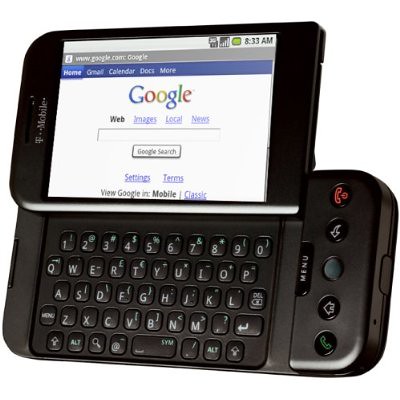
T-Mobile G1

I’ve been playing with the T-Mobile G1for a few days now and I’d say it’s definitely a mixed bag. The form factor is interesting and the screen is gorgeous. As noted last week, the initial user experience is hands down the ultimate experience I’ve seen yet on any platform. With a simple login to Google, you have access to all your data – awesome! Actually using the G1 though afterwards is considerably less awesome…

The first thing I noticed using the G1 is that you have to constantly use both the touch screen and the hardware keys. There’s no way to do it all from one or the other and that’s both frustrating and confusing. There’s NO text entry in portrait mode which means this is a two-hander in almost every use case and something I hate. No easy way to tap back a tweet, sms or any form of text. You can dial in portrait mode, but there’s no T9 mapped to the keys – or a virtual keyboard. I know this is coming in Cupcake, but this is a huge miss.

Typing on the keyboard takes getting used to like on all devices. Because of the hump on the right side, I actually find typing to be less comfortable than on other devices because I’m always moving my hand to get comfortable and this is slowing me down – way too much.

The trackball is both a strength and a weakness. Cruising through a web page or a list it’s great, but when you are actually trying to click on a small link it’s way too sensitive. I’ve honestly not looked to see if this can be adjusted yet, but imagine your mouse is operating at hyper-speed on a tiny screen and you ‘ll get the idea of what it can be like to use.

In general the UI is nice to look at but harder to use than you’d expect. There are a lot of ways to access things from the on-screen buttons to the menu key as well as the back and home buttons and unfortunately you need to know when to invoke what option. The only truly simple thing is that the green button calls up your dialer and the red key turns the screen off.

The Camera is pretty average. No flash, 3MP = poor indoor shooting. The shutter is mushy and I found the lag to be considerable. Typical for a phone actually though even the iPhone’s on-screen button snaps faster than this. Neither can compare to a several year old Nokia NSeries though …

The browser is very solid. Much faster on wifi than anything else – which brings up a related point on TMO here. The coverage in NYC is pretty good though not stellar but you lose ALL signal on the train platform’s at Grand Central and there’s little to no signal on Metro North making any T-Mobile device useless for the commute. Anyway the browser is as good as the iPhone in my book. There’s no flash support, but you can easily manage multiple tabs and moving between them is quite nice given the tile management system in Android. There’s no sync for bookmarks though so you’ll be adding what you want as you go here which is a definite hole that should be filled.

Playing with the Market / App Store (whatever the actual name is) has been pretty positive and I’ve seen how well integrated people are able to write applications. The store itself is nowhere as simple as the iPhone store, but certainly not hard to figure out and there’s a nice diversity of applications in each category. I can’t speak to the quality of things in general but the apps I’ve tried are all quite good. So far, I’ve tried and am using Accuweather (killer GPS integration), Truphone, Bonsai Blast, Compare Everywhere, Connect 4 and Tic Tac Toe (for Hannah who’s 5), fBook, Last.fm, My Maps Editor, PixelPipe, Pac-Man, Shazam, TuneWiki, and Twitdroid

I love how the notification system coordinates throughout the system! New apps installed, emails, tweets, sms messages … all come through the menu bar and you are able to switch modes to engage with the latest info that’s poured in. I cannot state how powerful this concept is enough. Looks like Palm is actually doing something similar in WebOS for the Pre though on the bottom… should be interesting to compare in a few months.

All of the potential power within the G1 is rendered useless within a few short hours of light use by it’s absolute crap battery. T-Mobile and Google should be ashamed for releasing such a power hog! I found that just be leaving email and Twitdroid on, the phone was dead by around 3pm – taken off power at 7 am when I left for work. In that time, I did some light browsing over cellular and perhaps 30 minutes of wi-fi use at the office. That’s awfully quick and I’m guessing I could actually kill the battery before lunch with heavy (more normal for me) use.

The G1 is a solid first effort but I would not recommend it to anyone other than a mobile geek looking to explore. I think the average person would have a lot to get used to which is certainly true of most devices, but the mass market simplicity you should expect to find today is just not there yet … and of course the battery issue.


Palm’s Synergy could be game changing

While they clearly still actually have to deliver on the vision here, the intent and initial demo of Palm’s Synergy concept are amazing when you consider what’s happening. Instead of having to sync, the device is seemingly aware of your various accounts across work and personal services and just able to present the relevant information in context. Even when looking at a single calendar, you are gently reminded of previously booked time from your personal life … When reviewing a contact, you can see all your information from Exchange, Gmail and Facebook (as well as others) in a single contact card!

I’ve been messing with sync for probably as long as I’ve been playing with mobile devices and to say it sucks would be putting it lightly. Sync is just too damn hard and even when it works well across systems you typically end of up data that’s intermingled poorly. That is you don’t want your work colleagues personal email to come up by default in Outlook since that’s somehow the sync logic. Instead Synergy leaves your various account data in place and “simply” presents it within the Palm Pre. I love this idea. As initially mentioned, they actually have to deliver here, but it’s looking damn good.

Well done Serko!

Windows 7 “Plays to” DLNA Standards while Apple keeps it closed – as usual

While this feature is not currently in the open beta, Play To highlights Windows 7 ability to be both a control point and server in a DLNA network.  What’s so awesome about this is that a ton of devices already have this baked in and Windows 7 can auto-discover them as well as present itself to them.  It’s great to see how easily this system works with existing media devices and formats.

Seeing this feature though also raises the obvious opposite perspective from Apple’s model.  The iTunes system ONLY works with itself.  Sure it works on both Macs and PC’s but there is no way without some hacking to get your AppleTV to play with other sources.  Even then it does not function as a DLNA UPnP device like what was shown in the video.  There’s no way to share media from my Nokia Handset to my television without first syncing to my desktop and then copying – through iTunes – over to the AppleTV.

Apple’s closed system certainly simplifies the consumer experience though that’s only due to the substantially limited perspective on how we are allowed to share media in the home.  I have many more things captures media than just those made by Apple … and I know I’m not alone.

Thanks to eHomeUpgrade for the tip.