One thing the iPhone definitely needs… Profiles!

I use profiles frequently on my Nokia devices and really miss that option on the iPhone.

When I’m in the car using the iPod, I want to turn mail notifications off and while I can do it manually, I’d prefer to set the phone into car mode. Lying in bed, I’d like system sounds on, but don’t want to hear the ringer in the middle of the night or hear my email coming in…

There’s a hardware switch which you can use to change things to silent, but you have to also choose to turn vibration off manually in settings in order to make the phone actually quiet which is handy if you charge on your bedside table as I do.

There are currently no settings for what uses vibration or options (like silent) for sounds per app. Right now it’s as Apple decided. A simple profiles setting (like what’s in all my Nokia’s) or a 3rd party app when the day comes we can install something would be much appreciated.

Technorati Tags:
, , ,

What’s on a Blogger’s Phone?

Zach from Symbian in Motion tagged me in the latest meme, “What’s on a Blogger’s Phone?” Zach is curious as to how I am adjusting (and perhaps compensating) for the iPhone’s lack of true applications based on what I run on the N95.My standard set of apps on S60 has not changed in quite a while…

  • Jaiku Mobile – I love the beta… and I am sure you will as well when it’s finally released to the greater public. The beta lets you see status for your contacts, update your location, post and reply. Essentially all the things you’d expect and miss in the release version.
  • Gmail Mobile – right softkey. Just wish it would do attachment sending and respect my preferred identity when sending mail.
  • Google Maps Mobile
  • Epocware has been a standard part of what I use. Their suite of Handy apps are well designed and look great too. My favorites are HandyWeather, HandyClock and HandyTaskman.
  • I really like Shozu, though it’s been a problem for me on the N95. The official release is out and seems to work fine, but people are still reporting incompatibilities. To me this biggest drawback is only being able to upload a 10MB video file which is (not so) surprisingly small on the N95.
  • On the WiFi capable devices I tend to install either Gizmo or TruPhone. I’ve got them both plugged into GrandCentral to simplify things, though honestly VOIP is more because I can, than because I need. 99.9% of my calls happen on the cellular network when I am mobile.

 That’s pretty much my standard set of apps to install. I use the Camera a lot to take video and still shots, review in Gallery and also find myself using the Calendar, Browser and Nokia Maps a fair bit though all of these are standard on the device. The iPhone is a new beast. No way to install anything and only Safari as a path to run something more robust. So far this has not really been that much of an issue for me, though I’d really like to get at least a chat client going. The mobile web apps I’ve been trying work nicely but have no notification sounds, so you have to constantly check to see if something is new. 

  • m.jaiku.com is my door into Jaiku on the iPhone and it works really well on EDGE or WiFi.
  • Unfortunately there is no way to get the Gmail mobile app running on the iPhone… without Java and a way to install, you need to choose either the web UI or POP download. I hate POP, but it’s the path I’ve chosen. I’ve yet to set Gmail to archive what gets popped and use the iPhone to review, desktop to manage. I like the looks of the iPhone email application, but wish there were some more advanced settings to choose an account when sending a message or perhaps adjust the reply to field at the very least. Once we have file system access I’d expect the mail client to change so attachment support for something other than mailing a picture (only from within the Photos app).
  • Google Maps is awesome! I use that frequently – in fact instead of sending an SMS To Google as I’ve done many times, I simply search and then either bookmark or add the result to my address book. This is very cool!
  • Weather and Clock are easily handled by the default app widgets. I’d love to have more than one countdown timer and would apprciate some louder sounds for alarms, but these work very well regardless. There’s currently no need to view my memory utilization or launch apps more quickly on the iPhone since there are no low memory issues and launching is two-clicks.
  • To “upload” to Flickr, I just email the pictures, but the iPhone strips EXIF data (if it even captures it in the first place) and scales pictures to 640×480 which is smaller than the original. I find unless I want to do a quick image blog post I’m uploading to Flickr less via mobile. I do sync my images back to Aperture which is great and works out of the box. No need to install the Nokia Media Transfer tool, which I did not mention above, but is required to sync / download images from your Nokia to your Mac.
  • Photos is a very impressive application and my 3yr old figured it out within moments. I have well over 700 images synced from Aperture and she loves to flick through them – as do I actually. The display is phenomenal and really shows off your pics!
  • iPod – I’ve got podcasts and a few albums loaded and find I use this more than I have ever on a mobile phone though perhaps an obvious outcome as an iPod syncs so easily with iTunes. I’ve been using Pzizz to generate some sleep patterns for the past week as well and have been enjoying.
  • From within Safari… I’ve been checking out AppMarks, Leaflets, and Digg and Mowser iFeeds to find good stuff to use and read. I also like the NYT and BBC River of news sites to see the latest headlines, though at least in the past 24 hours, the news reading on Leaflets is more appealing. I’ve tried the chat apps – BeeJive, FlickIM which are both nice. BeeJive lets you do more than AIM, while FlickIM has a way to track down links to either YouTube or movie trailers with a /youtube [movie name] or /movie [movie trailer] in a message. This feature is super cool actually and something I think others will likely copy.


On all my devices I tend to spend a good amount of time on Google Reader mobile and have bookmarks for certain tag folders so I can quickly drill down on topics of interest. I’d like to hear what Bryan Sawler is up to on his mobiles… He’s a mobile developer and I know has both an iPhone and a Nokia or two handy.

Technorati Tags:, , , , , , , , , , , , , , , , , , , , ,

Browser Comparison: iPhone vs. Nokia N95 and N800

I took a look at the browsing experience on the iPhone and compared it to the Nokia N95 as well as the Nokia N800 Internet Tablet. In general, the iPhone and N800 are much closer experiences, though having used both I’m leaning towards the iPhone. The N800 is definitely still robust for handling your browsing needs – especially with the addition of Flash 9 support, but my preference is for how Safari handles things over Opera.

Technorati Tags:
, , , , , , , , , , ,

Competing with iPhone: Nokia

Roland Tanglao has an interest post about a few ways Nokia could start thinking about competing with the iPhone:

Plan A:

  1. Make the existing phones work right. e.g. fix the memory problems with ShoZu and the N95 even if this requires throwing hardware at it e.g. by doubling the RAM.
  2. Bundle N95s with ShoZu (a version that allows unlimited size video uploads to YouTube, or blip.tv, the present 4MB limit is silly) and a flickr membership and market the N95 for the groundbreaking and cool device that it is (well that I think it is; I don’t have an N95 but other than the usual memory problems and the GPS antenna not being sensitive enough it looks like an awesome device)

Plan B:

  1. recast S60 around an open source core to make it more reliable and robust
  2. add touch and create a new user interface from the ground up to make the S60 user experience competitive with iPhone.

Hard to argue with Plan A, though I would add offering an upgrade / update to existing owners to fix the memory issues that plague us on the N95. The phone is $750, which as you know is MORE than the iPhone which according to the iPhone haters out there means you should be getting more for your money. I like the notion of a special version of Shozu. Assuming it actually works on your device – something that is a crap shoot apparently – it would be nice to actually be able to get media from the device up to your online service of choice. This only enhances the value of the device to the people most likely to be attracted to purchase.

Shozu should probably not be where things end either. Since there’s a bevy of applications available for the S60 platform, why not parter with the software companies for some bundling. Take better advantage of the Downloads service and offer more than people want and how they can get the most from their purchase. The devices are being sold unlocked — use that to your advantage as well… they can work out of the box anywhere you want on any carrier with little exception).

Nokia’s real issue though is marketing. They’ve had a massive head start in the market and have a few devices (UI aside) with much greater capabilities. The phones are more complex to use and have a definite learning curve if you are new to S60 which hurts adoption. That said, there’s an appeal with power users that needs to be properly exploited.

The Blogger Relations program of which I am a part helps – as illustrated by my readership as well as the reader of other participants, but Nokia needs to do more to SHOW what the devices are about, how they work and most importantly WHY you want one. I would suggest embracing the users more and sharing a deeper view from the base in a broader context — not just what readers see on the blogs, but in actual ads and a campaign site – make it mass! The iPhone broke through all the barriers and has become a pop culture icon in consumer electronics… use that momentum now that the people have awakened but steer them down your path. Apple’s excellent marketing simplicity has opened the door for opportunity.

BTW — my guess on the initial response to the iPhone in the US is that rumored 8GB N95 though I have a feeling we’ll see it working on US 3G bands.

Technorati Tags:
, , , , , , , , , , , , ,

iPhone Application Exploration

This morning I decided to check out some apps for the iPhone… Things seem to work great actually and I’ve set up dynamic dns services to enable access from EDGE when away from my systems.

BeeJive is a Multi-IM web service that can connect you to AIM / iChat, Yahoo, MSN, ICQ and Jabber / GoogleTalk nicely in the browser. Seems to be smart enough to manage the network switching between EDGE and WiFi. I’m hoping for some buddy management as they update things… it’s currently in a public alpha.

If you enjoy staying in touch via IRC, Colloquy has enabled a web server plugin which lets you connect through your Mac. I found it really works well and while I don’t do IRC every day it’s nice to know I can easily connect here.

As you may have heard there is currently no ToDo app on the iPhone for some reason even though it exists in iCal today and in Mail in the upcoming Leopard release of OSX. Omni Group has heeded the call by enabling their pending GTD app OmniFocus serve itself up through the browser. Seems to work very well – though I noticed it takes a few moments to update back on the desktop. Regardless, this is a great solution if you’ve already organized yourself or are planning to use Omnifocus.

PocketTweets is a beautiful way to stay connected with Twitter … while I’ve been using the m.jaiku.com site for about a week for my Jaiku fix, I’d love to see something similar developed to take specific advantage of the iPhone browser UI.

I’m also dabbling with iPhone Remote which lets you do some interesting things in a remote way with any Mac you install it on. You can run apple scripts, use the webcam, remote control iTunes, browse and send links to files (though they don’t work as attachments yet) and a few other tricks. This is one to watch I think as it really has the potential to extend your desktop into your mobile experience.

I’m still hoping there will be a way to get widgets if not full local apps on the iPhone though I don’t think that will happen until at least after the dust settles on the launch.

Technorati Tags:
, , , , , , , , , , ,

N95 Updated

Last night I began the firmware update process for my N95 and windows crashed about halfway through. This was a rather critical moment and I found myself looking potentially at a Nokia paperweight.

I tried several times to reestablish a connection but nothing seemed to work. My Windows machine is virtual running in Parallels so I was not certain I really even had a chance to get things restored. I did manage to get a connection going after several tries (and battery removals) but it was taking far too long to be reasonable. At the advice of my Jaiku friends, I kept it rolling and decided to get some sleep and check back in the am… nothing.

A fresh start to the day can apparently make some difference. After another couple of tries the connection just worked and somehow the N95 was reflashed and back in service! I honestly have no idea what happened or why it worked, but it does!

I’m happy to report that the new Firmware brings the AGPS support I alluded in a previous post about Nokia Maps. This is on by default in your Navigation preferences (system not app) though it may not be too obvious it’s running at first. When I connected for the first time today I was expecting first time response in less than 2 minutes. Instead, I found myself waiting for over 20 minutes… after about 15 I went outside to try and get a clear signal. I then powered down and restarted the N95. When I relaunched Nokia Maps, I was found instantly (literally) though the map needed about 20 seconds to complete the animation and zoom to where I was standing. This is VERY cool! Since the device has ZERO carrier support, Nokia is collecting data on the Cell-ID and building their own database. The more you use the real GPS, the more associations you’ll find with the cell towers in your travels and the better the experience for everyone. It’s a shame this is privatized data to begin with, but cool nonetheless. At least in my situation, I know I can just go with the GPS from my house, without having to worry about when I’ll get a signal to begin tracking a trip.

I’ve also loaded Shozu and the latest Jaiku beta which both seem to work just fine. Shozu now offers official N95 support which for me means it actually works. I’ve used Shozu for a long time across devices and in my book it’s the best way to get content from your device up to your web service of choice.

The N95 still suffers from memory issues unfortunately – probably it’s biggest weakness. I’m not sure why this is the case given it’s status as the über N-Series, but it’s how it is for now. With Jaiku, Shozu (both in the background) and the browser running, you can expect to run out of memory very quickly.

Technorati Tags:
, , , , , , , ,

Yahoo’s Push … Mail

Using the iPhone with a few email accounts over the past few days has given me some insight into the nature of how things are getting done between Apple and Google and Yahoo. While Google has a lock on the maps, YouTube and as the initial search partner for Safari, Yahoo scored two widget home screen placements with Stocks and Weather and is also the only way to get a push mail experience.

POP Mail is horrible. I was an IMAP user for years and only switched to GMail fulltime (my domain’s IMAP forwards into Gmail) when I realized I could get a similar experience across my mobile phones and the Nokia Internet Tablet (full web Gmail). Now on the iPhone things are a different story. For starters, there’s no Gmail application. I guess I could use the web browser, but I’ve been spoiled by the speed of the application Google released and would either like that as my main option or even better an iPhone integrated Gmail mail service. This full integration is actually exactly what Yahoo has scored with their IMAP support. For starters – it’s instant! Exactly what you would have come to expect if you’ve used a blackberry or a Treo with Chattermail. The shortest interval you can get mail to check on the iPhone is 15 minutes – unless it’s a Yahoo Account and then it’s real-time.

It’s great to have Yahoo mail updating in real-time, but there’s no way to change how you appear in sent mail and Yahoo is not my preferred domain. Additionally it’s more than likely that any reply to a mailing list will be blocked as it’s not the address you’ve subscribed with. Push is not enough for me to switch to Yahoo, but I definitely want it when I can tap in from another email account. For now without a way to change my identity I’m still sticking it out with GMail. POP annoyances aside…

It will be interested to see how long this lock lasts for Yahoo as well as everything else. I can’t see Google allowing Yahoo’s exclusive on premium access to mail lasting longer than the terms of the initial deal.

Technorati Tags:
, , , ,

I’m loving the iPhone!

I’m sure there will be a lot to say about this new device over time but I’ve got to say it’s a VERY cool device. Considering what it does and does well and even the things it does not do, I’m extremely pleased with how it all comes together.

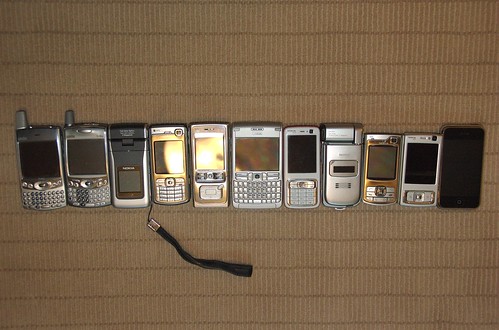
I’ve been using Nokia N-Series mobile devices for a few years now and have enjoyed the progression of functionality and features from the N90 to the N95 as well as in the two Nokia Internet Tablets. The iPhone combines everything I know I want to have and ties it all together in a beautiful package.

The hardware is stunning. When you hold it in your hand, you know it’s a solid piece. It’s heavier than my N95 but it’s metal, not plastic and the iPhone is also very smooth. The front as you’ve certainly seen by now is almost all screen and the display is the best I’ve seen – super bright and easy to read indoors and amazingly very easy to read in outdoor environments as well. I’ve been using it at the beach the past few days and have had no problem reading the screen in bright sun – even with polarizing sunglasses.

Calling the iPhone a phone would be a disservice.

It’s far more computer that makes phone calls than it is phone, though compared to any mobile computer I’ve used. The battery has enough in it to go a full day with everything on. I’ve been getting up around 6 and find that the battery can go until close to 5pm before I get the warning at 20%. This is with email (3 accounts) checking every 15 minutes, wifi and bluetooth on and clicking through to the web frequently from email as well as general browsing to sites like Google Reader or Jaiku. I’ve listened to a few podcasts while doing all of this and in general things flow very smoothly. Using the included earphones (not my usual choice) works great and with the single button controller I can start and stop the audio playing or take and kill calls.

There are a few times I’ve found that either the browser or email quits, which I honestly (and unfortunately) have come to expect on every device I’ve used. When this happens, it does so with grace and it’s easy to largely resume where yo left off in either app – though you will have to open your web pages again. The last one opened in the first tab pops back when you re-open safari…

It’s hard if not impossible to gauge how the iPhone uses memory. I can’t figure out when I am pushing it too far, though a few clues keep popping up. At times, when tapping a reply into a form in Jaiku, I’ve seen substantial delays in text entry. The only fix that works for me is to kill that tab and try again which is easy enough as I’ve clicked a link from email to get there anyway. I’ve had 5 windows going in the browser while email runs and I view pictures with my family. Initially I though that the browser was not loading windows unless they were upfront, but I Think actually that the iPhone is in fact a multi-threaded device thanks to OSX and having that much going at once just taxes the system to slow things down. Additional delays in both mail and web have been when I’ve walked to the maximum range of the wifi here at our beach house. While the iPhone beautifully reconnects to wifi when I enter the house, it’s slow to drop the connection to EDGE if it can detect WiFi on any level. If I know I’m going to be sitting in a tough connection place, I just manually switch the WiFi off and have had no issues working with EDGE.

The camera is adequate. If there’s good light and your subject is still, you can snap some very nice pictures. The shutter lag seems perfectly manageable – actually it’s pretty quick for a phone camera in my experience. I really like the integration of the images with Aperture and the Photos application is amazing – kills the Gallery app from my N-Series experience. The main drag here is that the only way to get images off is to either sync or email and you can’t save an image to the iPhone if you receive one via mail. That all happens on the desktop since Apple has rudely blocked access to the file system. This also means that your not able to upload to flickr for example while on the go. I did email a pic last night and it worked fine, though as has been reported elsewhere the iPhone strips the EXIF data when you do this for some reason along with resizing things down.

The touch-screen is killer. I’ve had to issues with entering text and have found it easy to pick up, which puts me in the minority I suppose, but I sorta already knew that’s where I was with how many of these toys I played with. 😉 Like everyone else I’d like to see landscape mode work in more than pictures, movies and safari. Especially given that the iPhone does HTML email by default. The zoom features with a double-tap are pretty sweet though and amazing when you realize it “knows” what part of the page to zoom on.

In general my gripes are things that can very easily be fixed with software updates. I’ll be doing some video soon and will compare more directly with my Nokia’s…

Technorati Tags:
, , , , , ,

iPhone Day 1: Battery is strong with this one

Not really my first day with the iPhone, but certainly the first day I can use it for the whole day. I’ve had it going since about 6am and got a 20% battery warning at around 12:40. All in all not a bad run.

I’ve had wifi and bluetooth on, email auto-checking every 15 minutes and used the web extensively. I’ve only made one call and that lasted about 15 minutes.

In my previous usage with WiFi enabled handsets, this is by far the best.

Technorati Tags:
, , , , , ,

iPhone activation issues highlight the problems with locked phones …

I’ve used a lot of mobile devices. Its been a while since I’ve used, let alone chose to own a locked device of any kind and this weekend confirms just how messed up the current system is. If the device was unlocked those of us with problems would have simply been on our way enjoying the experience instead of banging our heads into the wall in frustration.

In my recent experience, I take the current SIM I’ve been using and place it in my new phone. I’ve done this about a dozen times over the past few years and never had an issue – the phones just work and my previous account settings are nicely transferred as well.

There are likely plans to do OTA stuff we don’t yet have information on, but until then it seems the iPhone aside from Visual Voicemail has no carrier specific requirements. I can’t think why Apple actually wanted to even get the iPhone mapped into a carrier. In fact, I’d bet that if the product was spread around multiple carriers they’d be selling even more than they already are. Granted Apple would have to have multiple SKUs to manage both CDMA and GSM varieties, but that seems easy enough for Palm and if they can manage you know Apple could.

Technorati Tags:
, , , , ,

Quick Update on iPhone Activation…

I feel like I’ve spent more time (43 hours waiting on activation!) on this than most people so here’s some info for anyone having issues.

It’s DEFINITELY an ATT issue with porting of numbers. Porting unfortunately also includes Cingular. Thanks to the magic of corporate synergy (sarcasm), Cingular seems to have only changed in name and until you move into an iPhone or new locked ATT device (more on this in a moment), you are still clearly in the OLD system.

Yesterday Apple told me to speak to ATT about getting a new SIM, which ATT told me (at the store) was impossible. Today Apple told me (at the store) they had no SIMs to offer (I should speak to ATT!) and that they would NOT give me a new iPhone. Their POV was that the iPhone was fine and that it was just a matter of time… Around midnight I spoke to someone who was able to manually remove and re-add my iPhone to the plan and try an OTA activation … That was done again today and failed.

It was not until a call later today I learned there’s some magical bit that has to get associated with your account that until it does will leave you in limbo. My limbo lasted 43 hours… The magic bit is something called “Apple Tracking.” Until this is associated with your account, you will continue to see that you need more time for activation to occur.

During my dad’s activation this afternoon (after mine went through!) he encountered one hitch which is that he uses PayTrust to manage bills and that address (South Dakota) did not match where he was planning to use as his main address (outside Philadelphia). Amazingly ATT called within minutes of his second attempt to process and walked us through a walk-around. The suggestion was to set up a matching address with billing and usage and change once it’s activated. Once this was done, my dad’s iPhone activated a moment later. Knowing my issues well enough I suggested that instead of porting his number from Verizon, he go with a new ATT number and just port it later once everything was running.

The process is getting smoother but I am not sure that’s really because anything has been fixed, and more because enough time has passed for the customer reps to have a pooled an amount of learning and are actively sharing. Over the course of my conversations, the people seemed to have

Technorati Tags:
, ,

Updated iPhone Activation info

In speaking with ATT tonight I learned that my account was not configured correctly and now it is apparently. I still had a MediaMax (Cingular) data plan attached even though I had selected the iPhone data package as well as 1500 text messages. Neither were there. Interestingly that’s actually the same thing as what I already had – but not named iPhone.

Anyway.

The iPhone was removed and then added back manually by the customer service representative who tried several times to get an OTA activation going, but we were greeted by the standard “your activation requires more time.”

Information seems to be flowing in real-time with ATT and Apple… from the conversations I could hear between reps they are getting on-the-fly advice to try things in the system. Nothing seems to be working consistently. The only standard advice seems to be leave the iPhone connected to your system so as Apple batch processes things it will go through.

So … I think it’s actually on Apple’s end. Afterall my SIM works in my Nokia, but my iPhone sees NO bars and cannot complete it’s process.

Technorati Tags:
, ,

Your activation requires additional time to complete.

It’s officially been 24 hours…

I can’t tell you how many times I’ve seen those words in the past 24 hours, but it’s far more than I would like to admit. If you’ve followed my Jaiku or Twitters over the past day+, you know I still do not have an activated iPhone. This has been bothering me to such an extent that it actually disrupted sleep last night and gave mea headache for most of the day. To say I’ve been in a bad mood would be an understatement.

In case you’d like the short version… went through initial setup within minutes. (Actually was filming that for an unboxing video that will be far from relevant by the time I’m live with this thing.) Got to the more time needed BS message and sat looking dumfounded for a moment. About a minute or two later I got an email from the iTunes store stating the same thing and that I’d be notified by ATT when it was ready. About 15 hours later I got an email from ATT inviting me to the website to manage my account and all that usual getting started BS – which is extra BS for me as I am already a customer and have an account! Just shy of 18 hours later I got an email from ATT with a confirmation number confirming my processing – not activation of course, but that it was in progress. Nothing since …

My old phone SIM was killed by the activation process so there’s no going back to my prior devices. The iPhone SIM while reported to not work in anything else does in fact work in my Nokia phones (just tested this) and just confirms how messed up ATT is. If I can use the SIM, that means it’s been activated in the system and they have some very special extra lame system handling JUST iPhones which is the problem. It is “just” a phone anyway… regardless of how cool it might be.

I was told by Apple today that I could try a few things. First press the home and power buttons for a few seconds at startup until the logo screen appears… try it outside. Nothing. Apple also suggested I go to AT&T and get a new SIM which I did and was told a)they were not allowed to do that for iPhones and b) that would disrupt the process of activation since the SIM and IMEI are linked. This led me to try taking the SIM out and re-seating it. Nothing. BTW – the SIM is a 3G SIM and says so on both sides…. interesting.

I’m left with a few choices. 1 – Continue to suck it up and hope I magically activate soon. 2 – Kill this process with AT&T over the phone, go back to my other SIM once it activates (assuming it does) and then try again later with the iPhone. For now I’m sticking it out. Like some sick personal challenge, I can’t get beaten here.

I freaked on the ATT staff who shook their heads and hands and called (the same number!) customer support I’ve been dealing with but I somehow got to someone who seemed at least remotely in the loop – perhaps enough time had passed for training to occur. Anyway I pushed quite hard and was able to get a free month of voice service from the call – even though I am still without any service. I guess that and my hat will get me a free bowl of soup!

I’m out of thoughts here other than to try and chill. This is way beyond my control clearly and well beyond the control of anyone I’ve spoken to. It’s broken and will be until it’s fixed. It sucks, but that’s the way it is.

PS – Apple’s phone system said (and I heard this countless times in the hour I waited) hold time is estimated at 5 minutes or longer. My wait was 1 hour and 15 minutes and I suggested they update the time expectation.

Technorati Tags:
, , , ,

AT&T has completely deflated the iPhone experience for me

10 hours after attempting to activate later…. I have no phone. My iPhone is waiting and my previous SIM is dead. The iPhone is useless without activation – no iPod, or any other features period.

I was in the middle of shooting an uboxing video but that clearly is far from time relevant now given the delay. At this point I’d simply like to have some form of phone service via an active SIM.

Technorati Tags:
, ,

Destination Brewster, NY: iPhone Launch day!

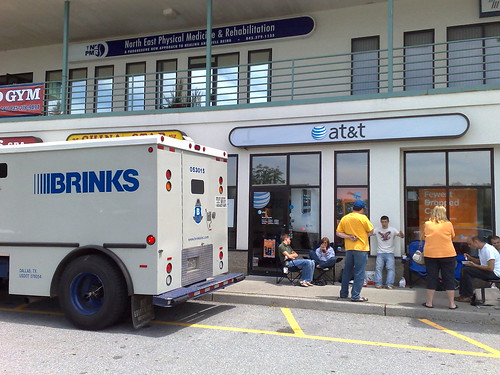
Not delivering the iphone yet

While we were led to believe otherwise this Brinks Security truck really did deliver the iPhones today.

I arrived at the Brewster, NY AT&T store around noon and found myself number 9 in line. I quickly moved to 8, when one potential customer discovered he was not eligible based on something (I honestly was not paying attention).

The day was painless. People were very friendly and generally just psyched to be there. The crowd was a total cross-section. We had geeks, nerds, jocks Moms, and Dads with kids. There was a good mix of women even, which was surprising, but clearly the iPhone crosses over every personality type.

6 hours later – the doors opened and we went inside to find the AT&T systems completely overrun with traffic. The 5 employes at the store were very friendly and doing what they could but it was just too much traffic at once apparently. After about 45 minutes I was able to leave with my 8GB (one per customer) iPhone in hand!

My iPhone is still sitting in it’s box and wrapped! I’m sitting in an almost dark room while my daughter falls asleep and then I’ll unbox properly! I did get a chance to play with a unit in the store and the hardware feels amazing in your hand. It’s quite solid and surprisingly smaller than anticipated which is great. Much more to follow…

Technorati Tags:
, ,

Happy iPhone Day!

Hello iPhone

I’ll be heading to an ATT store in Northern Westchester thinking I’ll beat the potential crowds at the White Plains Apple Mall Store. What’s your plan?

Don’t expect much here today until later, but here are a few notes from today’s papers:

From USA Today

Q: What about corporate e-mail? I understand that’s an issue for many consumers, who may not be able to hook up to their company networks?

Jobs: You’ll be hearing more about this in the coming weeks. We have some pilots going with companies with names you’ll recognize. This won’t be a big issue. [USA Today]

And the Wall Street Journal

WSJ: What do you both envision being added over time to the iPhone, in terms of access to ringtones through Cingular’s (now rebranded AT&T) platform and maybe through some other manner, like turning your iTunes songs into ringtones?

Mr. Jobs: As you may know, iTunes is now the number three distributor of music in the U.S., ahead of Amazon and Target and behind Best Buy and Wal-Mart, and obviously the largest online distributor of music in the world. Of course, you can play that music now on your iPhone. One might imagine a lot of things down the road.

WSJ: Is one of those things offering music purchases and video purchases directly from the phone?

Mr. Jobs: There’s a lot of things you can imagine down the road.

WSJ: Steve, how are you feeling now about how this device will impact your iPod business? Will it cannibalize iPod sales in any meaningful way?

Mr. Jobs: We can report to you that it hasn’t so far. We announced this in January, and we’ve had a very healthy iPod business since then. This is a more expensive device and one that carries a service requirement with it, unlike any iPod does. I’m not too worried about that, but we’ll certainly report to you what happens as it happens.

WSJ: A lot of attention has been focused in some of the initial reviews of the iPhone on the EDGE network that this phone is going to be on. Steve, we saw somewhere that your concern in putting a 3G chip in the first edition of the iPhone was that the current generation of that technology would drain the battery a lot, and that there were also some issues of coverage of the AT&T 3G network at the time you did this deal. Is that correct and have those issues been resolved over time as we’ve seen the technology evolve?

Mr. Stephenson: If you think about wireless broadband networks, EDGE is the only ubiquitous nationwide broadband network deployed today. It’s a 300-plus kilobit type service. We’re selling in the tens of thousands every single month of smart phones that operate on nothing but EDGE. The service experience is really, really good and what you’re going to see with the iPhone is the caching technology that Steve and the Apple guys have developed here makes the EDGE experience even better. Between the Wi-Fi and the EDGE coverage, this is a really good experience.

We put right south of $16 billion of capital into this network over the last two years. I feel real good about the coverage and the performance. We put tens of thousands of hours of testing this device on this network and it’s performing at the top of any device we have out there.

Mr. Jobs: You know every (AT&T) Blackberry gets its mail over EDGE. It turns out EDGE is great for mail, and it works well for maps and a whole bunch of other stuff. Where you wish you had faster speed is…on a Web browser. It’s good enough, but you wish it was a little faster. That’s where sandwiching EDGE with Wi-Fi really makes sense because Wi-Fi is much faster than any 3G network.

What we’ve done with the iPhone is we’ve made it so that it will automatically switch to a known Wi-Fi network whenever it finds it. So you don’t have to go hunting around, resetting the phone, flipping a switch or doing anything. Most of us have Wi-Fi networks around us most of the time at home and at work. There’s often times a Wi-Fi network that you can join whether you’re sitting in a coffee shop or even walking along the street piggybacking on somebody’s home Wi-Fi network. What we found is the combination is working really well.

When we looked at 3G, the chipsets are not quite mature, in the sense that they’re not low-enough power for what we were looking for. They were not integrated enough, so they took up too much physical space. We cared a lot about battery life and we cared a lot about physical size. Down the road, I’m sure some of those tradeoffs will become more favorable towards 3G but as of now we think we made a pretty good doggone decision.

WSJ: Can you say whether 3G technology has evolved to the point where you’re already working on including that in the next edition of the iPhone?

Mr. Jobs: No, we just don’t comment on future stuff.[WSJ]

T-Mobile officially Launches UMA service

“Essentially, what the T-Mobile has done is delivered the first consumers UMA platform using the same phone to make calls over a cellular network outside of the home and leveraging consumers WiFi and Broadband connections at home. To that end, there are two hardware components to T-Mobile’s offering. First is a phone that can work off of T-Mobiles Cell network and is also WiFi enabled to use GSM of over WiFi and a T-Mobile branded optimized router that gives priority to voice packets. While you don’t need T-Mobile’s router to use the service, it’s the recommended solution. On the phone side, you’ll need one of two new handsets T-Mobile is introducing, one from Nokia and one from Samsung. Regular WiFi enables phones or PDAs won’t work.” [Michael Gartenberg]

A tough week to launch a new mobile anything but T-Mobile is going live (sort of) with their UMA service… The site looks the same as it originally did and there’s no mention of the Nokia phone Michael Gartenberg mentions. I wonder if would be possible to activate true UMA service (auto switching) with software – like TruPhone Plus ?

I’ve used VOIP services on all of my WiFi enabled Nokia phones and both TruPhone and Gizmo let me choose the Internet Call option instead of cellular when I am in range of my AP at home (or work) but neither service seemlessly auto switches an active call between networks which is the real advantage to UMA.

I’ve been testing the service here in the Digital Domain for the last few weeks and i must say, it works and it works well. Places where I could never get a cell signal (like my home office) now work fully. Out and about, I had no problems connecting at T-Mobile’s Hotspots, getting into the car while on the same call and then going from car to home WiFi network. The call just stayed connected seamlessly which is as it should.

Technorati Tags:
, , , , ,