Define Normal

What’s normal usage with a tech product?

My recent return to the iPhone has quickly reminded me that while there is a ton of power available, the more you use the more you pay. With a mobile device that payment comes in the form of battery life and I am not impressed with the iPhone 3GS so far.

My benchmark for smartphones is one day. One day. Getting up at 6 I want to get back home by 8 on a single charge. That has proven impossible on the iPhone.

This am I unplugged the iPhone and checked mail and the weather before showering. Before I left the house, I did a sync with iTunes (podcasts and some new tunes) and then checked the app store for updates. During the course of my commute, I had the iPod playing while running through safari, email and tweetdeck. I used snapped a picture which I uploaded while walking through Grand Central and then checked in on foursquare a few times as well as I passed by a few spots.

When I got to the office (~8:45) I had 47% of my battery left. That means the iPhone would be dead by lunchtime easily at my current rate. WTF? I checked and I have 8 apps ready to use push notices currently so perhaps that’s having an effect but before those apps were even available I saw. Very rapid drain during the course of my morning trip. A quick check now (on the train home) and I can see I have burned about 25% of the battery since leaving the office a bit over an hour ago. Again WTF?

In discussing the battery and laptop performance issues with various people it seems everyone considers my usage more aggressive shall we say than average. No argument here though I don’t see my usage as that unusual anymore actually given the social environment along with the amount of information we are consuming in the more realtime web.

I believe the iPhone only has a 1200Mah battery which is lower than other smartphones in the general competitve set. My Nokia E71 runs with a 1500 battery and has considerably longer life than the E75 which uses a smaller capacity 1350Mah battery. Cleary 1500 shoul be the standard. All of these devices have 3G, wifi, GPS and run lots of applications – concurrently on the Nokia kit.

Is the iPhone actually a mid-tier product operating through the higher end space with a slick UX? Perhaps … The seductive nature of the experience and the flexibility of the applications make it seems like considerably more which has definitley set my expectations.

The iphone’s closed but no one seems to mind

I don’t know that the average mobile consumer knows or cares but the iPhone is a surprisingly closed platform. You’d think with the massive volume of applications and sales that it would naturally be open, but like all Apple products there are rules and the best oportunities are left for the house.

As I mentioned on my previous post, there is no way to get native multitasking going with a 3rd party application. For most people this is a non issue, but the more advanced consumer will definitely find limits with push notices. There is no way to stream last.fm or pandora while web browsing or emailing … No way to upload a picture through ShoZu or pixelpipe while snapping another. These are things I have been accustomed to for years yet are completely blocked on the iPhone. Apple’s solution is to email a reduced size picture from the camera roll instead of allowing 3rd party apps to help out. On the music side of course you have your iPod which plays anywhere.

Application amd network limits are another point of interest. Sling and Qik have yet to make an appearance yet MLB was able to offer 3G as well as wifi access to the games of your choice. The iTunes application will not let you download over wifi yet tap tap revenge is quite happy to let you download new tracks over 3G as I experienced last night. These network blocks seem to be the result of a carrier deal by AT&T here in the US and it’s definitely a cop out on a less than ideal network rollout. The fact that the new iPhone happily seemlessly switches to AT&T wifi at starbucks and other locations is no miracle … It is providing relief to the network strain the iPhone has brought.

The iPhone truly does offer a remarkable experience for a handheld device yet it also seems to be blocked of things other devices have either long been capable – even those offered by the very same AT&T. I know similar blocks exist in other markets as well …

While we all accept the “Apple Tax” on pricing of hardware the limits on the software and services side are unique to the iPhone. The basic BS limits you find on carrier delivered devices have simply been switched around for a new set offered by Apple instead. It’s curious how most tend not to be bothered by these restrictions … Presumably based on the superior level of finish and user experience no one wants to give back.

I’d really just like to have it all.

(btw I tapped this out in the wordpress iPhone app)

Is the 13″ MacBookPro a Shot at Netbooks?

Apple’s COO Tim Cook had stated the following regarding netbooks in a recent earnings call:

“When I look at netbooks, I see cramped keyboards, terrible software, junky hardware, very small screens. It’s just not a good consumer experience and not something we would put the Mac brand on. It’s a segment we would not choose to play in.”

For the past month or so, I’ve been thinking what my next netbook might be …

With the prices as they are it’s easy to consider netbooks almost temporary machines. My good friend Andy Abramson almost considers them disposable leaving his MacBook Air in the hotel safe and dragging around the netbook which he can afford to have smashed or even stolen.

In my case, I have been trying to do as much as possible on the netbook and while that’s been both largely successful and pleasurable, there are certainly some limits. The newer crop of netbooks is supposed to alleviate the video processing power and heavy flash web page processing the Atom really does at admirable job trying to handle, but lags. Battery life is of course a major plus on netbooks and I’ve gotten as much as 7.5 hours of active use during a day of business. I love that the battery is solid enough to go a few days of intermittent use without even having to plug in – something my other laptops (work lenovo X61 and personal 15″ macbookpro) can only dream of managing.

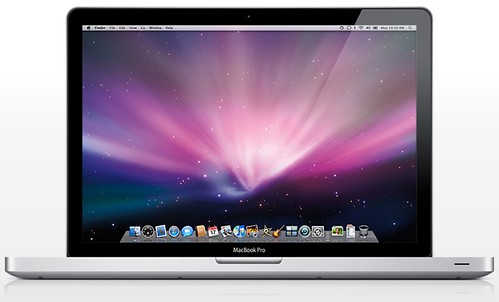
The new 13″ MacBookPro is completely changing my perspective on mobility … It’s only slightly larger and about 1lb heavier than I’m used to carrying around but offers an quantum difference in capabilities. The price is rather different as well. Instead of topping out at around $500 for a netbook, the 13″ MacBook is closer to $1800 configured the way I’d want. The price difference, while considerable is small compared to the newly found power I’m likely to find once again.  And let’s not overlook the new battery power to die for according to Anandtech … making the MacBookPro even more attractive!

While netbooks are really about compromises … MacBookPro’s are not.

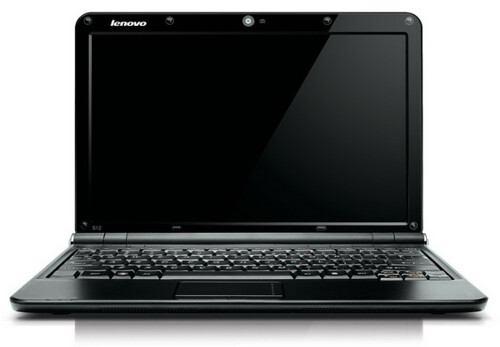
Lenovo IdeaPad ION Powered Netbook Coming

Lenovo IdeaPad

Portable Monkey brings some news about an upcoming Lenovo IdeaPad 12″ netbook and I am lusting for it. As much as I love my Samsung NC10 (writing this on it), I can’t help but find it lacking on a few fronts and ION seeks to remedy that.

Of course the netbook is a compromise, but after almost 6 months of regular use, I miss the oomph of a more powerful system. I would also love to have a bit more screen resolution and the new Lenovo seems to cover off on both bases. The Sammy’s video performance is very average though that’s apparently how it works with the Intel Atom integrated graphics solution.

I’ve not seen any updates that would propose to offer anything better than what I have in the initial Atom product. Until now … ION will definitely offer MORE. I look forward to tracking the updates on this as it gets closer to release … hopefully the battery tax won’t be substantial.

Waterfield Design’s

I purchased a new Canon G10 over the weekend and have really been enjoying it. More on that later …

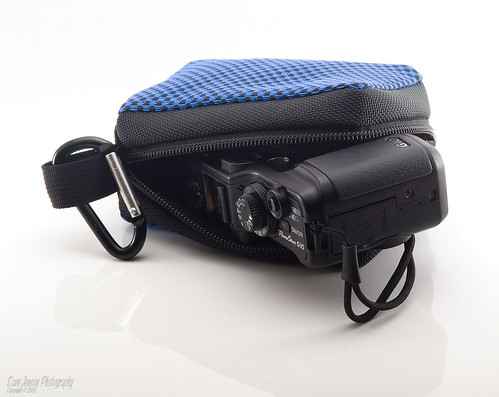
Like most camera’s you don’t get a case. I knew this going in, but since I opted for the immediate gratification (retail purchase) I was not able to get a case in time for my first few outings. After a bit of research I came across this:

Canon G10 Slim case, originally uploaded by SpeednutDave.

While I’ve been familiar with Waterfield Designs for a long time, I’d never ordered anything but seeing that picture immediately changed that!

What I discovered immediately though is that Waterfield is one cool company. I got a personalized order confirmation from Gary who asked how I came across the site. It struck me as such a simple thing I wonder why more companies don’t take the 2 minutes to do something similar. I replied to Gary, shared the picture above and Gary again replied with his thanks. Dig it!

Today my case arrived and on my packing invoice was another personal hand written thank you though this time from Alli. Waterfield – you’ve got class! And now that I have my first product I can also add you make very high quality goods! I’m sure I’ll be back for more gear.

I snapped a quick pic tonight of my case … while I don’t have a lightbox setup like Dave, I was able to snap a good macro shot to give a view of the stitching on my Zoom case.

IMG_0157

Photorec — the ultimate data recovery tool!

Thanks to @vnangia’s reply to my tweet and post last night I learned about an amazing data recovery application for camera memory cards.  Photorec was able to scan and recover ALL of my pictures from the Compact Flash card last night which is remarkable.  It was also able to see and recover images going quite a way back in time which was a nice reminder than the format function on the Nikon D70s is not very aggressive. Until @vnangia’s reply I did not know of any way to recover my images and had considered them lost thanks to a technical error, but I am elated to report that the pictures from my son’s birth are indeed intact and able to be shared.

Nikon, you are still dead to me.  The basic need I require of a digital camera can no longer be entrusted to your brand based on the seeming catastrophic failure yesterday.  There’s simply no way I can feel comfortable that something like this won’t happen again.

Why Nikon is dead to me and my next camera will be from Canon

Dear Nikon –

Thanks for absolutely destroying all photographic evidence of the birth of my son. Your failure to actually save any images shot (close to 100) has ruined any opportunity for a permanent record of this wonderful occasion. There are no do-overs, no next times. This was it and while it certainly looked like most of my pictures were terrific when captured and quickly reviewed on-screen, The D70s appears to have corrupted the CompactFlash card and there are NO PICTURES. The most basic function failed.

Thanks for nothing.

Jonathan

Access Point Destinations Make it Easy to Get the Best Connection, If You Can Choose One

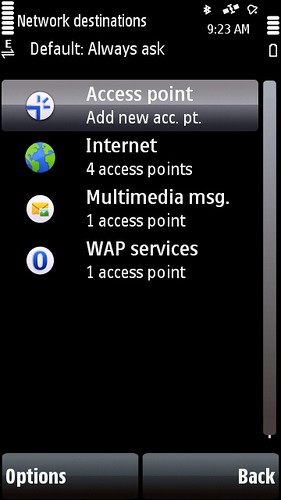
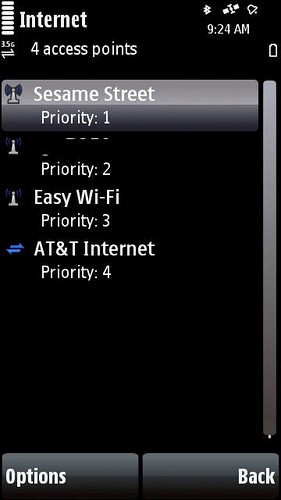
Nokia has been making some very nice though admittedly subtle updates to the way the S60 functions on the later devices and having used most of them I’ve been taking this for granted.  Starting in Feature Pack 2 (N85, N79) the Network Setting panel received an update which added something called Destinations.  Destinations are a way to group access points like your cellular data and wifi into a group.  This group function is actually an old function that used to exist in early Eseries devices (E61) and was awesome, but never seemed to carry forward to later ones like the E71.  Gotta love the consistency …

5800 - Network Destinations 5800 - Internet Destination

5800 - Network Destinations

Since using the Nokia 5800 I’ve noticed something about how these Destinations now work and it’s a very powerful concept and one that should really be part of all smart devices.  With wifi scanning on (I set mine to a 10 min interval), my phone will automatically switch over to wifi when in range.  The 5800 runs the 5th edition version of S60 which is what the upcoming N97 runs so this will also work there.  Connection switching back to cellular has not been as smooth in my experience, but it does work.  In classic form (and yes that is sarcasm) S60 is not set to use a Destination for all applications.  Instead some applications rely on an Access Point which makes the switching impossible. New apps like the Nokia Messaging service looks to use Default which will drop to Internet (the main Destination) though MailForExchange needs a single Access Point. The browser is happy with a Destination though Gravity (a 3rd party twitter app) wants an Access Point. Google Maps wants an Access Point … you get the idea.

These subtle changes are powerful but frustrating as even Nokia’s core applications cannot take best advantage of the work that’s been done to improve the user experience.  As a non-developer it’s hard to know whether these updates get pushed out in a reasonable way to encourage adoption or whether developers are left to figure it out for themselves just like the user. It’s getting better, but clearly quite a bit of work still lies ahead.

Windows 7 needs to get cleaned up before going out

I’ve been using the Windows 7 beta since it was released and I’ve updated through a few builds as well though admittedly not as an official MSDN partner.  I’ve acquired he build in the wild and have been using Windows 7 daily on my netbook.  The experience has been most good, but a few frustrating issues have remained through each update and these are going to frustrate people to no end.

The main bug I’ve encountered is that my network connection simply times out.  Sometimes I get hours, sometims minutes and sometimes it refuses to work at all after waking from sleep.  The repair utility has about a 40% chance of getting me back online, but generally I need to reboot the system.  The only upside here is that Windows 7 boots pretty quickly, but the average person is going to hate this.  This is a basic requirement for a computer and I expect networking to just work.

About 20% of the time after waking from sleep I lose the ability to control both volume and screen brightness from my function keys.  I can still handle volume from the taskbar, but there is no way to adjust screen brightness.  Brightness is locked down at the first level which is quite low.  I tend to run on the 3rd step up which is a nice balance of brightness and power utilization.  A restart fixes things.

I’ve mentioned these issues before and doing a general search around I can see I’m not alone though there’s no actual resolution from Microsoft yet.  The problems seem to actually be a part of Windows 7.  It took 2 restarts just to publish this post today … not cool at all.

This is what’s happening now …

This is what’s happening now …

Sprint’s launched a new campaign and is getting some good buzz on twitter because it mentions twitter.  I think the ad is a serious miss. But first why not watch it for yourself…

online casino

Pretty cool animation style, potentially interesting factoids – but for whom?  Most of what happens though is more visually interesting to the average person than actually meaningful or more importantly informative.

TV advertising is generally considered highly efficient because of it’s potential reach, but it’s also incredibly wasteful because there’s no real way to focus the message effectively at that scale. In the case of this piece, I’m wondering how many people even understand what they are seeing. The premise here is gobs of activity on our amazingly capable network.  If you get that and based on the frequency it’s running you’ll get a few chances to pick up on it, you might also realize Sprint is saying they apparently are able to and more importantly are actively scanning customer content.

The best part though is the end when they claim to be America’s most dependable 3G network bringing you the first wireless (in case you were expecting there to be a wired) 4G network.  This is when the magic happens … all the content from the screen – and there’s a lot of it – zooms through the PalmPre screen which is NOT called out by name or that it is coming soon.  The transition from 4G to PalmPre suggests the Pre is going to be a 4G device which is simply false.  I’m a geek.  I get it.  Most people will not and will instead be left (if they get any of this commerical) that there’s a new 4G cool thing coming.  Good luck buying that phone!

Let’s recap –

  • expensive to produce, expensive to run
  • limited audience understanding
  • negative brand connotations
  • false associations with an upcoming major product

Score!

The mobile phone is the social camera

I started to leave a blog comment on Antonio’s post and decided to do it here instead …

When I read the rumor that Apple has ordered a 5MP CMOS sensor for an unspecified product, it screamed to me of another coming disruption, this time around the point-and-shoot slice of the digital camera market. Because while the market for digicams is still growing at a healthy clip, the fat belly of point-and-shoot cameras has been relatively stalled since 2007 and shows signs of becoming a segment dominated by price and share wars— in other words, ripe for an Apple-like disruption.

A lot of the industry analysts that cover the emerging mobile space have been saying for a long time that better cellphone cameras would eventually kill the point-and-shoot, but I’m not sure that it is quite that simple. Or that is, before we get to this cellphone-as-camera nirvana, we may still have room for the iPod Touch of cameras (one that is connected but without a data plan). This would allow for all sorts of neat use cases around the concept of the “Social Camera, ” some similar to what Eye-Fi allows today, albeit with richer, more mass-market integration.

And best of all, if such a device was based on the iPhone platform, we’d benefit from the same Precambrian-like explosion of apps to explore every corner of the programable camera universe in a much more rich way than any one company could.[ The Onda]

An interesting thought for sure, but here’s where I see it really going. I already have a social camera and it’s called ANY Nokia handset I’ve used in the past several years.

Here’s how it works:

  1. I take a picture and share it instantly via (your choice) Share Online or Shozu.
  2. My current arrangement is via Share Online and pics pass through Pixelpipe which is an amazing photo mediation service. My default setting sends pictures to Flickr, Ovi, Facebook and Twitpic – all at once. Share Online also regularly checks Ovi and Flickr for new media, media that I’ve commented on and media of mine that’s been commented on and brings it all to me – even nicely notifying me via the homescreen.
  3. Pictures and Video I capture are geotagged and mapped on the supporting services as well so I’ve got a very rich contextual map of my media.

The social camera is here now.  It’s easy to use and has worked for a while.  I”m sure Apple has a perspective on this, but my guess is that it will happen on the existing platform not via some new piece of hardware.

World’s Fastest Broadband – And Not Here of Course

We can’t possibly get 100Mbps at home soon enough! Video seems like the obvious service in what we use today, but just imagine if everyone had such a fast connection! There’s sure to be new applications …

Cable executives have given several reasons for why many cable systems in the United States are going very slowly in upgrading to Docsis 3. There’s little competition in areas not served by Verizon’s FiOS system, which soon will offer 50 Mbps service. And some argue there isn’t that much demand for super-high speed.

Mr. Fries added another: Fear. Other cable operators, he said, are concerned that not only will prices fall, but that the super-fast service will encourage customers to watch video on the Web and drop their cable service.

The industry is worried that by offering 100 Mbps, they are opening Pandora’s box, he said. Everyone will be able to get video on the Internet, and then competition will bring the price for the broadband down from $80 to $60 to $40.

via World’s Fastest Broadband at $20 per Home – Bits Blog – NYTimes.com.

When Cablevision rolls out 50Mbps later this year, I will be very tempted though the cost will be double what I currently pay for 30Mbps. Seems like a steep upgrade tax to speed up the recoup on investment.

AT&T’s new mobile rules are BS

update – AT&T Caved!

I’m just catching the news on AT&T’s new TOS which seriously limits the potential for bringing your own mobile capabilities.

I think we all get that carriers don’t want to be just a dumb pipe, but let’s be honest the more advanced the mobile device, the less likely you are to be using the carrier offered services – music, navigation etc.  In today’s smartphone market, we are seeing all kinds of manufacturer and 3rd party offered applications and services and the user is really in control of what they do and more importantly, how they do it.

Instead of trying to force us to use devices or specific services (which usually only work on a limited set of devices), I would much rather just pay for my usage – exactly the same way I buy access from my home broadband provider.  Provide a reliable consumer service at a realistic price and everyone wins.  Consider this – the new TOS from AT&T means that applications like Qik, Sling or Hava, and Joikuspot are all violations of your basic unlimited plan since unlimited means exactly the opposite – plenty of limits.

Should be interesting to see who gets caught doing anything that’s no longer allowed.  I wonder what the real penalty is actually and if we’ll even receive a formal notice on the change as a precursor to some formal action against the consumer.

Do MIDs make sense?

Joanna Stern from Laptop Magazine makes many good points on why MIDs make no sense.

Still not sure what MIDs are? MIDs are meant to be different from smart phones in that they intended to have specific connected purposes. Intel told us that some MIDs will focus on navigation, others on multimedia (watching movies and listening to music), and a large selection on productivity (checking e-mail and reviewing PowerPoint slides, for example). But the driving force behind them all is Internet connectivity.

Do consumers really want to carry around different devices for different tasks? Unless you’re big on parachute pants, it’s not the most convenient solution. And can’t you do all those things with a $199 smart phone? Applications like Google Maps and TeleNav turn your phone into a GPS navigator, and people are ditching their point-and-shoot cameras for phones like the Samsung Memoir, which sports an 8-megapixel camera. Devices that can do it all make a lot more sense than ones that do a specific task really well. Isn’t this why iPhones and Blackberrys get more popular every day? [Laptop]

MIDs as they currently stand, are ‘tweener devices and that’s a hard sell. If someone could make a smaller MID-like device with the power to get through a day of use I’d be sold. Current devices seem to offer around 3 hours of battery life for $1000 which just does not cut it and none really fit in your pocket. I want a computer in my pocket but MIDs are the only thing trying to push these limits.

And by computer I don’t mean something that offers background processing through “push notificiations” or pseudo-multitasking because email can arrive when I’m listening to music. I mean the real thing. I want killer browsing, intelligent memory and task management, unified communications with presence and access to applications. I’d also like the power to both create and consume media on the go as well while we’re at it. Is that too much to ask for?

I’m not sure I’ll be a one-piece mobile device user anytime soon, but if a single device offered what I’m suggesting it would make quite the consideration …

Microsoft goes “high” fashion for Windows Mobile

In what has to be the lamest idea I’ve seen touted in a very long time, Microsoft has decided that Isaac Mizrahi (who has no mobile or technology design credit) knows more about what the on device experience should be like.

The designers are working to improve the background wallpaper, color schemes, and the look of scroll bars and other elements in the Windows Mobile interface, Woodman said. The goal is to let users personalize their phones, he added.

Windows Mobile, while potentially powerful, suffers from classic Microsoft design complexity. I look forward to seeing what comes from this experiment …

In a statement, Mizrahi said, “Phones are just as much a fashion statement as the clothes you wear. As a designer, I’m excited to team up with Microsoft to bring forth fresh and funky new ways for people to make their Windows phones a part of their personality. Cast aside your old black phone and make this about color and fun.”

Should be fun. Not.

via Computerworld

Networking issues with Windows 7 7057 – RESOLVED!

Given how smoothly Windows 7 had been running on the NC10, I really did not think twice about updating to the (unofficially released) latest version 7057. Windows 7 is still peppy and I’m running the Ultimate version on the netbook rather than the more limited version which is likely to come pre-installed on most future netbooks. I have not had a chance to test whether power management has been improved in this build but plan to do do shortly.

I did my update last Sunday and then Monday flew to London.  I noticed a network problem immediately on Sunday evening but thought it was my usually very reliable cable connection rather than my computer.   I did not have time to really test things out and instead rebooted the cable modem and went to bed.  The next day I was completely unable to connect to Boingo at JFK and only after a reboot did things work.  My time was limited so I checked a few messages and boarded the plan.  At my hotel in London is where I finally realized the problem was consistently related to the new Windows 7 build.  Both my wireless and wired connection options were dropping after about 30 minutes and given the hassle of frequent reboots I chose to just leave the NC10 in the safe and use my work machine instead.  This morning however back at home, I’ve had time and the patience to try and few things and it seems I’ve solved the matter for real …

Windows comes with it’s own generic drivers and I had them running alongside my Atheros Driver from Samsung though the Atheros was the preferred choice. I guessed there was a conflict between the two and decided to remove the Atheros via the Setup utility (in the installer download).  When the Windows 7 generic driver also failed to stay connected I removed that as well and then re-installed the Atheros driver – leaving just that as my only wireless connection option.

I’m happy to report that after over an hour of connectivity I am still connected and there are no detectable issues.  Previously I would see the Yellow Caution Triangle appear on my wireless signal meter within 15-30 minutes killing the connection.  Clearly beta is beta though with a bit of troubleshooting Windows 7 is back online reliably.

Could the Nokia Skype Deal Activate Mobile Video Calling?

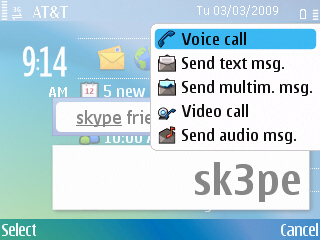
03/03/2009 E71 call menu

While the the obvious intent of a Nokia Skype deal is about voice calling, it could definitely have a substantial impact on mobile video calling.  As noted in the just linked Techlivez post, the Skype deal will integrate Skype directly into Contacts – meaning it’s not a separate application, but rather an available protocol.

It’s too early to know how real that is, but the idea is actually pretty huge and I can suddenly see how this makes carriers nervous as they consider the potential loss to their voice revenues.  As an integrated experience I could imagine seeing another option in my call menu which would include options for sending a Skype message or making a a Skype call much like making an Internet Call appears when you’ve added a SIP account today.  The difference of course is that very few people with the exception of a few geeks actually use the intgrated SIP stack.  I made a Skype video call with my parents over the weekend and Skype reported over 14 Million active connections during that time – that’s some serious potential!

Now back to video for a moment… Video calling usage is low for a few reasons.  First are the data costs, but I think even more importantly is that the service is operator provisioned – at least on the integrated front.  The 3rd party options work, but are also have limiting factors as they require some advanced planning on both sides to make sure everyone has the right applications and connections on either their PC or mobile.  Skype on the other hand is a fairly ubiquitous application and something you can expect to find on the other end of a lot of people’s PCs today.  I’ve even been seeing Skype on national TV lately on Oprah, the Today Show and not a commerical but in actual use as part of the show.  These are programs watched by (again) millions of people who are seeing  Skype in action.  One video call with my parents and they could easily see AND hear (Skype’s voice quality is awesome) the benefits.

I’ve had a front facing camera on my mobile phone since 2005 when I first received the N70.  Since that time, I’ve been able to make a single video call.  Even with a flat data rate and a 3.5G as well as wifi capable device, no carrier supports direct video calling (in the US) without first subscribing to a proprietary service that of course restricts use to a few select phones.  Skype could very easily change all this and if they offer video this change could substantially impact how we communicate.  Sure we still have to get around the data tarrifs, but that is actually happening more and more on a global basis even which is excellent as it enables greater usage … exactly what we need.  As I’ve mentioned previously my own usage is at least 90% data if not more.  Skype would only add to this … even as a voice option and I would expect a considerable shift to data over voice (in time) as more people realize the potential.

Cablevision’s Optimum Voice Control Panel needs an update

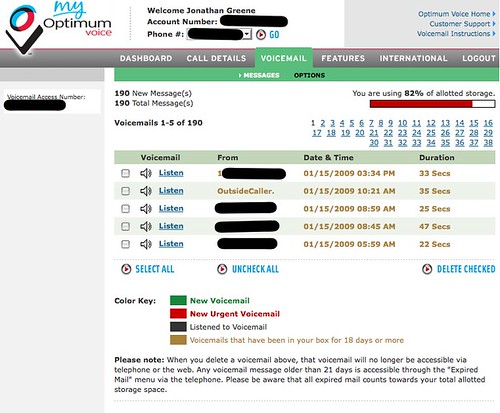
My Optimum Voice

I am taking a quick break from cleaning out my home voicemail box which became full somewhere north of 200 saved messages. We never dial-in since we get the messages as MP3 attachments on email which is quite handy – even while mobile.

As you can see from the above screenshot, you can only select a maximum of 5 messages which makes deleting everything a rather annoying and time consuming process. Too bad there’s neither an option to auto-delete aged messages or an advanced control to select everything and delete them. Consider this a feature request!

BTW – It would also be nice to know when the box is getting full and certainly when over the limit.

Video: Nokia E75 (Proto) Quick Overview


Nokia E75 (Proto) Quick Overview from Jonathan Greene on Vimeo.

The Nokia E75 was announced officially at Mobile World Congress recently and I’ve been fortunate to have been playing with a near release prototype of the Nokia E75 for a few weeks.

The Nokia E75 is the first Eseries device to support tri-band HSDPA and Quad Band EDGE which enables it to really cover the needs of the global traveler. I’ve used it with both TMO and ATT sim cards and found that I was able to find 3.5G signals without issues on both sides of the Atlantic. The E75 is also the first Eseries to run Feature Pack 2 which offers key some UI enhancements as well as the all important non-destructive system updates.

As you can see in the video, the E75 offers two modes of operation and let’s you choose between the standard number pad / T9 and a very full QWERTY keypad which slides out from the side. The screen auto-rotates when you open the keypad and maintains the state (as expected) of whatever operation you might have been in the midst of trying to complete. I found the keyboard to be very easy to use and would consider it one of the easier keyboards to use on the various mobile devices I’ve tried.

Nokia Messaging is integrated into the E75 and as you can see it can handle both Mail For Exchange along with your personal email accounts. I’ve been using both my work exchange account and Gmail with full push running all day. The 1000Mah battery can easily deal with this as well as my general usage which consists of email, web, maps and Joikuspot though I tend to recharge after a Joikuspot (on all devices) to make sure I can get through the day.

The E75 should will be a great device when it’s officially released later this quarter and I expect it to be very popular for people looking for a highly capable smartphone.

Web Video War is Facebook’s to Lose

There’s no shortage of options when it comes to uploading video, but lately a few sites have upped their game and have changed how I’ve been considering even where to upload.

It has been a while since I captured HD video, but I recently received the Flip MinoHD as a gift and have been shooting a lot of clips again.  In my latest tests, I’ve tried Facebook, Vimeo, YouTube, blip, Viddler and Ovi.  Facebook and Vimeo are the clear leaders for streaming quality and the edge there goes to Vimeo.  What’s more interesting though is how differently the services are used and why I think Facebook will win in the end.

If you have never worked with video, it’s important to understand that sharing is a bit more complex than photos as anything you upload needs to be converted for flash which is how just about all web video is presented.  Shooting with the Flip is great as the files come off the camera already digitized as .mp4 files which means they can be uploaded straight away if you like.  You can also use a video editor like iMovie or Final Cut to add some polish though that really depends on your need.  In previous video work I’ve done, I’ve had to first import my footage from the camera (shot on tape) which is a real-time process.  If you shoot 30 minutes, you need 30 minutes to copy it over.  Once on your computer even if you choose to dump it right back out, you need at least the same amount of time (if you have a fast computer) to create a digital file which can then be uploaded for sharing.  The flip (and other digital storage based cameras) let you just copy the files over and get going right away.

So as I had started to say initially, I’ve been shooting a some new stuff since getting the camera last week and I was looking to share easily with family and friends.  Since Facebook offers some excellent control over who sees what, I went there first and uploaded a few clips.  Facebook recently updated their video offering and my HD (720p) video uploaded and encoded quickly.  I was actually pretty impressed with how quickly the encoding process took as that’s generally another real waiting point for most video sites.  The posted video showed up on my profile and in my feed and I was instantly sharing my vacation experiences.

I’ve been seeing a lot of video on Vimeo lately and wanted to test out their HD offer to compare and so I uploaded the same HD video again.  I also posted the video on Viddler, Blip (different video) YouTube and Ovi.  The differences became apparent immediately.  Every other site needed some serious time to encode the posted content and this time took anywhere from over 2 hours (vimeo) to overnight (youtube).  When my content appeared on Vimeo it looked awesome, but I was frustrated with the time it took to actually see it.  I’m not in a race to share content, but having to wait in line to even get the encoding going is quite frustrating.  Only Blip offers the original MP4 (believe at my preference) while the flash is being encoded which is very cool.  The negative is that MP4 files do not buffer or stream with the same ease across clients as flash – regardless of what Apple says.  Ovi, by the way refused to playback my video …

Vimeo is the only site that offers a premium option and I debated it for a day before going for the upgrade.  For about $60/year you get the skip the encoding queue and are offered better quality video playback, HD embeds (with 1000 plays), and a few other bits.  Right after I paid, I uploaded another video and I have to say it looks damn good.  Compared to the Facebook version there is noticeably less digital artifacting and the playback seems a bit smoother.  All is good right?  Well …

While Vimeo offers the best playback and a community, the community aspect is minor compared to what Facebook delivers given the real connections and notifications within the FB system.  The quality is very good, totally free and if you make your video public able to be embedded on your blog or website which is a very interesting move by Facebook in itself.  Facebook’s only real flaw is that there are no statistics available for content you share.  There’s no way to see how many people have seen your video or photos which tends to be a currency on most media sharing sites.  Facebook is probably going to be the place you also first think to share video content much like people have been doing with Photos.  As I see it there’s no reason why not to use it.  TOS BS aside of course though that does seem to be behind us for the moment. I will likely continue to use a variety of sites and have signed up for Tubemogul which will let me upload a single (<100MB) file and have it shared across the sites I choose as a bonus I can see an aggregated dashboard for my views as well.  Except for Facebook …